

InkStencil: AI Tattoo Design
MMG Labs ltd · Graphics & Design
Independent analytics for this App Store listing. AppTracker is not affiliated with MMG Labs ltd.
Chart standing · US
What changed · US
Listing changes AppTracker has observed for this app in this storefront — new versions, price moves, rating shifts, and store copy.
NEW — Your first idea now gets three AI design options to choose from, from words or a reference photo. NEW — Love one design? Unlock just that design with a one-time clean export, no subscription needed. NEW — Rate any result with a thumbs up or down, and tell us what went wrong in a couple of taps. You can also send feedback from Settings. NEW — A quick "What brings you here?" question when you start, so we can build what you actually need. FIXED — Reference photos from your camera now work first time, and come back as clean black linework on white. Better layouts at large text sizes, clearer design balances, and many smaller fixes.
In-app purchases · US
What this app sells inside itself, grouped by kind and priced for this storefront.
Screenshots


About
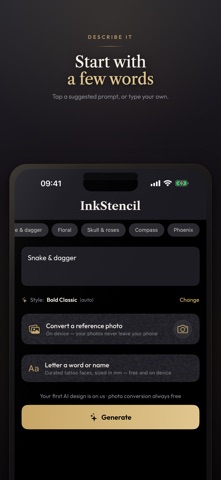
Describe your tattoo — or photograph a reference — and get an artist-grade, print-ready stencil. InkStencil is the stencil app that generates. Type an idea and get clean tattoo linework in seconds, or convert a photo into a stencil entirely on your phone. Then print it at true real-world size, ready for your artist. DESCRIBE IT, GET A STENCIL • Type your idea — a snake wrapped around a dagger, a moth with skull wings, anything • Seven styles: Bold Classic, Dark & Detailed, Clean & Simple, Precise Geometry, Japanese Art, Stipple & Dot, Hand Sketched • The style is picked automatically from your words, or choose it yourself • Start from a reference photo, pick your favourite of three options, refine with "More like this" variations, and compare before you keep TURN PHOTOS INTO STENCILS • Convert any reference photo to clean stencil linework • Crop, rotate, clean up the background, erase what you don't want • 100% on-device — your photos never leave your phone • Live detail and line-thickness controls • Always free, no limits PRINT IT TRUE TO SIZE • Export PNG or PDF at exact real-world sizes (300 DPI), including custom sizes in mm, cm or inches • Mirrored output for thermal transfer paper • 1-inch calibration square so you can verify sizing on paper • Multi-size sheets: one design at 2–3 sizes on a single A4 or US Letter page • SVG vector export with real paths for Procreate and Illustrator • Lettering in real tattoo faces, and flash sheets with several designs on one page BUILT FOR TRUST • Your first idea gets three AI design options, free — no time-limited trial, no tricks • Love one design? Unlock just that one with a single clean export, no subscription • Photo conversion is free and unlimited, forever • Prices are always shown before you pay, and cancelling is never hidden INKSTENCIL PRO • 50 AI designs a month • Watermark-free exports • PDF, SVG and the full artist toolkit • Variations, flash sheets and lettering export Whether you're planning your first tattoo or you're a working artist converting references between clients, InkStencil gets you from idea to transfer-ready stencil faster than anything else. Terms of Use (EULA): https://www.apple.com/legal/internet-services/itunes/dev/stdeula/ Privacy Policy: https://mmglabs.co.uk/privacy Pro Monthly ($9.99/month) is an auto-renewing subscription. Payment is charged to your Apple Account at confirmation of purchase. The subscription renews automatically unless auto-renew is turned off at least 24 hours before the end of the current period, and the account is charged for renewal within 24 hours before the period ends. Manage or cancel any time in Settings › Apple Account › Subscriptions.
What's new · 2.4.0
NEW — Your first idea now gets three AI design options to choose from, from words or a reference photo. NEW — Love one design? Unlock just that design with a one-time clean export, no subscription needed. NEW — Rate any result with a thumbs up or down, and tell us what went wrong in a couple of taps. You can also send feedback from Settings. NEW — A quick "What brings you here?" question when you start, so we can build what you actually need. FIXED — Reference photos from your camera now work first time, and come back as clean black linework on white. Better layouts at large text sizes, clearer design balances, and many smaller fixes.
Details