

Notely - Notes & PDF app
JUSTIN WEI SUN · Productivity
Independent analytics for this App Store listing. AppTracker is not affiliated with JUSTIN WEI SUN.
Chart standing · US
What changed · US
Listing changes AppTracker has observed for this app in this storefront — new versions, price moves, rating shifts, and store copy.
Notely 1.4.1 is a big feel update. • Zooming and panning bounce and settle like they should, and pinch works with flat fingers • Your palm no longer moves the page while you write • Ink stays put while you draw — no more shifting or popping when you lift the Pencil • Three stroke sizes right in the palette, down to 0.1 pt • Scratch out a word to erase it • The eraser only erases what the dot touches • Tap empty paper with the lasso to paste right there • Write over text boxes without moving them, or handwrite into them with Scribble • Open Notability, Goodnotes and PDF files straight into Notely • Folder colours, and empty notes you never touched are cleaned up • Lots of small fixes and a more consistent look
Price & rating history · US
Reconstructed from the listing changes AppTracker has observed in this storefront. A field is charted once it has changed more than once, and each line starts at the value it moved from.
Average rating · ★ 4.38 now · 4 changes on record
In-app purchases · US
No in-app purchases.
Screenshots


About
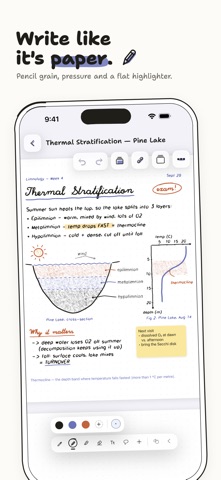
Notely is a notebook for iPad and iPhone that feels like paper and keeps everything on your device. Write by hand, mark up PDFs, record a lecture while you take notes, then study from what you wrote. There's no account and no cloud. Your notes stay where you wrote them. New in 1.4 Notely has a hand-drawn look now, with drawn icons and handwritten headings. I also rebuilt the pencil from scratch. It picks up the grain of the paper and responds to pressure, and if you tilt Apple Pencil on its side it shades like a real one. Record the lecture with your notes Press record and keep writing. Notely transcribes on your device as you go and remembers when each stroke was written. Later, tap a line of ink and the audio jumps to what was being said at that moment. Tapping a line in the transcript works too. Transcription depends on on-device speech support for your language and device. If it isn't available, Notely still saves the audio. Study from your own notes Make flashcards yourself, or lay tape over part of a page and quiz yourself on what's underneath. Cards come back on a spaced review schedule, and you can turn on reminders for when they're due. On devices with Apple Intelligence, Notely can also draft cards from a note and answer questions about it, with a link back to the page each answer came from. You review every draft before it's saved. Handwriting that turns into text Tap the handwriting button and Notely turns your writing into typed text, on the device. Anything it can't read confidently stays as ink. Search also looks inside your handwriting, typed text and PDFs. Pages or open space Use Letter or A4 pages, or switch a note to an infinite canvas when you need room to think. There's always a blank page waiting at the end, and if you don't use it, it's left out when you export. Templates include Cornell notes, dot grid, lab reports, math and physics pages, and music staff. Import PDFs and write on them, or scan paper pages with the camera. Private by default Notely works offline, with no analytics and no ads. Lock any note with Face ID or a password. Locked notes are kept out of Spotlight search and the widget. A few more things - Export pages as PDF or PNG - Back up notes to a .vectora archive and restore them without overwriting anything - Bring notebooks over from Goodnotes or Notability (PDF exports work best; native import is experimental) - A home screen widget with recent notes and a New note button - Shortcuts actions to create a quick note or open recent notes - Folders, tags and smart collections Notely is made by one person. If something bugs you, the support page reaches me directly.
What's new · 1.4.1
Notely 1.4.1 is a big feel update. • Zooming and panning bounce and settle like they should, and pinch works with flat fingers • Your palm no longer moves the page while you write • Ink stays put while you draw — no more shifting or popping when you lift the Pencil • Three stroke sizes right in the palette, down to 0.1 pt • Scratch out a word to erase it • The eraser only erases what the dot touches • Tap empty paper with the lasso to paste right there • Write over text boxes without moving them, or handwrite into them with Scribble • Open Notability, Goodnotes and PDF files straight into Notely • Folder colours, and empty notes you never touched are cleaned up • Lots of small fixes and a more consistent look
Details