

BendCalc: Conduit Bending
MMG Labs ltd · Utilities
Independent analytics for this App Store listing. AppTracker is not affiliated with MMG Labs ltd.
Chart standing · US
What changed · US
Listing changes AppTracker has observed for this app in this storefront — new versions, price moves, rating shifts, and store copy.
Start your BendCalc Pro trial right after setup. • After your first worked mark, new installs can start the 7-day BendCalc Pro trial: every calculator, jobs and Foreman, the AI assistant. • Not ready? Continue with the free calculators. Stub-Up and Offset stay free and unlimited. • Subscriptions renew automatically unless cancelled. Manage or cancel them in your Apple Account settings. Already a member or a lifetime owner? Nothing changes for you.
Price & rating history · US
Reconstructed from the listing changes AppTracker has observed in this storefront. A field is charted once it has changed more than once, and each line starts at the value it moved from.
Average rating · ★ 4.36 now · 4 changes on record
Ratings breakdown · US
The star breakdown behind this app's rating in this storefront.
In-app purchases · US
What this app sells inside itself, grouped by kind and priced for this storefront.
Screenshots


About
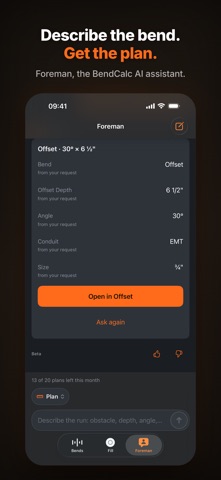
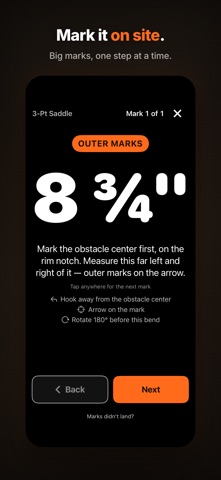
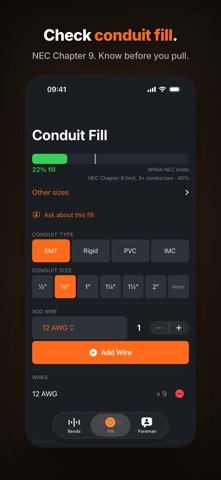
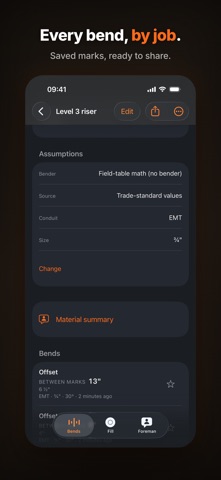
Meet Foreman: the AI assistant for electricians, built into BendCalc. Stub-Up + Offset: free and unlimited BendCalc Pro: every calculator, jobs, NEC Chapter 9 fill and Foreman Already bought BendCalc Pro? Everything you bought stays yours. BendCalc turns bend math into field-ready marks. Pick your bender once — results use its published take-up where it applies, shown in tape fractions to the nearest 1/16". FOREMAN, THE AI FOR ELECTRICIANS (BETA) • A chat that keeps up — ask, follow up, and Foreman keeps the last few questions of the conversation in mind • Plans — describe a run in your own words and Foreman works out the calculator and the inputs; open it in the calculator for the marks • Troubleshooting — "Marks didn't land?" gets ranked causes, each with one next step • Conduit fill — ask about a wire list and a conduit, with the NEC Chapter 9 rows cited • Explanations — ask about the result on screen and get the marks explained in trade language • Material lists — conduit, bend counts, cut lengths and couplings for a job • NEC questions — electrical answers with the articles to check in the latest NEC edition • Read aloud — Foreman can read its answers out loud • Not a member yet? Try Foreman with 3 questions Foreman is in Beta and can make mistakes. Check its figures in the calculators, and check code answers against the latest NEC edition and your local amendments. FREE AND UNLIMITED • Stub-Up — mark from the conduit end, arrow alignment, your bender's take-up • Offset — distance between marks and shrink from the published field tables THE BENDCALC PRO SUBSCRIPTION • Foreman, the AI assistant (Beta) — chat, plans, troubleshooting, fill, explanations, material lists and NEC questions • Rolling Offset - true offset, marks, shrink, and rotation from horizontal • Back-to-Back - both 90° marks from the conduit end • 3-Point Saddle - center and outer marks, plus shrink • 4-Point Saddle - all four marks from the saddle center, plus shrink • Kick — kick mark spacing and shrink • Rack Offsets - nested marks for every conduit in a rack, 2 to 8 pipes • NEC Chapter 9 Conduit Fill - fill-limit status for THHN/THWN conductors (NEC 2023, Chapter 9 Tables 1, 4, and 5) • Jobs, history, share cards, site marking, bender calibration and the technique lessons BendCalc Pro is a monthly or annual subscription, with a 7-day trial for new subscribers. Subscribe monthly or annually for all calculators, premium tools and AI assistance. Subscriptions renew automatically unless cancelled. Access continues until your subscription expires. IF YOU ALREADY BOUGHT BENDCALC PRO Thank you. Everything you bought stays yours. Your lifetime purchase keeps all calculators and offline Pro tools unlocked permanently. AI assistance requires an optional monthly or annual subscription. You can also try Foreman with 3 questions. WHEN A SUBSCRIPTION ENDS • Your saved jobs, history and results stay on your iPhone, and you can still open them and export a share card or a job PDF • Adding, editing and recalculating need an active subscription, or the calculators you already own BUILT FOR THE FIELD • Every constant is sourced — check Math & Sources in the app • Calculators work offline; Foreman needs a connection. No account required. • Restore Purchases on any device with your Apple Account Prices are shown in the App Store before you subscribe, and a subscription is managed and cancelled in your Apple Account settings. Terms of Use: https://www.apple.com/legal/internet-services/itunes/dev/stdeula/
What's new · 2.14.0
Start your BendCalc Pro trial right after setup. • After your first worked mark, new installs can start the 7-day BendCalc Pro trial: every calculator, jobs and Foreman, the AI assistant. • Not ready? Continue with the free calculators. Stub-Up and Offset stay free and unlimited. • Subscriptions renew automatically unless cancelled. Manage or cancel them in your Apple Account settings. Already a member or a lifetime owner? Nothing changes for you.
Details