

Pixel Art Animator
Can Bi · Entertainment
Independent analytics for this App Store listing. AppTracker is not affiliated with Can Bi.
Chart standing · US
What changed · US
Listing changes AppTracker has observed for this app in this storefront — new versions, price moves, rating shifts, and store copy.
New • Pixelate a shared photo straight from any app's share sheet. • Use Siri or Shortcuts to pixelate a photo or export an animation. • Touch and hold the app icon to suggest a feature or report a problem faster. Improved • Settings has an Advanced screen with one-tap Copy ID and a Show IDs toggle. • If your projects can't be opened, the app now shows a clear recovery screen instead of closing at launch. Fixed • A shared image no longer gets stuck before it reaches the app. Have feedback? Write to support@can.bi
Ratings breakdown · US
The star breakdown behind this app's rating in this storefront.
In-app purchases · US
What this app sells inside itself, grouped by kind and priced for this storefront.
Screenshots

Keywords this app targets
Search terms AppTracker associates with this app — estimates, not search volume. ❝ = in the app's title; a highlighted number is its current position for that term.
Similar apps
Competitors and close alternatives, as estimated by AppTracker.
 Animation Creator
miSoft
Animation Creator
miSoft
 EDGE touch (pixel art tool)
TAKABO SOFT
EDGE touch (pixel art tool)
TAKABO SOFT
 MotionBook - Draw & Animate
亮 彭
MotionBook - Draw & Animate
亮 彭
 RoughAnimator - animation app
Jacob KAFKA
RoughAnimator - animation app
Jacob KAFKA
 Callipeg mini: Animation App
Enoben
Callipeg mini: Animation App
Enoben
 FlipaClip: Draw 2D Animation
Visual Blasters LLC
FlipaClip: Draw 2D Animation
Visual Blasters LLC
 Procreate Pocket
Savage Interactive Pty Ltd
Procreate Pocket
Savage Interactive Pty Ltd
 Olli by Tinrocket
Tinrocket, LLC
Olli by Tinrocket
Tinrocket, LLC
About
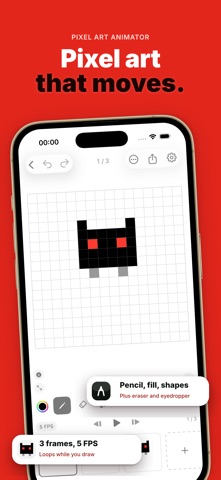
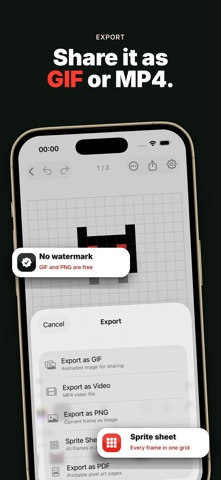
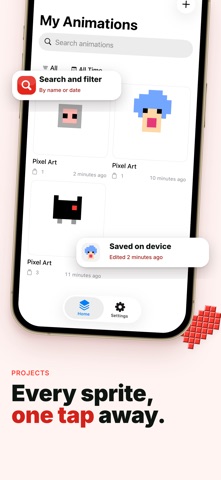
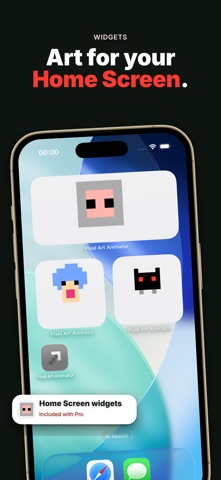
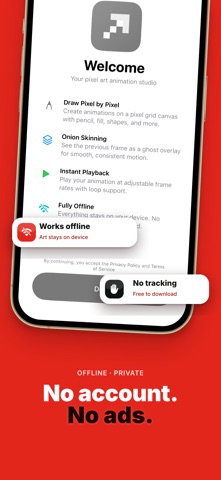
Create pixel-perfect animations on your phone. Pixel Art Animator is a frame-by-frame pixel editor with onion skinning, reference images, and exports — fully offline, no account needed. Free to download. No ads. No tracking — ever. ▸ PIXEL-PERFECT DRAWING Draw on a pixel grid with Pencil, Eraser, Fill, and Eyedropper (Free). Pro adds Line, Rectangle, Circle, Selection, Move, and Replace Color. Canvas sizes 16×16 and 32×32 (Free); Pro adds 64×64, and 128×128 on iPad. ▸ ONION SKINNING See the previous frame as a translucent overlay while you draw. Free includes onion skin at the default opacity; Pro adjusts opacity from 5% to 50%. ▸ REFERENCE IMAGES (Pro) Import a reference image, pan, zoom, rotate, and adjust opacity — ideal for tracing and rotoscoping. ▸ FRAME MANAGEMENT Add, duplicate, reorder, and clear frames. Free projects support up to 12 frames; Pro unlocks up to 256 frames and per-frame background colors. ▸ SMOOTH PLAYBACK Play at 1–30 FPS with loop preview. ▸ EXPORTS Free: animated GIF and single-frame PNG — no watermarks. Pro adds MP4 video, sprite sheet, and multi-page PDF. ▸ PROJECTS Free: up to 2 animation projects. Pro removes the project cap with search and filter. ▸ HOME SCREEN WIDGET (Pro) Show your latest pixel animation on your Home Screen. ▸ BACKUP & RESTORE (Pro) Export and restore your full .pixelart archive. ▸ FULLY OFFLINE & PRIVATE No account. No cloud. No ads. Your animations stay on your device only. ▸ TRY FREE Complete a real animation job on Free — draw, preview with onion skin, and export GIF or PNG without watermarks. ▸ PRO UNLOCKS THE STUDIO Larger canvas, pro tools, all exports, no project or frame caps, reference images, backup, and Home Screen widget. Monthly, annual, or lifetime. Pixel Art Animator is built for pixel artists who value simplicity and privacy. Download now and start animating. Have feedback? Reach us at support@can.bi Privacy Policy: https://canbi.notion.site/Privacy-Policy-4c96cac95bdb8303a12e01d3ae58da74 Terms of Use (EULA): https://canbi.notion.site/Terms-of-Service-c966cac95bdb83498f60012e6d420d74
What's new · 1.4.1
New • Pixelate a shared photo straight from any app's share sheet. • Use Siri or Shortcuts to pixelate a photo or export an animation. • Touch and hold the app icon to suggest a feature or report a problem faster. Improved • Settings has an Advanced screen with one-tap Copy ID and a Show IDs toggle. • If your projects can't be opened, the app now shows a clear recovery screen instead of closing at launch. Fixed • A shared image no longer gets stuck before it reaches the app. Have feedback? Write to support@can.bi
Details