

Chart standing · US
What changed · US
Listing changes AppTracker has observed for this app in this storefront — new versions, price moves, rating shifts, and store copy.
Casting to a TV actually works now. Fixes the problem where turning on AirPlay connected the TV but never showed the slideshow. The old button only moved audio output — the slides stayed on the device and the TV sat on its idle screen. Two ways to reach a TV: Cast directly Tap AirPlay in the app to send the slideshow to your TV, with no trip to Control Centre. Photos and videos both work, and clips keep their sound. Screen Mirroring Once you start mirroring, LoopSlide claims the display and fills it at the TV's own resolution — no black bars, no controls on top. Keeps playing when you switch apps Switch to another app or lock the screen and the TV carries on. Also in this release: - Portrait photos and videos are shown whole on a 16:9 TV, over a blurred background, instead of being cropped - Fixed some portrait clips appearing upside down - Fixed a crash that could happen when a video came up - WebDAV connection and image loading fixes
Screenshots



About
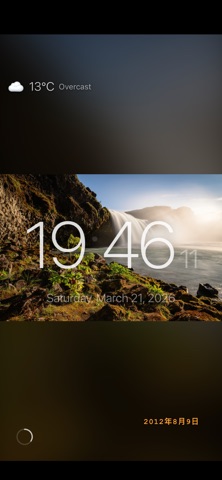
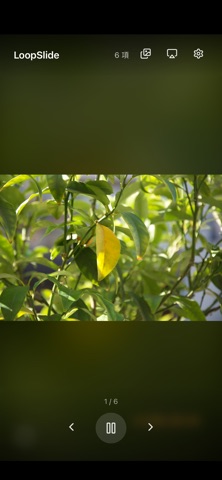
Turn your iPhone or iPad into a beautiful digital photo frame. LoopSlide plays your photos and videos in a stunning continuous slideshow with smooth transitions and smart features. Connect to your NAS, browse your photo library, or pick files — LoopSlide handles it all. KEY FEATURES: Smooth Transitions Beautiful slide transitions between photos and videos, randomly varied for a dynamic viewing experience. Multiple Media Sources Play photos from your local library, Files app, WebDAV servers, or SMB/CIFS network shares. Bonjour auto-discovery finds your NAS devices automatically. Ken Burns Effect Elegant slow zoom and pan animation brings your photos to life — just like a professional documentary. Photo Filters Apply B&W, sepia, vintage, warm, or cool filters to create the perfect mood for your slideshow. Clock & Weather Display Show a beautiful large clock and current weather conditions right on your photo frame. Weather data from Open-Meteo — no API key or account needed. Photo Collage Display 2, 4, or 6 photos at once in a stylish grid layout. EXIF Info Overlay See camera model, lens, aperture, shutter speed, and ISO for each photo — perfect for photography enthusiasts. Date Stamp Retro camera-style date overlay in multiple formats (YYYY/MM/DD, localized) and 6 languages. Background Music Play music from your library while enjoying your slideshow. Exhibition Mode Schedule automatic start and stop times — perfect for galleries, museums, and commercial displays. AirPlay Support Cast your slideshow to an Apple TV or AirPlay-compatible TV in one tap, photos and videos alike. Screen Mirroring fills the TV at its own resolution, and playback keeps going when you switch apps. Always-On Display Keep your device screen awake for continuous, uninterrupted display. Smart Caching Preloads adjacent photos for seamless, buffer-free transitions. PERFECT FOR: - Repurposing an old iPhone or iPad as a digital photo frame - Displaying family memories at home - Art galleries and museum exhibitions - Restaurant and retail digital signage - Office lobby and reception displays - Photography portfolio showcase LoopSlide works entirely offline for local photos. NAS features require a local WiFi connection. No account required, no ads, no tracking.
What's new · 1.4.0
Casting to a TV actually works now. Fixes the problem where turning on AirPlay connected the TV but never showed the slideshow. The old button only moved audio output — the slides stayed on the device and the TV sat on its idle screen. Two ways to reach a TV: Cast directly Tap AirPlay in the app to send the slideshow to your TV, with no trip to Control Centre. Photos and videos both work, and clips keep their sound. Screen Mirroring Once you start mirroring, LoopSlide claims the display and fills it at the TV's own resolution — no black bars, no controls on top. Keeps playing when you switch apps Switch to another app or lock the screen and the TV carries on. Also in this release: - Portrait photos and videos are shown whole on a 16:9 TV, over a blurred background, instead of being cropped - Fixed some portrait clips appearing upside down - Fixed a crash that could happen when a video came up - WebDAV connection and image loading fixes
Details