
Chart standing · US
What changed · US
Listing changes AppTracker has observed for this app in this storefront — new versions, price moves, rating shifts, and store copy.
1. Fitbit now syncs directly — no bridge app Fitbit steps flow straight into Apple Health through the Google Health app — just turn on Apple Health sharing and you're set. Fitbit now works the same easy way as Garmin, Whoop, Oura, and Apple Watch. 2. A smarter widget — now for steps, too The home screen widget now updates your "Steps Today" on its own as you move throughout the day, and resets cleanly at midnight — no need to reopen the app to see your latest count. 3. Guided goal setup in Active Mode Setting a personal goal now starts you with a recommended target from the Activity Goal Generator, so you're never staring at a blank field. Fine-tune it manually anytime. 4. Faster into Active Mode When your profile is already set up, switching into Active Mode drops you right in — no extra confirmation step. 5. Quieter midnight Removed the late-night "New Day, New Goals" notification. Your steps and screen time still reset at midnight — it just happens quietly now. 6. Reliability improvements Fixes across step tracking, the widget, and notifications for a smoother, more dependable experience.
Ratings breakdown · US
The star breakdown behind this app's rating in this storefront.
Screenshots



About
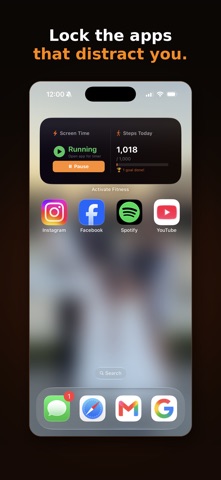
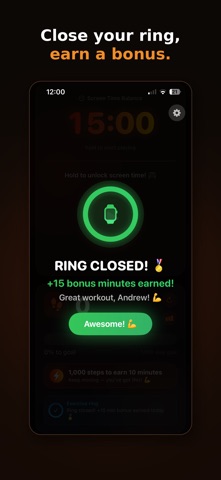
Turn movement into screen time — for yourself, your kids, or your whole family. Activate Fitness flips screen-time management on its head. Instead of punishing you for picking up your phone, it rewards you for staying active. Hit your step goal or close your Apple Watch ring, and you earn access to the apps you've chosen to lock. Run out of earned time, and those apps lock again until you move. It works two ways — and you choose: FOR YOURSELF Set your own step goal, pick the apps you want to earn back, and let Activate Fitness hold you to it. Use it as a commitment device: your distracting apps stay locked until you've done the activity you set for yourself. Switch into Active Mode when you're ready to earn, and back to Admin Mode (PIN-protected) whenever you need to adjust. FOR YOUR FAMILY Set activity goals for each child, choose which apps unlock with earned time, and let physical activity — not nagging — decide screen time. Kids earn their own minutes by hitting step goals, so you're not the bad guy. Pair a child's device in minutes with a secure code. HOW IT WORKS • Choose a step goal (for example, 1,000 steps = 10 minutes) • Pick the apps or whole categories to lock • Move — steps are tracked through Apple Health or your Apple Watch • Earn minutes automatically as goals are hit • Apps lock again when earned time runs out APPLE WATCH RING BONUS Close your Exercise ring and earn a bonus block of screen time on top of your step goals. A reward for the days you go the extra mile. BUILT-IN SCHEDULES Set bedtime and focus-hour lockouts that apply no matter how much time has been earned — for you or for your kids. TRACK YOUR PROGRESS See steps, goals met, and screen-time trends over time, so you can watch healthier habits build. PRIVACY FIRST We don't sell data, use third-party tracking, or show ads. Ever. Your information — and your family's — stays private and secure. Activity data is used only to run the app's core feature: turning your movement into earned screen time. Activate Fitness is free to download and use. Note: Screen-time enforcement uses Apple's Family Controls and Screen Time frameworks. As with all apps built on these frameworks, some behavior is governed by iOS and is subject to Apple's platform rules. Questions? Contact andrew.armour@activatefitnessapp.com Privacy Policy & Terms: https://activatefitnessapp.com
What's new · 1.0.8
1. Fitbit now syncs directly — no bridge app Fitbit steps flow straight into Apple Health through the Google Health app — just turn on Apple Health sharing and you're set. Fitbit now works the same easy way as Garmin, Whoop, Oura, and Apple Watch. 2. A smarter widget — now for steps, too The home screen widget now updates your "Steps Today" on its own as you move throughout the day, and resets cleanly at midnight — no need to reopen the app to see your latest count. 3. Guided goal setup in Active Mode Setting a personal goal now starts you with a recommended target from the Activity Goal Generator, so you're never staring at a blank field. Fine-tune it manually anytime. 4. Faster into Active Mode When your profile is already set up, switching into Active Mode drops you right in — no extra confirmation step. 5. Quieter midnight Removed the late-night "New Day, New Goals" notification. Your steps and screen time still reset at midnight — it just happens quietly now. 6. Reliability improvements Fixes across step tracking, the widget, and notifications for a smoother, more dependable experience.
Details