

Toniq - AI Photo Color Grading
Chengdu Yuuglow Technology Co., Ltd. · Photo & Video
Independent analytics for this App Store listing. AppTracker is not affiliated with Chengdu Yuuglow Technology Co., Ltd.
Chart standing · US
What changed · US
Listing changes AppTracker has observed for this app in this storefront — new versions, price moves, rating shifts, and store copy.
A smoother start to your next creation. • Explore color, reference styles and photo creations with a new four-step introduction. • Refined Pro plans, trial information and settings. • Choose whether to share optional analytics, with controls in Settings. • Improved page transitions, layouts and reliability.
In-app purchases · US
What this app sells inside itself, grouped by kind and priced for this storefront.
Screenshots



About
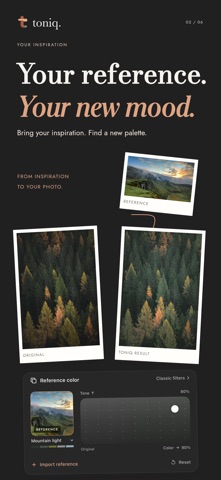
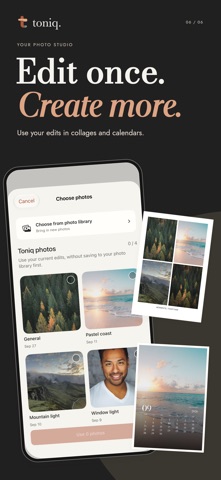
Find a palette you love. Make it your own. Toniq brings reference color matching, AI color grading and print-ready photo creations into one studio. REFERENCE COLOR Start with a built-in reference or import a photograph from your library or Toniq edits. Toniq analyzes both photographs to bring the reference's colors and tonal mood to your image, while keeping your composition intact. Explore warm sunset palettes, quiet greens, delicate pastels and your own inspiration. COLOR AND TONE, SEPARATELY Use the two-dimensional control to find your balance between color and tone matching. Keep the reference visible as you work, compare with your original and fine-tune the result. Saved analyses and matching results reduce repeat processing when you reuse a reference. AI COLOR GRADING AND CLASSIC LOOKS AI analyzes your photo's scene, lighting and mood to suggest a color grade. Explore classic presets, adjust exposure, contrast, highlights, shadows, warmth, saturation and more, or describe a change in your own words. BATCH EDITING Import up to 15 photos. Apply a consistent style or edit each photo individually. PHOTO COLLAGES Arrange 2–4 photos in a collage. Drag, resize and rotate directly in the preview, replace one photo without changing the others, adjust spacing and add a caption. PERSONALIZED PHOTO CALENDARS Create a monthly calendar with your own photo. Choose from three layouts and distinctive editorial, modern and handwritten typography. Set the year, month and first day of the week. FROM EDIT TO PRINT Use your current Toniq edits directly in collages and calendars, without saving to your system photo library first. Export photo edits as HEIC, JPEG or PNG. Export creations as 300 ppi JPEG or print-ready PDF in 4 × 6 inch and A4 sizes, or send them to an AirPrint printer. Save your works and return to edit them later. Toniq Pro includes AI color grading, premium presets, natural language adjustments and original-resolution photo export. Subscription options and prices are shown in the app. Terms of Use: https://toniq.yuuglow.com/terms-en.html Privacy Policy: https://toniq.yuuglow.com/privacy-en.html
What's new · 1.4.0
A smoother start to your next creation. • Explore color, reference styles and photo creations with a new four-step introduction. • Refined Pro plans, trial information and settings. • Choose whether to share optional analytics, with controls in Settings. • Improved page transitions, layouts and reliability.
Details