

Conduit: SSH, RDP, VNC & Web
Christopher Vautour · Utilities
Independent analytics for this App Store listing. AppTracker is not affiliated with Christopher Vautour.
Chart standing · US
What changed · US
Listing changes AppTracker has observed for this app in this storefront — new versions, price moves, rating shifts, and store copy.
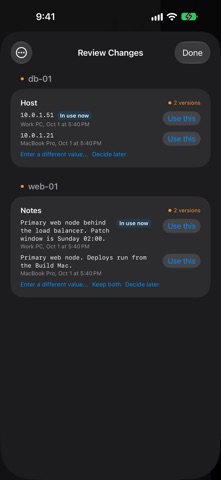
A knowledge base for every asset. - Knowledge for every asset: keep overviews, procedures, troubleshooting and facts with each asset. Folder and vault articles show up on every asset they apply to. - Secrets as chips: passwords in notes and articles are stored encrypted and show as chips. Tap one to reveal or copy it. Type !!value!! or use Add Secret. - Review what agents learned: when an agent like Claude Code updates an article on your computer, see what changed and keep it or undo it. - History for every article: each save keeps a version you can go back to. Split long notes into articles by their headings. - Better iPad layouts: knowledge, notes and details sit side by side on larger screens.
Ratings breakdown · US
The star breakdown behind this app's rating in this storefront.
In-app purchases · US
No in-app purchases.
Screenshots




About
Conduit is a complete remote connection manager built for IT professionals, developers, and sysadmins who need fast, secure access to their infrastructure from anywhere. CREATE & MANAGE YOUR VAULT ON MOBILE Get started right from your iPhone or iPad — create encrypted vaults, add and edit connection entries, manage credentials, and organize everything into folders. No desktop app required. MULTI-PROTOCOL SUPPORT Connect to any server or workstation using SSH, RDP, VNC, or web sessions — all from a single, unified interface. No need to juggle multiple apps. FULL SSH TERMINAL A complete terminal emulator with support for keyboard shortcuts, cursor rendering, and session persistence. Run commands, manage servers, and troubleshoot issues on the go. REMOTE DESKTOP (RDP) Access Windows desktops and servers with full graphical RDP sessions. Supports touch gestures for seamless navigation on iPhone and iPad. VNC REMOTE ACCESS Connect to macOS, Linux, and other VNC-enabled machines with a high-performance VNC client built on modern Swift frameworks. WEB SESSIONS Launch authenticated web sessions to management consoles, dashboards, and internal tools — complete with credential autofill from your encrypted vault. ENCRYPTED CREDENTIAL VAULT Your passwords, SSH keys, and connection details are protected with AES-256-GCM encryption and secured behind biometric authentication (Face ID / Touch ID). Credentials never leave your device unencrypted. CLOUD SYNC Sync your vault across devices securely. Your connections and credentials stay encrypted end-to-end and are available wherever you need them. ORGANIZED WORKSPACE Group connections into folders, search across your vault, and launch sessions with a single tap. Designed for professionals managing dozens or hundreds of connections. BUILT FOR iPHONE & iPAD A native SwiftUI experience optimized for both iPhone and iPad, with responsive layouts and full keyboard support for iPad Pro users. KEY FEATURES - Create and edit vaults directly on mobile - Add, edit, and organize connection entries - SSH terminal with full keyboard and cursor support - RDP remote desktop with touch gesture navigation - VNC client for macOS, Linux, and more - Web sessions with credential autofill - AES-256-GCM encrypted vault - Face ID & Touch ID biometric unlock - iCloud sync across devices - Folder organization and search - Auto-lock with configurable timeout - Dark mode support
What's new · 1.1.1
A knowledge base for every asset. - Knowledge for every asset: keep overviews, procedures, troubleshooting and facts with each asset. Folder and vault articles show up on every asset they apply to. - Secrets as chips: passwords in notes and articles are stored encrypted and show as chips. Tap one to reveal or copy it. Type !!value!! or use Add Secret. - Review what agents learned: when an agent like Claude Code updates an article on your computer, see what changed and keep it or undo it. - History for every article: each save keeps a version you can go back to. Split long notes into articles by their headings. - Better iPad layouts: knowledge, notes and details sit side by side on larger screens.
Details