

FindSimilarPics: Best Shot
Masashi Kawakami · Photo & Video
Independent analytics for this App Store listing. AppTracker is not affiliated with Masashi Kawakami.
Chart standing · US
What changed · US
Listing changes AppTracker has observed for this app in this storefront — new versions, price moves, rating shifts, and store copy.
The comparison view has been significantly improved. • Movable divider (Pro) Drag the divider in the center of the comparison view left or right to freely adjust how much of each photo is shown. Double-tap the handle to reset it to the center. • Hide the reference photo (Pro) Hide the reference photo and view only the similar photo full screen. Use the buttons along the left edge to delete, favorite, or add the photo you're viewing to an album on the spot. • Clearer guidance when a search fails The app now identifies the cause — loading the reference photo, analyzing the image, or comparing photos — and suggests what to try next. • Improved the layout of the Pro plan screen on iPad. • Rearranged the buttons in the first-launch dialog for easier reading. • Reviewed translations in all supported languages, plus stability and performance improvements.
In-app purchases · US
What this app sells inside itself, grouped by kind and priced for this storefront.
Screenshots


About
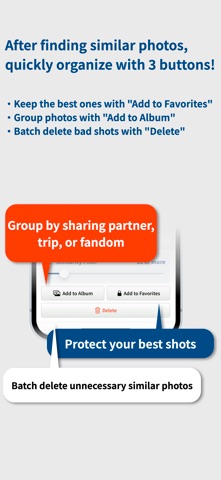
Are you taking too many photos trying to get the perfect expression or scenery? This app is a photo organization tool that allows you to easily select a "Reference Image" and instantly find similar photos on your phone. Compare them side-by-side to curate your absolute best shots. [Super Easy 4 Steps!] Select a "Reference Image" from your photos. AI extracts similar photos from your iPhone. Zoom in and compare them side-by-side. Quickly organize using 3 buttons (Album / Favorite / Delete)! ▼ Key Features ◆ AI Similar Search Based on a Reference Image Your organization starts with just one photo. The latest AI instantly analyzes features and lists only bursts or similarly composed photos with a "Similarity Score (0-100)". ◆ Intuitive "Side-by-Side" Comparison View Tap an extracted image to compare it side-by-side with your reference image. Pinch to zoom and swipe to catch every detail in facial expressions or focus. ◆ Visualize Organization with Album Badges "Color & Number Badges" are automatically assigned to each album you create. You can tell at a glance in the search results or comparison screen if a photo is already categorized, making themed collection building a breeze. ◆ Filter by Calendar & Map Perfect for when you only want to organize photos from a specific trip. Specify a date or location to search for similar photos within that range. ◆ Protect Your Precious Photos Set photos you want to keep as "Favorites" to exclude them from batch deletion, allowing you to focus on protecting your best shots without worrying about accidental taps. ◆ Completely Offline Operation (Pro Plan) No images are ever uploaded to a server. All analysis is completed on your device, ensuring privacy and lightning-fast operation even without an internet connection. [Recommended for:] Those who want to pick the best expression of their kids or pets from bursts. Fans who want to neatly organize similar screenshots or photos into themed albums. Those who want a positive organization experience focusing on "what to keep" rather than "what to delete". Download now and experience a new way of organizing photos starting from your favorite shot! EULA: https://www.apple.com/legal/internet-services/itunes/dev/stdeula/ Privacy Policy: https://kawasuke.wixsite.com/kawasukestore/privacy-policy
What's new · 1.8
The comparison view has been significantly improved. • Movable divider (Pro) Drag the divider in the center of the comparison view left or right to freely adjust how much of each photo is shown. Double-tap the handle to reset it to the center. • Hide the reference photo (Pro) Hide the reference photo and view only the similar photo full screen. Use the buttons along the left edge to delete, favorite, or add the photo you're viewing to an album on the spot. • Clearer guidance when a search fails The app now identifies the cause — loading the reference photo, analyzing the image, or comparing photos — and suggests what to try next. • Improved the layout of the Pro plan screen on iPad. • Rearranged the buttons in the first-launch dialog for easier reading. • Reviewed translations in all supported languages, plus stability and performance improvements.
Details