
Chart standing · US
What changed · US
Listing changes AppTracker has observed for this app in this storefront — new versions, price moves, rating shifts, and store copy.
CaesuraLab 3.0 is a top-to-bottom rebuild of the practice room. • All-new guided lessons — a step-by-step theory curriculum, from the staff and rhythm basics through scales & keys. Unit 1 is free for everyone; the full curriculum unlocks in a future update • Smarter onboarding — pick your instrument and method book, and the tuner, fingerings, and practice content follow you everywhere • Counting your way — traditional (1 e & a) or Eastman (1 ti te ta) counting, five sub-count styles, and color-by-value notes you can switch anytime • A redesigned Fingering Explorer for every band instrument • New quiz modes with instant feedback across rhythm, notes, fingerings, and vocabulary • A cleaner, faster design — new navigation, new Home, and a music dictionary built in Tools stay free forever — no account needed. Open the app and start practicing.
Ratings breakdown · US
The star breakdown behind this app's rating in this storefront.
Screenshots



About
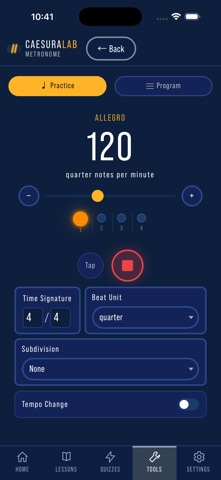
Built by a band director with 17 years in the classroom, CaesuraLab puts everything your students need to practice smarter into one app — no account required, no ads, completely free. PRACTICE TOOLS The metronome features two full modes: a standard practice metronome with subdivisions, tap tempo, and tempo markings, plus a programmable click track sequencer where you can build multi-section programs with tempo changes, ritardandos, fermatas, and count-ins. A floating mini overlay keeps the beat going as you navigate the app. The chromatic tuner uses your device's microphone to detect pitch in real time, with a needle gauge, cent display, adjustable tolerance zones, and A4 calibration from 400–480 Hz. It supports 15 instruments with correct transposition, shows both written and concert pitch, and includes a reference tone generator with drone mode for intonation work. FINGERING CHARTS & NOTE READING Interactive fingering charts for every standard band instrument — flute, oboe, bassoon, clarinet, saxophone, trumpet, horn, trombone, baritone, and tuba, plus mallet percussion. Students can quiz themselves on fingerings in multiple-choice mode or use Build It mode to tap keys directly on a blank instrument diagram. Note reading quizzes cover treble and bass clef across customizable note ranges. RHYTHM The Rhythm Explorer lets students build rhythms measure by measure with a tap-based note palette, see them rendered in real notation with proper beaming and counting syllables, and play them back with a count-in click. Supports simple, compound, and odd meters with both Traditional and Eastman counting systems. Rhythm Quiz offers four challenge modes: identify counting from notation, identify notation from counting, build the counts, and build the rhythm. Eight curated difficulty levels plus a method book mode aligned with Habits of a Successful Beginner Band Musician by Rush and Scott (exercises 1–197). Distractors are modeled on real student mistakes. MUSIC THEORY The Scales and Key Signatures module guides students through major scale construction, key signature identification, the circle of fifths, and minor scales — with interactive staff notation, a visual circle of fifths, and quiz modes covering scale identification, key signature building, and relative major/minor pairing. The Intervals module walks students through four learning phases — generic intervals, half and whole steps, specific interval quality, and augmented and diminished intervals — with an interactive piano keyboard, staff notation, and a quiz mode that covers all four phases. Vocabulary drills cover essential music terminology with category-based progression. DESIGNED FOR THE CLASSROOM CaesuraLab works offline, loads instantly, and requires zero setup. Students open it and start practicing. Every tool is integrated into one app — no switching between a tuner app, a metronome app, and a theory app. Aligned with the Habits of a Successful Beginner Band Musician method book series. Supports freeplay mode for students not using a method book.
What's new · 3.0
CaesuraLab 3.0 is a top-to-bottom rebuild of the practice room. • All-new guided lessons — a step-by-step theory curriculum, from the staff and rhythm basics through scales & keys. Unit 1 is free for everyone; the full curriculum unlocks in a future update • Smarter onboarding — pick your instrument and method book, and the tuner, fingerings, and practice content follow you everywhere • Counting your way — traditional (1 e & a) or Eastman (1 ti te ta) counting, five sub-count styles, and color-by-value notes you can switch anytime • A redesigned Fingering Explorer for every band instrument • New quiz modes with instant feedback across rhythm, notes, fingerings, and vocabulary • A cleaner, faster design — new navigation, new Home, and a music dictionary built in Tools stay free forever — no account needed. Open the app and start practicing.
Details