

Atlas: Book Tracker
Austin Thompson-Truchan · Books
Independent analytics for this App Store listing. AppTracker is not affiliated with Austin Thompson-Truchan.
Chart standing · US
What changed · US
Listing changes AppTracker has observed for this app in this storefront — new versions, price moves, rating shifts, and store copy.
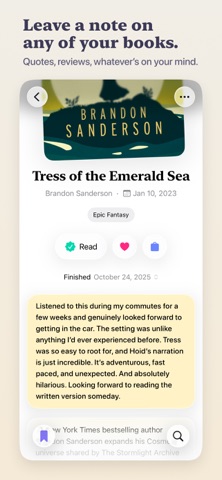
Notes List Every book leaves something behind, a line you held onto, a feeling you couldn't shake, a thought you wanted to keep. Until now, those notes were tucked away on each book's page. Now all your notes live in one place, in the Notes List. After you add a note to any book, a new Notes card appears on the Home View. Inside, you can search, sort and review the notes you've taken across your entire library. Various Improvements - Toasts are a little more helpful now. After moving a book, tap the link in the toast to follow it to its new list. - So, how was it? Marking a book as Read from within a book now brings up the note field so you can easily jot down any thoughts while they're fresh, or simply ignore it. Notes also have a little more personality now with newly added placeholder text. - Followed author monograms have been adjusted to have more color on iOS 27. - The search tab's magnifying glass now has a plus, so it's clearer that this is where you find new books to add. - The app icon has been rebuilt to look slightly nicer on iOS 27. - Book titles no longer include promotional tags like "A GMA Book Club Pick." Using Refresh Book Details now works to clean up titles for books already in your library. - Various style improvements for iOS 27. A Small Favor If you're enjoying Atlas, a quick App Store review makes a big difference and helps shape the future of the app. Feel free to reach out with feedback anytime at atlas.app@icloud.com Enjoy your next read, - Austin
Ratings breakdown · US
The star breakdown behind this app's rating in this storefront.
In-app purchases · US
What this app sells inside itself, grouped by kind and priced for this storefront.
Screenshots







About
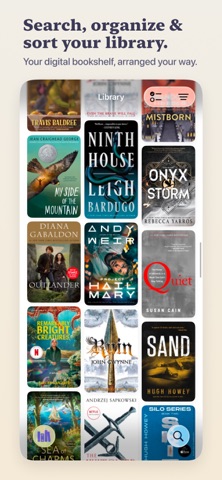
A calm, private space to track your books, navigate your reading lists, and get back to what you love: reading. No streaks, no goals, no ratings, no guilt. Not a habit tracker, not a stats dashboard, not a social network. Just your books, their beautiful covers, and the order you intend to read them. Organize - Five reading lists: Reading, Reading Next, Someday, Read, and Set Aside - Drag and drop to reorder books in the exact order you intend to read them - Bulk edit to move, favorite, or remove a stack of books at once - Mark books as owned to keep track of what's on your shelf Covers, front and center - Book covers are treated like the art they are - Tap the cover on its detail page to open it in full screen - Zoom in to discover details you've never noticed before - Displayed in high resolution throughout the app Find your next book - Search powered by Apple Books - Book detail pages with cover art, description, genres, and more from the author - Tap any author to view their full catalog - Follow any author to keep their catalog a couple taps away - Add books that aren't in Apple Books, with your own covers and details - A Coming Soon list that tracks upcoming releases automatically Reflect - Add notes on any book in your library - Review all the notes taken across your entire library in the Notes List - A reading timeline showing what you finished, and when - Start a re-read from any finished book, keeping your first reading intact - Favorite the books you loved, then drag and drop to rank them Browse your library - Masonry grid and list views - Filter and sort by genre, author, date, favorites, ownership, and availability - Search directly within your library and individual reading lists Bring your books with you - Import from Goodreads, StoryGraph, or CSV - Export your full library as CSV - iCloud sync across all your devices Designed for iOS - Built natively for iOS26+27 from the ground up with Liquid Glass and system styling - Feels like a cohesive, first-party Apple app - Light, Dark, and System themes Private by design, and no data collection - No accounts. No sign-up. No profile. - No analytics, no tracking, no data collection - Your library lives on your device and syncs through iCloud Atlas was built to highlight your covers, your lists, and the order you decide to read your books in. Reading doesn't need to be gamified, optimized, or made public. It just needs a quiet space to keep your books, plan what's next, and remember where you've been. Reading is one of the few things left that's slow, quiet, and entirely yours. Atlas is built to keep it that way.
What's new · 1.4
Notes List Every book leaves something behind, a line you held onto, a feeling you couldn't shake, a thought you wanted to keep. Until now, those notes were tucked away on each book's page. Now all your notes live in one place, in the Notes List. After you add a note to any book, a new Notes card appears on the Home View. Inside, you can search, sort and review the notes you've taken across your entire library. Various Improvements - Toasts are a little more helpful now. After moving a book, tap the link in the toast to follow it to its new list. - So, how was it? Marking a book as Read from within a book now brings up the note field so you can easily jot down any thoughts while they're fresh, or simply ignore it. Notes also have a little more personality now with newly added placeholder text. - Followed author monograms have been adjusted to have more color on iOS 27. - The search tab's magnifying glass now has a plus, so it's clearer that this is where you find new books to add. - The app icon has been rebuilt to look slightly nicer on iOS 27. - Book titles no longer include promotional tags like "A GMA Book Club Pick." Using Refresh Book Details now works to clean up titles for books already in your library. - Various style improvements for iOS 27. A Small Favor If you're enjoying Atlas, a quick App Store review makes a big difference and helps shape the future of the app. Feel free to reach out with feedback anytime at atlas.app@icloud.com Enjoy your next read, - Austin
Details