

Change Hair Color in Photo
HYPER IGNITION SYSTEMS - FZCO · Lifestyle
Independent analytics for this App Store listing. AppTracker is not affiliated with HYPER IGNITION SYSTEMS - FZCO.
Chart standing · US
What changed · US
Listing changes AppTracker has observed for this app in this storefront — new versions, price moves, rating shifts, and store copy.
You can now pinch to zoom and drag to reposition your photo on the preview screen. Tap "Use This Photo" to crop it to the frame, so your hair-color preview uses exactly the area you selected.
In-app purchases · US
What this app sells inside itself, grouped by kind and priced for this storefront.
Screenshots


About
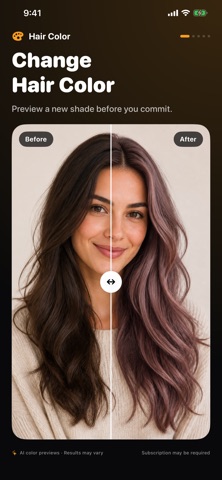
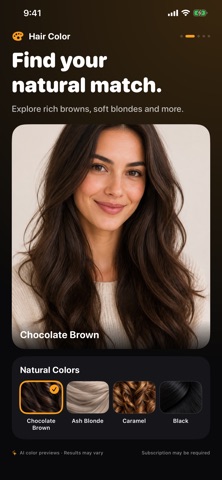
Explore a new hair color before making a change. Use AI to preview natural shades and bold colors on your own photo, with options for short, long, straight and curly hair. MAKE THE LOOK YOURS • Choose a photo from Photos or Files, use the camera, or try a sample portrait. • Explore browns, blondes, copper, burgundy and creative shades. • Pick a custom color and adjust its intensity. • Refine the hair area and review your choices before creating. • Compare before and after, save your result and share your new look. • Revisit recent looks and keep your favorites together. Use a clear, well-lit portrait with visible hair. Results are AI-generated previews and may differ from real hair dye. An internet connection is required for AI processing. A subscription may be required to create previews. SUBSCRIPTIONS Weekly and yearly plans are available. Prices and any eligible trial or introductory offer are shown before purchase. Payment is charged to your Apple Account at purchase confirmation. An eligible free trial converts to a paid subscription unless canceled. Subscriptions renew automatically unless canceled at least 24 hours before the current period ends. Manage or cancel your subscription in your App Store account settings. Terms of Use: https://www.apple.com/legal/internet-services/itunes/dev/stdeula/ Privacy Policy: https://hyperignitionsystems.com/privacy-policy
What's new · 1.9
You can now pinch to zoom and drag to reposition your photo on the preview screen. Tap "Use This Photo" to crop it to the frame, so your hair-color preview uses exactly the area you selected.
Details