

Flipbook - Animation Maker
Can Bi · Entertainment
Independent analytics for this App Store listing. AppTracker is not affiliated with Can Bi.
Chart standing · US
What changed · US
Listing changes AppTracker has observed for this app in this storefront — new versions, price moves, rating shifts, and store copy.
New • Turn a shared image into a flipbook right from the share sheet — Flipbook now appears when you share an image. • Export a flipbook or get its preview from Siri and Shortcuts, without opening the app. Improved • Long-press the Flipbook icon on your Home Screen to request a feature or report a bug. • Settings > Advanced now has a Show IDs option, so you can copy an item’s ID in one tap when support asks for it. • Settings pages now show your current choices right away. • The privacy note in Settings uses the app's name in your language. Fixed • If your library can't be opened, you now get a recovery screen instead of the app closing at launch. • Something you shared into the app no longer gets stuck before it arrives. Have feedback? Write to support@can.bi
Price & rating history · US
Reconstructed from the listing changes AppTracker has observed in this storefront. A field is charted once it has changed more than once, and each line starts at the value it moved from.
Average rating · ★ 4.00 now · 3 changes on record
Ratings breakdown · US
The star breakdown behind this app's rating in this storefront.
In-app purchases · US
What this app sells inside itself, grouped by kind and priced for this storefront.
Screenshots

About
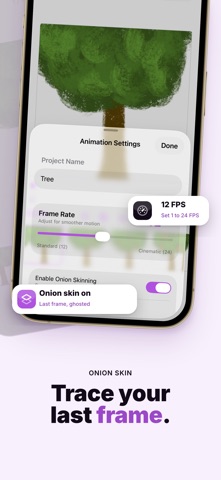
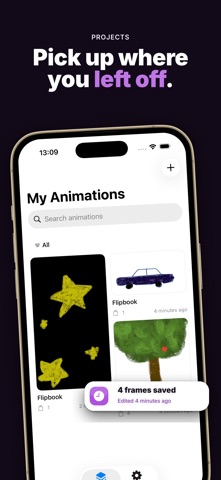
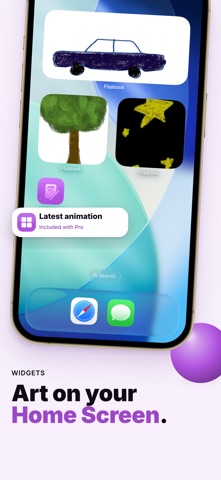
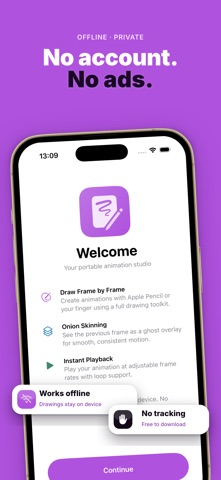
Turn your device into a portable flipbook animation studio. Draw frame by frame with Apple Pencil or your finger, preview with onion skinning and loop playback, then share your creations — fully offline, no account needed. Free to download. No ads. No tracking — ever. ▸ DRAW FRAME BY FRAME Use the full PencilKit canvas with pens, pencils, markers, and erasers. Each frame is your canvas — draw, erase, and refine until it's perfect. ▸ ONION SKINNING See the previous frame as a ghost overlay while you draw. Free includes onion skin at the default opacity; Pro adjusts opacity from 5% to 50%. ▸ REFERENCE IMAGES (Pro) Import a reference image and overlay it on your canvas. Pan, zoom, rotate, and adjust opacity — ideal for tracing, rotoscoping, or photo references. ▸ FRAME MANAGEMENT Add, duplicate, reorder, and clear frames. Set a background color on any frame. Free projects support up to 12 frames; Pro unlocks up to 256 frames. ▸ SMOOTH PLAYBACK Play your animation at adjustable frame rates from 1 to 24 FPS with loop preview. ▸ MULTIPLE PROJECTS Free: up to 2 animation projects (existing projects stay editable). Pro removes the project cap. ▸ EXPORTS Free: animated GIF and all-frames PNG — no watermarks. Pro adds MP4 video and multi-page PDF. ▸ HOME SCREEN WIDGET (Pro) Add a Flipbook widget to your home screen to see your latest animation at a glance. ▸ BACKUP & RESTORE (Pro) Export and restore your full .flipbook archive. ▸ FULLY OFFLINE & PRIVATE No account. No cloud. No ads. All your drawings and animations stay on your device only. ▸ TRY FREE Complete a real animation job on Free — draw, preview with onion skin, and export GIF or all-frames PNG without watermarks. ▸ PRO UNLOCKS THE STUDIO Large and XL canvas, extended frame capacity, adjustable onion skin, reference images, MP4/PDF export, backup, and Home Screen widget. Monthly, annual, or lifetime. Flipbook is designed for creators who value simplicity and privacy. Download now and start animating. Have feedback? Reach us at support@can.bi Privacy Policy: https://canbi.notion.site/Privacy-Policy-2f76cac95bdb82f2b23f01be456d1f4f Terms of Use (EULA): https://canbi.notion.site/Terms-of-Service-abb6cac95bdb83debe910153019d3f47
What's new · 1.4.1
New • Turn a shared image into a flipbook right from the share sheet — Flipbook now appears when you share an image. • Export a flipbook or get its preview from Siri and Shortcuts, without opening the app. Improved • Long-press the Flipbook icon on your Home Screen to request a feature or report a bug. • Settings > Advanced now has a Show IDs option, so you can copy an item’s ID in one tap when support asks for it. • Settings pages now show your current choices right away. • The privacy note in Settings uses the app's name in your language. Fixed • If your library can't be opened, you now get a recovery screen instead of the app closing at launch. • Something you shared into the app no longer gets stuck before it arrives. Have feedback? Write to support@can.bi
Details