

HandNote: Handwriting OCR
The Sky Bringup, LLC · Productivity
Independent analytics for this App Store listing. AppTracker is not affiliated with The Sky Bringup, LLC.
Chart standing · US
What changed · US
Listing changes AppTracker has observed for this app in this storefront — new versions, price moves, rating shifts, and store copy.
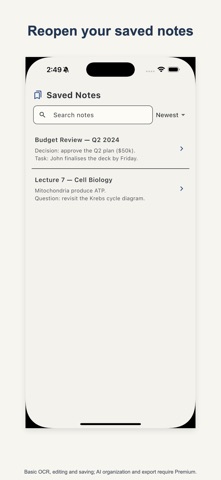
The app now speaks English, German, Spanish, French, Italian, Portuguese, Japanese, Korean and Chinese — choose one under Settings > Language — and long labels or large text sizes no longer get cut off. Saved notes now reopen their study cards and progress. Corrected OCR text and the source page recover after a restart, while free saves stay local before Premium organization.
In-app purchases · US
What this app sells inside itself, grouped by kind and priced for this storefront.
Screenshots


About
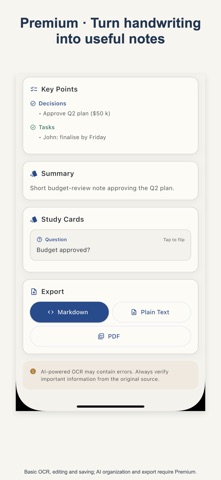
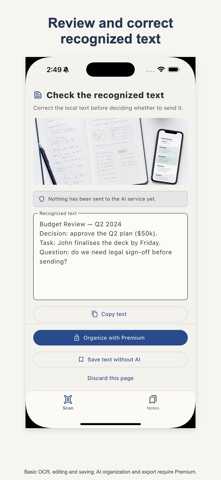
Turn a photo of one handwritten page into clear, editable text. HandNote helps you keep and use your notes without typing them again. • Current recognition supports handwriting written with the Latin alphabet. • Recognize text from one handwritten page for free. • Edit, save, copy and share recognized text for free. • Premium adds a structured outline with clear headings. • Pull out key points, a summary and study cards with Premium. • Export as PDF, Markdown or plain text with Premium. How it works: 1. Photograph one handwritten page or choose it from your photo library. 2. Review the recognized text and correct it where needed. 3. Save, copy or share it; use Premium to structure and export it. The app is free to download. Recognition, editing, saving, copying and sharing are available without upgrading. HandNote Premium only includes the structured outline, key points, summary, study cards and PDF, Markdown or plain-text export through an auto-renewing weekly subscription or a permanent purchase. Important: Handwriting recognition and AI-organized content may contain errors. Always check important information against the original page. Apple Standard Terms: https://www.apple.com/legal/internet-services/itunes/dev/stdeula/ Privacy Policy: https://handnote.skybringup.com/privacy/
What's new · 1.4.1
The app now speaks English, German, Spanish, French, Italian, Portuguese, Japanese, Korean and Chinese — choose one under Settings > Language — and long labels or large text sizes no longer get cut off. Saved notes now reopen their study cards and progress. Corrected OCR text and the source page recover after a restart, while free saves stay local before Premium organization.
Details