

CellarLog Wine Cellar Manager
Myro Control, LLC · Food & Drink
Independent analytics for this App Store listing. AppTracker is not affiliated with Myro Control, LLC.
Chart standing · US
What changed · US
Listing changes AppTracker has observed for this app in this storefront — new versions, price moves, rating shifts, and store copy.
Freshly Uncorked v3.02 The bottle that rang the bell. Tap a Ready to Drink notification with CellarLog closed and it now opens straight to that bottle, where it belongs, instead of leaving you at the cellar door. The same goes for a note that one of your wines has been corrected. ------ Freshly Uncorked v3.00 Two screens, one book. Unfold your cellar. iPhone Duo brings wine to life on two pages. Open the device and a wine spreads before you: the label sits framed on the left with a cream border, drinking window and tasting notes filling the right. Tap the photo and it lifts from the page; pinch it and it rises between your fingers; drag it and it floats to fill the page, the border falling away. Let go and it settles back like paper. Prop the Duo half open on the dinner table and the label stands up on the hinge like an easel while details lie flat below. As you open, the photo glides in from the spine and settles onto its page. Folded, CellarLog fits the cover screen with the tab bar along its edge and the Add button ready. Lock Screen knows what's ready. Three new Lock Screen widgets keep the cellar a glance away. A small ring counts the bottles at their peak, a longer one names tonight's best bottle and how many more wines are waiting, and a single line sits quietly above the clock. What to Drink Today now comes in a small size for StandBy on the nightstand. On this day. Some bottles are worth remembering. When you opened a wine on this date in an earlier year, a small card at the top of your cellar says so: a year ago today, the 2018 Barolo. Tap it to revisit the wine, or close it until tomorrow. Pour at peak.
Ratings breakdown · US
The star breakdown behind this app's rating in this storefront.
In-app purchases · US
What this app sells inside itself, grouped by kind and priced for this storefront.
Screenshots





About
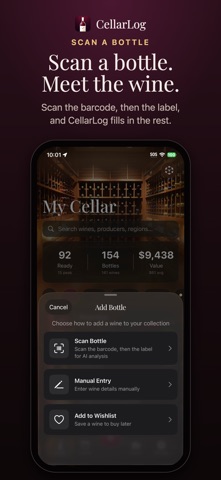
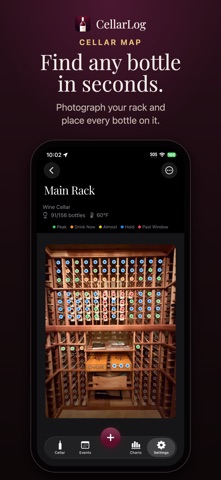
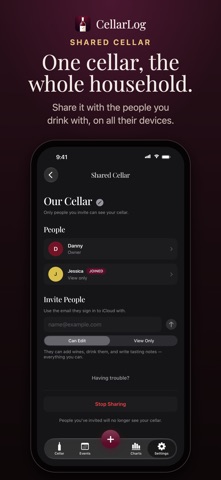
CellarLog is your personal wine cellar management app. Catalog your collection, track drinking windows, and get AI-powered recommendations — all from your iPhone, iPad, and Apple Watch. Built for iPhone Duo: unfold it and each wine opens like a book, label left, details right. SHARED CELLAR • Invite the people you share wine with and everyone keeps the same collection on their own devices. Add bottles, open them, write tasting notes — every bottle remembers who added it. Or invite someone View Only to browse without changing a thing. GLASS DESIGN • A photo-tinted glass interface — now the default theme. Drop in your own cellar photo and the rest of the app picks up its colors. Classic Light and Dark are still on the shelf for the purists. SCAN & IDENTIFY • Scan wine barcodes or photograph any label. Our AI sommelier identifies the wine and suggests drinking windows, critic ratings, tasting notes, and food pairings. ASK THE AI SOMMELIER • Tap any bottle and ask: "Should I decant this?", "Is it past peak?" Conversational answers in plain language — never an upsell to a different wine. MANAGE YOUR COLLECTION • Rack every bottle with vintage, region, grape variety, purchase price, and personal ratings. Know exactly what's in your cellar and when to drink it. SMART DRINKING WINDOWS • See at a glance which wines are ready, approaching peak, or need more time. Get notified when bottles enter their ideal window. APPLE WATCH COMPANION • Your entire cellar on your wrist. Browse filtered by wine color, peek at your wishlist at the wine shop, and see what's hitting peak tonight. Works standalone — syncs via iCloud. Mark wishlist wines as purchased from your wrist. WATCH FACE COMPLICATIONS • How many bottles are ready to drink right now? Always-on wine radar. HOME & LOCK SCREEN WIDGETS • Three widgets for your iPhone Home Screen: a Featured Wine that rotates every four hours, a "What to Drink Today" list of wines hitting peak, and a Cellar Colors donut chart. PLAN EVENTS • AI-powered wine pairings and serving-order suggestions based on your collection, guest count, and budget. Generate printable drink sheets with QR codes. LABEL PRINTING & NFC TAGS • Print custom labels with QR codes to your Niimbot Bluetooth printer. Write NFC tags for instant bottle identification — tap your phone to pull up any wine. CELLAR MAP • Photograph your rack and place bottles directly on it. See your entire collection mapped visually with color-coded drinking windows. AR BOTTLE INFO • Point your camera at bottles in your rack to see wine details, drinking status, and ratings overlaid in augmented reality. TASTING NOTES • Record notes with aroma, palate, and finish. Rate wines and track whether they were worth the price. CHARTS & ANALYTICS • Visualize your collection by color, region, value, and drinking windows. See peak windows, cellar status, highest rated, and most valuable bottles at a glance. IMPORT, EXPORT & BACKUP • Round-trip your cellar through a spreadsheet. Export as CSV, edit in Excel, Numbers, or Sheets, and re-import with a full preview. Every row is tagged new, update, or unchanged, with a field-by-field diff. Plus PDF drink sheets and full iCloud backups. PRIVACY FIRST • Your collection is stored locally and syncs via your personal iCloud — never on our servers. No account required. No tracking. CellarLog+ unlocks shared cellars, AI label scanning, event recommendations, label printing, NFC tagging, full analytics, CSV import/export, Home Screen widgets, the Apple Watch app, and watch complications. Scan packs available for one-time AI credit purchases. The Lifetime option unlocks everything — including widgets and the Apple Watch app — with no subscription. Buy scan packs anytime for AI. Pour at Peak. Terms of Use: https://www.apple.com/legal/internet-services/itunes/dev/stdeula/ Privacy Policy: https://cellarlog.app/cellarlog/privacy
What's new · 3.02
Freshly Uncorked v3.02 The bottle that rang the bell. Tap a Ready to Drink notification with CellarLog closed and it now opens straight to that bottle, where it belongs, instead of leaving you at the cellar door. The same goes for a note that one of your wines has been corrected. ------ Freshly Uncorked v3.00 Two screens, one book. Unfold your cellar. iPhone Duo brings wine to life on two pages. Open the device and a wine spreads before you: the label sits framed on the left with a cream border, drinking window and tasting notes filling the right. Tap the photo and it lifts from the page; pinch it and it rises between your fingers; drag it and it floats to fill the page, the border falling away. Let go and it settles back like paper. Prop the Duo half open on the dinner table and the label stands up on the hinge like an easel while details lie flat below. As you open, the photo glides in from the spine and settles onto its page. Folded, CellarLog fits the cover screen with the tab bar along its edge and the Add button ready. Lock Screen knows what's ready. Three new Lock Screen widgets keep the cellar a glance away. A small ring counts the bottles at their peak, a longer one names tonight's best bottle and how many more wines are waiting, and a single line sits quietly above the clock. What to Drink Today now comes in a small size for StandBy on the nightstand. On this day. Some bottles are worth remembering. When you opened a wine on this date in an earlier year, a small card at the top of your cellar says so: a year ago today, the 2018 Barolo. Tap it to revisit the wine, or close it until tomorrow. Pour at peak.
Details