

Wind Meter+ Anemometer Gust
Kyu-Hee Jang · Utilities
Independent analytics for this App Store listing. AppTracker is not affiliated with Kyu-Hee Jang.
Chart standing · US
What changed · US
Listing changes AppTracker has observed for this app in this storefront — new versions, price moves, rating shifts, and store copy.
• Gust alert: get notified when forecast gusts reach your threshold, with the time and speed • New home-screen widget: forecast wind, gusts and direction for your place • Start sits right under the gauge, and tapping the gauge starts or stops • When a session is saved to your gust log, a result card shows peak gust, average, Beaufort and duration
In-app purchases · US
No in-app purchases.
Screenshots

About
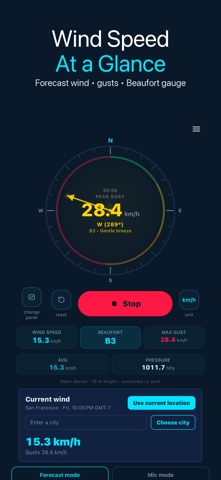
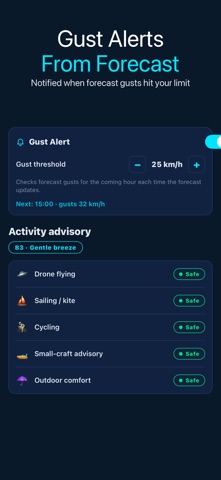
Wind Meter+ is a wind speed meter and anemometer with a gust alert and a home-screen widget. See the forecast wind, gusts and direction for your place, or measure the wind across the iPhone microphone (beta estimate), then press Stop: once the session is saved to your gust log, a result card shows what you measured. ▶ Wind speed at a glance • Forecast wind, gust and direction for your current location or a city you choose (Open-Meteo) • Radial gauge with the Beaufort scale, sustained speed, peak gust and pressure • Units: km/h, mph, knots and m/s • Start sits right under the gauge; tapping the gauge starts or stops too ▶ Stop and see the result Press Start, then Stop. A session of at least 3 seconds with readings is saved to the gust log (the last 50), and a result card then shows the peak gust, the average speed, the Beaufort class and the duration, with the source marked (forecast or mic estimate). Export the log as CSV; a statistics CSV of all sessions unlocks for 24 hours after a short ad. ▶ Gust alert Set a gust threshold and get a notification when the forecast shows gusts at or above it: "Gusts up to 32 km/h forecast at 3:00 PM". The app checks forecast gusts for the coming hour each time the forecast updates, including periodic refreshes while the app is closed when the system allows it. The threshold moves in 5 km/h steps. ▶ Home-screen widget Add the Wind Meter+ widget in small or medium size. It shows the forecast wind, gusts and direction for your place with the forecast hour and the time it was updated; the medium size also shows the next gust alert. When the stored forecast runs out it asks you to open the app instead of showing old numbers. Microphone readings are never shown on the widget. ▶ Activity advisory and week planner • Drone, sailing/kite, cycling, small craft and outdoor comfort graded Safe, Caution or No-go • This week: every hour from 5:00 to 22:00 for 7 days graded green, amber or red for drone, kite, sailing, cycling or comfort, with the next usable window • In the planner, drone grading uses the forecast wind at 120 m altitude when it is stronger than at ground level • Hourly strip for the next 24 hours with sustained wind and gusts ▶ Microphone mode (beta) Point the mic edge into the wind with no case. The reading is an estimate from wind noise; calibrate the calm-air zero, or scale it to a reference speed from a real anemometer. Handling noise and the case affect it. ▶ Honest limits Forecast values come from the nearest Open-Meteo grid point, not a sensor at your exact spot, and need an internet connection. Background refresh timing is decided by the system, so an alert can arrive late or not at all while the app is closed. For critical decisions use a dedicated anemometer and official weather warnings. The app is available in 30 languages.
What's new · 1.1.18
• Gust alert: get notified when forecast gusts reach your threshold, with the time and speed • New home-screen widget: forecast wind, gusts and direction for your place • Start sits right under the gauge, and tapping the gauge starts or stops • When a session is saved to your gust log, a result card shows peak gust, average, Beaufort and duration
Details