

Clinometer+ Slope
Kyu-Hee Jang · Utilities
Independent analytics for this App Store listing. AppTracker is not affiliated with Kyu-Hee Jang.
Chart standing · US
What changed · US
Listing changes AppTracker has observed for this app in this storefront — new versions, price moves, rating shifts, and store copy.
• Miter tab, “Measure with phone”: the corner angle now comes from the direction each wall faces. Before, a square corner was read far wider than 90°, so the Miter and Bevel to set on the saw were wrong. • Press the back of the phone flat on wall A, then on wall B, holding it upright. The A and B buttons stay dimmed until the phone is upright against the wall and the reading has settled.
Price & rating history · US
Reconstructed from the listing changes AppTracker has observed in this storefront. A field is charted once it has changed more than once, and each line starts at the value it moved from.
Average rating · ★ 2.33 now · 3 changes on record
Screenshots


About
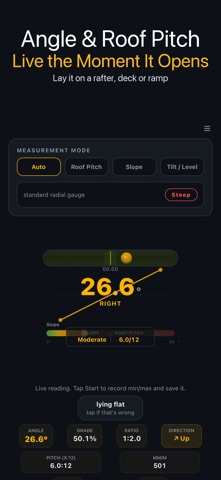
Clinometer+ turns your iPhone into a slope, angle and roof pitch meter. Open the app and the live angle is already on screen — lay the phone on a rafter, a ramp or a deck board and read it in degrees, percent grade and 1:N ratio at the same time. ▶ FOUR WAYS TO READ AN ANGLE • Auto — round gauge with degrees, grade % and ratio, plus a live row for x:12 pitch and mm per metre. • Roof Pitch — rise:run (4:12, 6:12…) with the nearest standard pitch from 1:12 to 12:12. • Slope — grade % with walking categories and references such as the ADA ramp limit (1:12) and a safe ladder angle (75°). • Tilt — bubble view with ± degrees and a clear level indicator. ▶ HOLD IT ANY WAY Lying flat on a surface, standing on its end, or on its long edge against a stud — the app detects how the phone is held and shows it. If it guessed wrong, tap the chip to switch. Uphill and downhill are told apart. ▶ TARGET CHECK Pick a target — ADA ramp, drainage fall, driveway, shingle roof or stairs — and a PASS / OUT OF RANGE badge updates live while you adjust. ▶ RECORD, HOLD, ZERO • Start records a session: min / max, elapsed time and a live trend chart. Stop saves it to History. • Hold freezes the number so you can read it off a tight spot. • Zero on any surface you trust; the offset is kept after relaunch and a long press clears it. • Optional vibration when the angle crosses 0°. ▶ MORE TOOLS • Bubble level — two-axis roll and pitch for shelves, floors and appliances. • Vehicle — roll and pitch gauges for off-road driving, with Zero here, max values and a warning angle from 5° to 60°. • Miter & Crown — miter and bevel saw settings for crown moulding from the corner and spring angle (38°, 45°, 52°), or a simple baseboard miter. Capture the corner by holding the phone against each wall. ▶ HISTORY Up to 500 saved readings with notes, favourites, side-by-side compare and 7-day stats. Export everything as CSV, record a one-per-second log, or share the current reading as an image. ▶ GUIDE Short notes on measuring roof pitch, ramp rules, the two-sided calibration trick and the difference between degrees and percent grade. Readings are shown to 0.1°. Phone sensors vary and cases or bent frames add error, so zero on a known level surface before critical work.
What's new · 1.0.35
• Miter tab, “Measure with phone”: the corner angle now comes from the direction each wall faces. Before, a square corner was read far wider than 90°, so the Miter and Bevel to set on the saw were wrong. • Press the back of the phone flat on wall A, then on wall B, holding it upright. The A and B buttons stay dimmed until the phone is upright against the wall and the reading has settled.
Details