

Tone Generator+ Freq
Kyu-Hee Jang · Utilities
Independent analytics for this App Store listing. AppTracker is not affiliated with Kyu-Hee Jang.
Chart standing · US
What changed · US
Listing changes AppTracker has observed for this app in this storefront — new versions, price moves, rating shifts, and store copy.
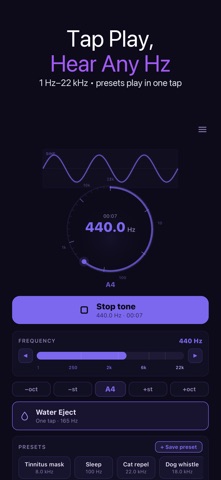
• A big Play button now sits right under the dial — tap the dial too • Presets start the sound in one tap; while playing they retune live • Tones keep playing when you switch to another app or lock the screen • Tones, binaural beats and mixer layers now match the Hz shown (no more 0.5 Hz rounding) • Line icons, haptic feedback and steadier number display
Screenshots


About
Tone Generator: Frequency Hz plays audio tones from 1 Hz to 22 kHz — pick a frequency or a preset, press the big Play button under the dial, and hear it. Sine, square, sawtooth and triangle waves, plus white, pink and brown noise. The tone keeps playing when you switch to another app or lock the screen, so a tone or noise can run while you read, work or rest. A sleep timer (15, 30 or 60 minutes) stops it for you. ▶ SET THE FREQUENCY • Step with the frequency arrows, jump by semitone or octave, or tap A4 • Watch the note name and cents readout as you go • Type exact Hz values for the right ear, the mixer and the sweep • The tone you hear matches the frequency shown on screen ▶ WAVEFORMS AND NOISE • Sine for a clean pure tone • Square, sawtooth and triangle for harmonics • White, pink and brown noise ▶ PRESETS — ONE TAP TO HEAR THEM • Tinnitus masking tone, sleep, A4 440 Hz, subwoofer 60 Hz, bass strings E A D G, dog whistle, cat repel • Brainwave beat pack (delta, theta, alpha, beta, gamma) and solfeggio tones • Save your own presets, including mixer setups • Tapping a preset starts the sound; if a tone is already playing, it switches to the new preset ▶ CHANNELS, BEATS AND SWEEP • Mono, stereo with a separate right-ear frequency, binaural beats and isochronic tones • Dual tone: two frequencies at once • Mixer: layer up to four tones, each with its own waveform and level • Frequency sweep between any two frequencies, once or looping, with the dial following the sweep ▶ MORE TOOLS • Instrument tuner: play a note and see its pitch and cents (uses the microphone) • Water Eject: a 165 Hz tone at full volume to help push water out of the speaker • Speaker and subwoofer checks with steady tones and sweeps ▶ WHO IT IS FOR • Musicians checking tuning against an exact Hz • People testing speakers, headphones and subwoofers • Students exploring sound, frequency and waveforms • Anyone who wants a steady tone or noise in the background ▶ SAFETY Start at a low volume. Loud tones, especially high frequencies, can harm hearing and speakers. Brainwave and solfeggio presets are traditionally used in relaxation and focus routines; they are not a medical or therapeutic treatment. The tinnitus preset is a masking tone, not a treatment. Available in 30 languages.
What's new · 1.0.27
• A big Play button now sits right under the dial — tap the dial too • Presets start the sound in one tap; while playing they retune live • Tones keep playing when you switch to another app or lock the screen • Tones, binaural beats and mixer layers now match the Hz shown (no more 0.5 Hz rounding) • Line icons, haptic feedback and steadier number display
Details