

Basic Checkbook: Spending Log
Sean Trapani · Finance
Independent analytics for this App Store listing. AppTracker is not affiliated with Sean Trapani.
Chart standing · US
What changed · US
Listing changes AppTracker has observed for this app in this storefront — new versions, price moves, rating shifts, and store copy.
Version 8.3 • Made for iPhone Duo. Open it and your accounts sit beside the register. • Fold it closed for the phone layout. An account you opened stays on screen, along with anything you were typing. • Larger text. The rest of the app no longer cuts words off at bigger text sizes or with Display Zoom. • VoiceOver. Back buttons, the Monthly Recap arrows and the Scheduled button now say what they do. • Send Feedback can include your email, if you'd like an answer. • The time and signal now show at the top of New Transaction and the other white screens. • Delete All Data no longer closes the app on iOS 27.
Ratings breakdown · US
The star breakdown behind this app's rating in this storefront.
In-app purchases · US
What this app sells inside itself, grouped by kind and priced for this storefront.
Screenshots




About
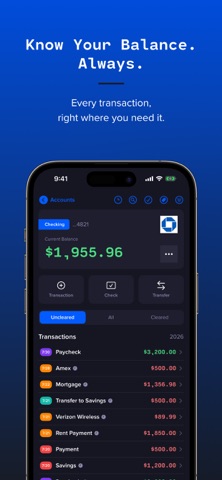
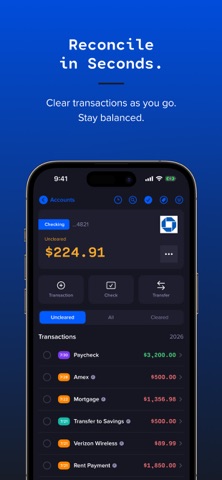
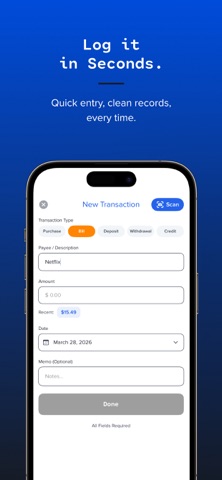
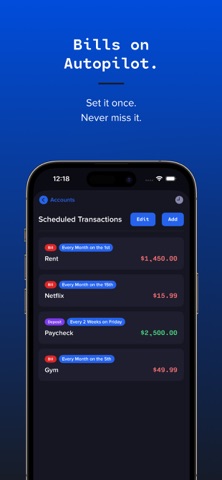
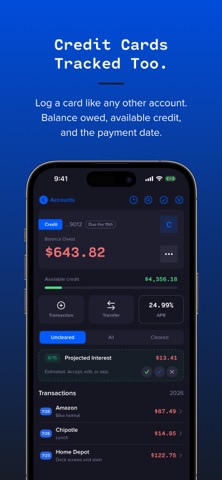
Your bank app shows what cleared. Basic Checkbook shows what's real. Most banking apps only show transactions that have already posted, not the check you wrote yesterday, the bill that hits Friday, or the withdrawal you made this morning. Basic Checkbook is a personal register where you log every dollar as you spend it, across checking, savings, credit cards, and brokerage accounts, so your running balance is always accurate, up to date, and yours. No bank logins. No credentials on anyone's server. Just a fast, private register that works the way a checkbook always has, only better. WHAT YOU CAN DO • Log purchases, deposits, bills, withdrawals, checks, credits, and transfers as they happen • Watch your true running balance update with every entry • See every account's combined total at the top, with card debt subtracted • See any month at a glance, free: money in, money out, your net, and your biggest expense • Track credit cards alongside your bank accounts: what you owe, the credit you have left, your APR, and the day payment is due • See how much of a card's limit you are using, so you know when a balance is creeping up • Decide what interest costs you: your card shows a projected charge on its due day, and you accept, adjust, or skip it • Add a transaction from your home screen with the Quick Add widget • Add a transaction hands-free with Siri, the Shortcuts app, or Spotlight • Mark items cleared one at a time, fly through a statement with Quick Reconcile, or balance a statement step by step • Void a canceled or torn-up check and keep it on the record while the money returns to your balance • Tag transactions with as many labels as you like, and reuse any tag with one tap • Filter by type or status and search your whole register by payee, amount, memo, or tag • Schedule bills and income every 1 to 4 weeks, twice a month, monthly by date or weekday, quarterly, or yearly, with reminders, and skip one • Set a low balance warning and get a notice two days before a scheduled bill takes the balance under it • Earn interest on savings: choose the day it posts each month, and see the total at a glance • Track a brokerage account, 401(k) or IRA by its value: type it, paste it, scan a screenshot, or ask Siri, and Checkbook writes the gain or loss, keeps what you put in separate, shows your return, and reminds you to update it • Scan a check or receipt to fill in the details automatically • Track a different currency per account • Keep every account in sync across your devices with iCloud, free • Back up your entire register to a file and restore it anytime • Lock the app with Face ID, Touch ID, or a passcode BASIC CHECKBOOK PREMIUM Two ways to upgrade: Lifetime Premium, a single purchase that never renews and never expires, or a yearly plan if you prefer it. Both unlock: • Unlimited accounts: keep checking, savings, credit cards, brokerage, and more in one place • Your accounts over time: tap the total and see how they have moved, month by month, with a tile for each one • Full Monthly Recap: the tags and payees you spent the most on, plus save any month as a PDF • Payoff plan: set a monthly payment on any credit card and see the payoff date and what the interest will cost • Projected balance: where your balance is headed from your scheduled and recurring activity • Receipt photos: attach a receipt to the transaction it belongs to • Spending analytics: charts, trends, budgets, and period comparisons • Monthly PDF statements: clean, bank-style statements for any date range • CSV import and export: bring your history in, or take it anywhere • Color themes and app icons: premium palettes and home-screen icons Basic Checkbook doesn't connect to your bank or your brokerage. It never reads your transactions or stores your credentials anywhere. It's your ledger: private, accurate, and completely yours. Privacy Policy: https://basicapps.tech/privacy Terms of Use: https://www.apple.com/legal/internet-services/itunes/dev/stdeula/
What's new · 8.3
Version 8.3 • Made for iPhone Duo. Open it and your accounts sit beside the register. • Fold it closed for the phone layout. An account you opened stays on screen, along with anything you were typing. • Larger text. The rest of the app no longer cuts words off at bigger text sizes or with Display Zoom. • VoiceOver. Back buttons, the Monthly Recap arrows and the Scheduled button now say what they do. • Send Feedback can include your email, if you'd like an answer. • The time and signal now show at the top of New Transaction and the other white screens. • Delete All Data no longer closes the app on iOS 27.
Details