

Lapster Racing
Roman Milushov · Sports
Independent analytics for this App Store listing. AppTracker is not affiliated with Roman Milushov.
Chart standing · US
What changed · US
Listing changes AppTracker has observed for this app in this storefront — new versions, price moves, rating shifts, and store copy.
• Added an Apple Watch app: view sessions and laps, chat with other riders, and record and play voice messages. Includes voice transcription, watch face complications, and Smart Stack widgets. • Added Session Review: compare each corner across laps, identify your best results, and track changes in a selected metric. • Added personal PDF timing sheet imports: open a file in Lapster, select your name, and save your results to your profile. • Expanded the iPad experience with dedicated layouts for corner analysis, lap comparison, teams, notifications, settings, track creation, and stories. Added keyboard shortcuts and trackpad support. • Improved ride preservation for iPhone and RaceBox: rides with recorded movement are now saved even when no laps could be detected. Select or create a track to recalculate laps. • Added support for start/finish crossing direction when detecting laps. • Improved iPhone GPS recording, recovery of unfinished rides, and synchronization on unreliable connections. • Improved RaceBox Pro Wi-Fi connectivity, session downloads, and connection recovery after interrupted transfers. • Added session reactions and quick double-tap reactions in chats. • Added inline comment replies with a separate reply draft. • Improved chats, including voice and video message recording, photo and GIF uploads, scrolling to new messages, and playback controls. • Refined the photo viewer, best-lap presentation, and rider comparison screens. • Added sample sessions to the home screen to help new users explore the app. • Fixed bugs and improved animation smoothness, keyboard behavior, VoiceOver support, and larger text layouts. • Session video (beta): optional experimental clip editing, lap synchronization and telemetry overlays, available through Developer settings.
Screenshots



Keywords this app targets
Search terms AppTracker associates with this app — estimates, not search volume. ❝ = in the app's title; a highlighted number is its current position for that term.
Similar apps
Competitors and close alternatives, as estimated by AppTracker.
 LapTrophy - Track Lap Timer
DXB Technologies
LapTrophy - Track Lap Timer
DXB Technologies
 GPS Lap Timer
Takao Ichimura
GPS Lap Timer
Takao Ichimura
 Harry's LapTimer Petrolhead
Harald Schlangmann
Harry's LapTimer Petrolhead
Harald Schlangmann
 Harry's LapTimer Rookie
Harald Schlangmann
Harry's LapTimer Rookie
Harald Schlangmann
 TrackAddict Pro
HP Tuners LLC
TrackAddict Pro
HP Tuners LLC
 GinnyPix Racetimer
NK Aviation Ab
GinnyPix Racetimer
NK Aviation Ab
 Reva - Ride Tracker
ANTHONY CHRISTIAN YANEZ
Reva - Ride Tracker
ANTHONY CHRISTIAN YANEZ
 Harry's LapTimer Grand Prix
Harald Schlangmann
Harry's LapTimer Grand Prix
Harald Schlangmann
About
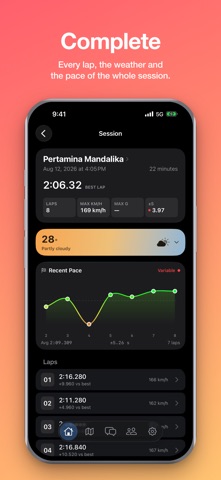
Lapster turns your RaceBox into a complete lap timer and telemetry system. And if you don't own one yet, your iPhone can time your laps too. RACEBOX — ALL THREE MODELS RaceBox Mini S, RaceBox Micro and RaceBox Pro. Connect over Bluetooth or Wi-Fi, pull the sessions stored on the device, and every lap is timed, mapped and saved automatically. NO RACEBOX? USE YOUR PHONE Start a session with your iPhone's GPS and get real lap times on any circuit. Live map, predictive delta, lean angle, and a separate 0-100 acceleration mode with its own personal bests. EVERY LAP, IN DETAIL • Replay any lap on the map at 1x, 3x or 5x • Speed, position and time for every corner • Put your lap next to a friend's and see where the time went • Sector splits, top speed, G-forces and lean angle TRACKS Official circuits with verified records, plus tracks you build yourself — drop the start/finish line and sectors straight onto the map. Every track keeps a leaderboard of the riders on it. TRACK DAYS Find track days, book your spot, and read reviews from riders who were actually there — with their photos and lap times attached. SHARE IT Send a lap or a whole session with a link, post a story, or export a poster for Instagram. Your profile keeps every stat and badge you have earned. MESSAGES Direct and group chats with other riders, including voice messages. ALSO INSIDE • Import your existing rides from the RaceBox app (CSV) • Weather recorded automatically for every session • Your garage: cars and bikes, with photos • Available in 14 languages Free to use. Optional donations if you want to support development. Lapster is not affiliated with RaceBox. RaceBox is a trademark of its respective owner. Terms of Use (Apple Standard EULA): https://www.apple.com/legal/internet-services/itunes/dev/stdeula/ Apple Watch: view sessions and lap times, chat with other riders, and record, play and transcribe voice messages. Includes watch face complications and Smart Stack widgets.
What's new · 1.4.1
• Added an Apple Watch app: view sessions and laps, chat with other riders, and record and play voice messages. Includes voice transcription, watch face complications, and Smart Stack widgets. • Added Session Review: compare each corner across laps, identify your best results, and track changes in a selected metric. • Added personal PDF timing sheet imports: open a file in Lapster, select your name, and save your results to your profile. • Expanded the iPad experience with dedicated layouts for corner analysis, lap comparison, teams, notifications, settings, track creation, and stories. Added keyboard shortcuts and trackpad support. • Improved ride preservation for iPhone and RaceBox: rides with recorded movement are now saved even when no laps could be detected. Select or create a track to recalculate laps. • Added support for start/finish crossing direction when detecting laps. • Improved iPhone GPS recording, recovery of unfinished rides, and synchronization on unreliable connections. • Improved RaceBox Pro Wi-Fi connectivity, session downloads, and connection recovery after interrupted transfers. • Added session reactions and quick double-tap reactions in chats. • Added inline comment replies with a separate reply draft. • Improved chats, including voice and video message recording, photo and GIF uploads, scrolling to new messages, and playback controls. • Refined the photo viewer, best-lap presentation, and rider comparison screens. • Added sample sessions to the home screen to help new users explore the app. • Fixed bugs and improved animation smoothness, keyboard behavior, VoiceOver support, and larger text layouts. • Session video (beta): optional experimental clip editing, lap synchronization and telemetry overlays, available through Developer settings.
Details