

Yomu - Manga Reader
MOBILE ALCHEMY LTD · Books
Independent analytics for this App Store listing. AppTracker is not affiliated with MOBILE ALCHEMY LTD.
Chart standing · US
What changed · US
Listing changes AppTracker has observed for this app in this storefront — new versions, price moves, rating shifts, and store copy.
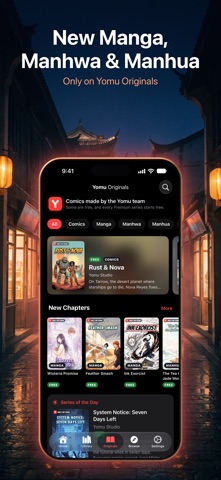
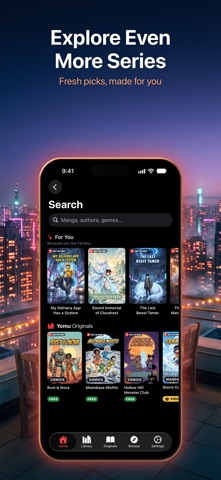
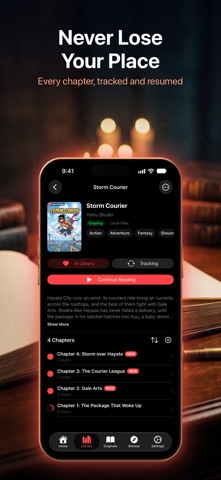
• Reading a Yomu Originals series follows it: the bell on its page turns on New Chapter Notifications, and new chapters show up in Updates even outside your Library. Follow Originals I Read in Settings switches it off. • Move many Library series from one catalog to another at once from the Library menu; Yomu matches each title and keeps your reading progress. • Sync your whole Library's reading progress with your connected reading-list services in one go from the Library menu, never lowering it. Part of Premium. • A search that finds little offers to go on across all your catalogs, or in Search for Yomu Originals. • After a Yomu Originals series' last chapter, You're all caught up offers Add to Library, More Like This and Back to Originals. Popular Yomu Originals gain more chapters. • Shorts are now called Dramas, and each reader sees them in an order of their own. • For You, Yomu Originals, Popular and Latest on Search, and More Like This on series pages, suggest from what you read, on your device and in every language Yomu speaks. A tag on a series page opens Search. • Home's New Chapters says which chapter is new, and See All opens Updates, also a tab in Customize Tabs. Show Yomu Originals on Home in Settings hides or restores the Yomu Originals and Dramas shelves. A new reader's Home opens with Start Reading. • Coming Soon lists the Yomu Originals on their way; choose Remind Me to hear when one arrives. • Cover Size for the Library and every cover grid: Large, Medium or Small, with a preview. Choose Grid or List from the Library menu or in Settings. Option menus show what's chosen: Sort, View As and more. • A download button on a series page opens Download Unread and Download All. • A Reading Direction button on the reader's top bar shows your reading mode's new icon, and Page Transition gains Off. Customize Toolbar adds a Chapters button and reorders or hides the rest. • Horizontal Scroll no longer jumps and turns pages by your Tap Zones. Two-page spreads fit each page, with Spine Gap in Page Layout. Page Curl no longer flickers when the chapter changes. Paged readers on iPad in landscape go on to the next chapter. • A chapter you read to the end opens on its first page, and files that repeat chapter numbers, like main episodes and side stories, are read in file-list order. • Open MOBI, AZW and AZW3 comics like any other comic file. Local Files can Select several series and delete them together, and network folders open much faster. • Read Aloud picks up voices as you install them, lists Personal Voice first in its menu and no longer hangs on a translated page. • Novels: controls hide and show properly in Scroll mode, and late pictures no longer close the reader. • Translate To follows the app's language, and the Translation Language sheet opens large. • Larger text sizes keep their layout, controls are bigger and easier to hit, and Reduce Motion and Reduce Transparency are respected. • Links to Yomu Originals series, chapters and episodes open in Yomu. Fixes Yomu closing on iPhone X and older iPhones.
Price & rating history · US
Reconstructed from the listing changes AppTracker has observed in this storefront. A field is charted once it has changed more than once, and each line starts at the value it moved from.
Average rating · ★ 3.33 now · 5 changes on record
Ratings breakdown · US
The star breakdown behind this app's rating in this storefront.
In-app purchases · US
What this app sells inside itself, grouped by kind and priced for this storefront.
Screenshots





Keywords this app targets
Search terms AppTracker associates with this app — estimates, not search volume. ❝ = in the app's title; a highlighted number is its current position for that term.
Similar apps
Competitors and close alternatives, as estimated by AppTracker.
 Omoi: Manga Reader
KiraKira Media Inc.
2 shared topics · 3 shared title words
Omoi: Manga Reader
KiraKira Media Inc.
2 shared topics · 3 shared title words
 Komic - Comic/Manga Reader
Pablo Ruiz
3 shared topics · 3 shared title words
Komic - Comic/Manga Reader
Pablo Ruiz
3 shared topics · 3 shared title words
 Mangamo Manga Reader & Comics
Mangamo Inc.
2 shared topics · 3 shared title words
Mangamo Manga Reader & Comics
Mangamo Inc.
2 shared topics · 3 shared title words
 Manga Reader King
Monstera Labs LLC
3 shared topics · 3 shared title words
Manga Reader King
Monstera Labs LLC
3 shared topics · 3 shared title words
 Kuro Manga Reader
Kuro Apps LLC
1 shared topic · 3 shared title words
Kuro Manga Reader
Kuro Apps LLC
1 shared topic · 3 shared title words
 YACReader - Comic Reader
Luis Ángel San Martín
3 shared topics · 1 shared title word
YACReader - Comic Reader
Luis Ángel San Martín
3 shared topics · 1 shared title word
 Shimoe Manga Reader
Frans Setiawan
2 shared topics · 3 shared title words
Shimoe Manga Reader
Frans Setiawan
2 shared topics · 3 shared title words
 Manga Infinity - Manga Reader
Tien Hoang Khac
2 shared topics · 3 shared title words
Manga Infinity - Manga Reader
Tien Hoang Khac
2 shared topics · 3 shared title words
About
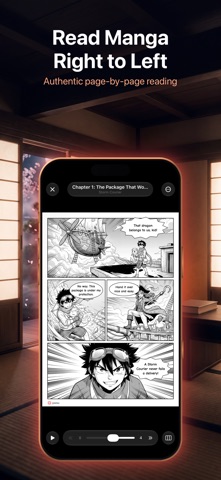
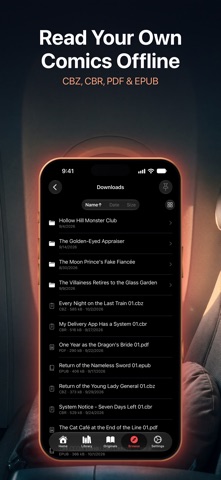
Yomu is a manga, comic, and webtoon reader for iPhone, iPad, and Mac that lets readers browse, read, and organize content from hundreds of sources in one library. WHO IS YOMU FOR? Yomu is built for manga readers who want one app for all their reading — whether you follow series from online sources, connect self-hosted servers like Komga or Kavita, or read your own CBZ, CBR, EPUB, and PDF files from local storage or a NAS. HOW DOES YOMU WORK? Add a source repository and hundreds of manga, manhwa, and manhua sources appear in the app. Browse, search, and read directly — no browser tabs, no sideloading. Yomu also connects to WebDAV, SMB, NFS, and OPDS servers, and can use an iCloud Drive folder as a library. WHEN SHOULD I USE YOMU INSTEAD OF A BROWSER? Yomu downloads chapters for offline reading, syncs progress across devices via iCloud, and tracks your reading on AniList, MyAnimeList, Kitsu, and MangaUpdates automatically. You keep your place across hundreds of series without managing bookmarks. CAN YOMU TRANSLATE MANGA? Yes. Yomu uses on-device AI to detect text in manga panels and translates to 27 languages with text wrapping that fits the original speech bubbles. AUTO ZOOM — PANEL-BY-PANEL READING On-device AI detects individual panels on each page and glides through them one at a time — turning dense manga pages into a cinematic, panel-by-panel reading experience that works especially well on smaller screens. READING · Right-to-left, left-to-right, and vertical scroll reading modes · Single and double-page layouts · Download chapters for offline reading · Smart notifications when new chapters drop · Sleep timer for reading before bed · Volume button and Apple Pencil page turning LIBRARY & TRACKING · One library for extensions, servers, and local files · iCloud sync across iPhone, iPad, and Mac · Automatic tracker sync with AniList, MyAnimeList, Kitsu, and MangaUpdates · One-tap backup and restore · Incognito mode and Face ID app lock PREMIUM Unlock Auto Zoom, AI Translation, Auto-Scroll, Tracker Sync, iCloud Sync, Komga/Kavita/Jellyfin/OPDS server connections, Sleep Timer, Backup & Restore, Incognito Mode, Face ID Lock, and all future premium features. NATIVE APPLE APP Built with SwiftUI — no web views, no wrappers. Fluid, responsive, and battery efficient on iOS and macOS. Terms of Use (EULA): https://yomureader.app/terms/ Privacy Policy: https://yomureader.app/privacy/
What's new · 4.2
• Reading a Yomu Originals series follows it: the bell on its page turns on New Chapter Notifications, and new chapters show up in Updates even outside your Library. Follow Originals I Read in Settings switches it off. • Move many Library series from one catalog to another at once from the Library menu; Yomu matches each title and keeps your reading progress. • Sync your whole Library's reading progress with your connected reading-list services in one go from the Library menu, never lowering it. Part of Premium. • A search that finds little offers to go on across all your catalogs, or in Search for Yomu Originals. • After a Yomu Originals series' last chapter, You're all caught up offers Add to Library, More Like This and Back to Originals. Popular Yomu Originals gain more chapters. • Shorts are now called Dramas, and each reader sees them in an order of their own. • For You, Yomu Originals, Popular and Latest on Search, and More Like This on series pages, suggest from what you read, on your device and in every language Yomu speaks. A tag on a series page opens Search. • Home's New Chapters says which chapter is new, and See All opens Updates, also a tab in Customize Tabs. Show Yomu Originals on Home in Settings hides or restores the Yomu Originals and Dramas shelves. A new reader's Home opens with Start Reading. • Coming Soon lists the Yomu Originals on their way; choose Remind Me to hear when one arrives. • Cover Size for the Library and every cover grid: Large, Medium or Small, with a preview. Choose Grid or List from the Library menu or in Settings. Option menus show what's chosen: Sort, View As and more. • A download button on a series page opens Download Unread and Download All. • A Reading Direction button on the reader's top bar shows your reading mode's new icon, and Page Transition gains Off. Customize Toolbar adds a Chapters button and reorders or hides the rest. • Horizontal Scroll no longer jumps and turns pages by your Tap Zones. Two-page spreads fit each page, with Spine Gap in Page Layout. Page Curl no longer flickers when the chapter changes. Paged readers on iPad in landscape go on to the next chapter. • A chapter you read to the end opens on its first page, and files that repeat chapter numbers, like main episodes and side stories, are read in file-list order. • Open MOBI, AZW and AZW3 comics like any other comic file. Local Files can Select several series and delete them together, and network folders open much faster. • Read Aloud picks up voices as you install them, lists Personal Voice first in its menu and no longer hangs on a translated page. • Novels: controls hide and show properly in Scroll mode, and late pictures no longer close the reader. • Translate To follows the app's language, and the Translation Language sheet opens large. • Larger text sizes keep their layout, controls are bigger and easier to hit, and Reduce Motion and Reduce Transparency are respected. • Links to Yomu Originals series, chapters and episodes open in Yomu. Fixes Yomu closing on iPhone X and older iPhones.
Details