

LessonTree - Lesson Journal
REMOSIA, K.K. · Education
Independent analytics for this App Store listing. AppTracker is not affiliated with REMOSIA, K.K.
Chart standing · US
What changed · US
Listing changes AppTracker has observed for this app in this storefront — new versions, price moves, rating shifts, and store copy.
Log a lesson with just your voice. Tell Siri "Log a lesson for Emma in LessonTree" and it's saved without opening the app. LessonTree now supports iPhone Duo, too. NEW - Log lessons with Siri: Siri asks what happened and saves the record. You can also check the last lesson, the next one and your total count, set or change the next lesson ("next Thursday at 3" is understood as-is), and add a student by voice - iPhone Duo support: open it and your past records sit side by side with today's record, so you can write while looking back. Hold it upright and they stack top and bottom. Keep it closed and you can still log one-handed - Search across everything: find student names, lesson content, next plans and your custom fields in one search - Your students now appear in Spotlight (iOS 18 and later). Only names and icons go into the on-device index, and you can turn it off in Settings at any time - Everything is available from the Shortcuts app, the Action button and the Lock Screen. See "What You Can Say to Siri" in Settings for the phrases IMPROVED - A fresh, softer hand-drawn look for the launch art, the rating icons and the welcome guide - Lesson notes you are still writing now survive leaving the app and coming back, or tapping a notification mid-entry - On devices set to the Japanese or Buddhist calendar, the next-lesson year now displays correctly and the day-before anniversary reminder arrives as expected - The lesson form title now follows the language you chose in the app Note: this version requires iOS 17.2 or later.
In-app purchases · US
What this app sells inside itself, grouped by kind and priced for this storefront.
Screenshots




About
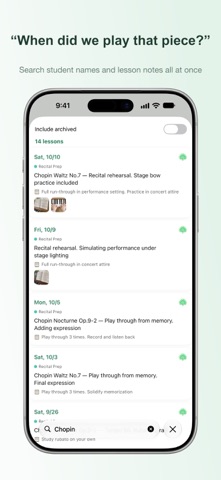
Grow trust with your students, like a tree. LessonTree is a lesson journal app for private tutors. Record each lesson in 30 seconds, and use student-organized history to prepare for your next session instantly. Still managing lesson notes in Apple Notes? Once you have more than a handful of students, things get messy fast. LessonTree keeps every lesson organized by student in chronological order, so you always know what happened last time. ◆ Built for tutors like you - Piano, guitar, violin, and other music teachers - ESL, language, and conversation tutors - Calligraphy, art, and cooking instructors - Programming tutors - Academic tutors and private instructors - Coaches and counselors - Anyone who teaches one-on-one ◆ Key Features ◆ Record a lesson in 30 seconds Enter what you covered today and the homework or plan for next time. Attach up to 10 photos. Rate the student's condition on a 5-point scale. Every field is optional, so even a single photo counts as a record. ◆ Log a lesson with your voice (Siri) — New in 2.0 Just say "Log a lesson for Emma in LessonTree." Siri asks what happened, and the record is saved without opening the app. You can also check the last and next lesson, reschedule the next one, and add a student by voice. Everything is available from the Shortcuts app, the Action button and the Lock Screen. ◆ Made for iPhone Duo — New in 2.0 Open it and past records sit beside today's record, so you can look back as you write. Held upright, they stack top and bottom. Your draft stays put as you open or close it. ◆ Student-organized lesson history Lessons are automatically sorted by student. Tap a student to see their full lesson history, newest first. Review what you did last time in 10 seconds before the next lesson. ◆ Search across everything — New in 2.0 Search student names together with lesson content, next plans and your custom fields. "When did we work on that piece?" takes one search. On iOS 18 and later your students also appear in Spotlight (you can turn this off in Settings). ◆ Growth reports for parents (PDF) — New in 1.1 Your daily lesson log becomes a beautiful report you can hand to parents. - Period report: attendance calendar, progress trends, milestones, and a personal message — auto-laid-out into a polished PDF. Perfect for recitals, progress reviews, and parent meetings - Lesson card: one lesson's plan, notes, and homework on a single page. Share instantly via Messages or AirDrop - AI draft suggestions: on Apple Intelligence devices, LessonTree drafts your overall comments and next goals from your records — processed entirely on device ◆ Next lesson reminders Set the next lesson date and get a reminder notification before it starts. Tap the notification to jump straight to that student's history. ◆ Custom fields Add fields that match your teaching style: song title, textbook page, tempo (BPM), grammar topic, and more. Supports text, number, date, and selection field types. ◆ iCloud sync Record on your iPhone, review on your iPad. Data syncs automatically across your devices via iCloud. Your data is stored only on your devices and iCloud. It is never sent to third-party servers. ◆ Data export Export your data in CSV or JSON format anytime. Your data is always yours. ◆ Student archive Archive students who are no longer active. Their lesson history is preserved while your active list stays clean. ◆ Pricing Core features are free. - Free plan: Up to 5 students, up to 2 custom fields per category - Pro plan (monthly or yearly): Unlimited students and custom fields, plus growth reports (PDF) ◆ Requirements - Universal app for iPhone, iPhone Duo and iPad - iOS 17.2 or later - iCloud sync supported ◆ Privacy LessonTree respects your data. All data is stored on your device and iCloud only. No third-party servers, no ads, no tracking. Contact: info@remosia.biz Privacy Policy: https://lessontree.remosia.biz/en/privacy.html Terms of Use: https://lessontree.remosia.biz/en/terms.html
What's new · 2.0
Log a lesson with just your voice. Tell Siri "Log a lesson for Emma in LessonTree" and it's saved without opening the app. LessonTree now supports iPhone Duo, too. NEW - Log lessons with Siri: Siri asks what happened and saves the record. You can also check the last lesson, the next one and your total count, set or change the next lesson ("next Thursday at 3" is understood as-is), and add a student by voice - iPhone Duo support: open it and your past records sit side by side with today's record, so you can write while looking back. Hold it upright and they stack top and bottom. Keep it closed and you can still log one-handed - Search across everything: find student names, lesson content, next plans and your custom fields in one search - Your students now appear in Spotlight (iOS 18 and later). Only names and icons go into the on-device index, and you can turn it off in Settings at any time - Everything is available from the Shortcuts app, the Action button and the Lock Screen. See "What You Can Say to Siri" in Settings for the phrases IMPROVED - A fresh, softer hand-drawn look for the launch art, the rating icons and the welcome guide - Lesson notes you are still writing now survive leaving the app and coming back, or tapping a notification mid-entry - On devices set to the Japanese or Buddhist calendar, the next-lesson year now displays correctly and the day-before anniversary reminder arrives as expected - The lesson form title now follows the language you chose in the app Note: this version requires iOS 17.2 or later.
Details