

Blur Video AI
Bitsbaker LLC. · Photo & Video
Independent analytics for this App Store listing. AppTracker is not affiliated with Bitsbaker LLC.
Chart standing · US
What changed · US
Listing changes AppTracker has observed for this app in this storefront — new versions, price moves, rating shifts, and store copy.
Export every video without a watermark. Mosaic Blur is now available in Korean and Japanese, with refreshed branding highlighting automatic face and text tracking.
Price & rating history · US
Reconstructed from the listing changes AppTracker has observed in this storefront. A field is charted once it has changed more than once, and each line starts at the value it moved from.
Average rating · ★ 4.67 now · 2 changes on record
Ratings breakdown · US
The star breakdown behind this app's rating in this storefront.
In-app purchases · US
No in-app purchases.
Screenshots


About
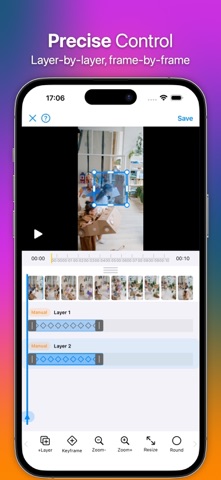
Blur or mosaic faces, license plates, text, and any sensitive area in your videos with automatic detection and precise manual controls. All processing happens entirely on your device—your videos are never uploaded or sent anywhere. # Key Features • AI Auto-Detection — Automatically detects and tracks faces and text. Just tap to blur. • Multiple Blur Layers — Add as many blur regions as you need, each with independent timing. • Frame-by-Frame Timeline — Precise control over when and where each blur appears. • Multiple Effects — Choose from blur or mosaic (pixelate) effects. • Manual Mode — Place and resize blur regions anywhere on the video. • Auto-Tracking — AI follows moving objects across frames automatically. • Watermark-Free Export — Save your finished video to Photos without an app watermark. • iPad Support — Full adaptive layout for iPad in portrait and landscape. # How It Works 1. Select a video from your library or record a new one. 2. Add blur layers — use AI auto-detection or place them manually. 3. Adjust timing and size on the timeline. 4. Choose your blur effect and strength. 5. Export and share. All video processing is done entirely on your device. No data is uploaded to any server. • Privacy Policy: https://bitsbaker.com/blurvideo/pp • Terms & Conditions: https://bitsbaker.com/blurvideo/tnc • Support: https://support.bitsbaker.com/blurvideo
What's new · 1.2
Export every video without a watermark. Mosaic Blur is now available in Korean and Japanese, with refreshed branding highlighting automatic face and text tracking.
Details