

Selene Moon Calendar
Thomas Erwin Stange · Weather
Independent analytics for this App Store listing. AppTracker is not affiliated with Thomas Erwin Stange.
Chart standing · US
What changed · US
Listing changes AppTracker has observed for this app in this storefront — new versions, price moves, rating shifts, and store copy.
1.0: Initial version 1.0.1: Current Moon · Local Moonrise 1.1: Calendar 1.2: Use Current Location · Choose Place · Favorites 1.3: Moon Sky Track · Calendar 1.4: Selene is now localized in 50 languages. 1.5: Apple Watch · Current Moon · Local Moonrise · Favorites 1.5.1: Phase Timeline · Current State · Current Moon 1.5.2: Auto · Light · Dark 1.6: Orbit · Observer perspective · Scale · Eclipse geometry 1.7: Orbit · Time-lapse · Observer perspective · Eclipses · Glossary 1.8: Moon Rendering · Classic · Natural · Contrast · Relief · Coordinates 1.8.1: Moon Finder Point the top edge of your device toward the Moon. The compass shows direction and height. The Moon Finder needs your current location; a selected remote place cannot be used for physical pointing. The Moon Finder is available only in Live mode. 1.8.2: Moon card: hourly timeline ±180 days; phase, illumination, age, surface and location-dependent rotation change together. “Now” returns straight to live data; Selene always launches live. Astronomical model unchanged; works offline on iPhone and iPad. 1.9: Selene becomes your personal lunar observatory: local event alerts, an 8-night observation and photography planner, and an interactive lunar map with 120 formations, libration, and the terminator. Configurable widgets, Shortcuts, Spotlight, sharing, and calendar/data export bring the Moon into your day. Every astronomical calculation stays on your device, offline, private, and ad-free. 1.9.1: New Apple Watch complication. The current Moon now appears directly on the watch face with a realistic surface and the correct phase. 1.9.2: Selene now shows lunar eclipses directly on the Moon across iPhone, iPad, Apple Watch, Mac, and widgets. On Apple Watch, Moon path and Moon compass lead to a new live orbit model that shows the current geometry of the Sun, Earth, and Moon. On Mac, optimized background updates keep scrolling smooth even during long sessions. Legibility and reliability have also been improved. Selene Watch Faces: Choose one of three Selene designs. 1.9.3: A new observation cockpit shows the current Moon, local direction, best observing window and next event at a glance. Explanations beside critical values clarify their meaning, location scope and limits. Astronomical calculations are unchanged. iMessage – Share lunar cards: Current Moon · Lunar map · Observation · Next event. 1.9.4: Explore all six crewed Apollo landing sites in verified modern LRO images. Moon Sky Track: Drag across the path or use the control to move through 24 hours. · Now iMessage · Apollo landing site 1.9.5: Selene now launches more efficiently and reliably on Apple Watch, especially on smaller and older models. Location card: actual current Watch location + 4 iPhone favorites. Glossary via book; moonrise/set only on Orbit. In full-screen Moon/Orbit, Digital Crown moves hourly through ±180 days with local date/time; Back returns instantly live. After syncing, favorites work offline; manage/search only on iPhone. Moon Finder works only in Now at the real Watch location. Sky Track is gapless and time-synced; Phase Timeline precedes Events. Show maximum jumps to the exact eclipse maximum for the selected place; Now returns live. Next 3 lunar eclipses + next Blood Moon. 1.9.6: Siri & Shortcuts: Moon phase by date, next moonrise, moonset, full/new moon and direction. Reuse results in your own shortcuts. 1.9.7: Smooth Moon orientation and lighting as time changes, without sudden 180° flips. 1.9.8: Natural: 4K NASA/LROC imagery. Relief: NASA/LOLA elevation colors. Your iPhone Moon style now syncs to Apple Watch. 1.9.9: iPhone and iPad: pinch to zoom 1–4×, pan with one finger and hold for a magnifier. Double-tap or reset to original size. Wide views put the Moon left and controls right. Watch adds a magnifier in full-screen Moon view and 1–4× pinch zoom on watchOS 11 or later; the crown still controls time. 2.0: New: Support for iPhone Duo.
In-app purchases · US
No in-app purchases.
Screenshots






Keywords this app targets
Search terms AppTracker associates with this app — estimates, not search volume. ❝ = in the app's title; a highlighted number is its current position for that term.
Similar apps
Competitors and close alternatives, as estimated by AppTracker.
 Lunar Watch Full moon calendar
Angela Hatcher
4 shared topics · 3 shared title words
Lunar Watch Full moon calendar
Angela Hatcher
4 shared topics · 3 shared title words
 Moon Calendar — Lunar Phases
Pavlo Nosov
2 shared topics · 3 shared title words
Moon Calendar — Lunar Phases
Pavlo Nosov
2 shared topics · 3 shared title words
 Moon Phase Calendar & Tracker
Daniel McAleese
2 shared topics · 2 shared title words
Moon Phase Calendar & Tracker
Daniel McAleese
2 shared topics · 2 shared title words
 Moon Phase Calendar Plus
Fascinating Projects Pty Ltd
3 shared topics · 2 shared title words
Moon Phase Calendar Plus
Fascinating Projects Pty Ltd
3 shared topics · 2 shared title words
 Moon Phase Calendar LunarSight
Applorium Ltd
2 shared topics · 2 shared title words
Moon Phase Calendar LunarSight
Applorium Ltd
2 shared topics · 2 shared title words
 Moon Phases - Lunar Calendar
LionsApp di Nallbati Elton
3 shared topics · 2 shared title words
Moon Phases - Lunar Calendar
LionsApp di Nallbati Elton
3 shared topics · 2 shared title words
 Moon Calendar + Phases
Rivolu LLC
1 shared topic · 3 shared title words
Moon Calendar + Phases
Rivolu LLC
1 shared topic · 3 shared title words
 Moon Calendar Watch
AppMosaic.com
2 shared topics · 3 shared title words
Moon Calendar Watch
AppMosaic.com
2 shared topics · 3 shared title words
About
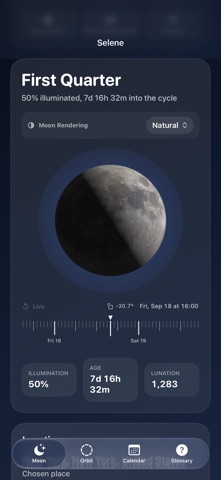
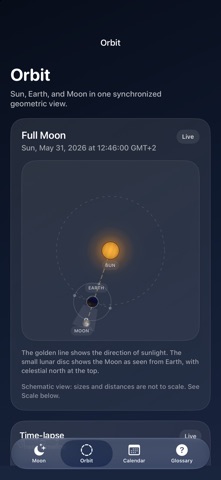
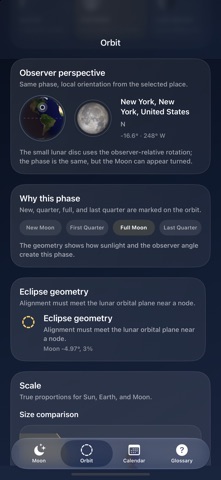
Selene is a calm lunar reference for iPhone and iPad. Check the current phase, illumination, age, lunation, distance, and the next major event at a glance. Explore the Moon up close on iPhone and iPad: pinch to zoom from 1× to 4×, then move the enlarged view with one finger. Touch and hold the Moon and move your finger to examine details with the magnifier. Double-tap or use the reset button to return to original size. Wide views place the Moon on the left and controls on the right. The full-screen Moon on Apple Watch also offers a magnifier and, on watchOS 11 or later, two-finger zoom from 1× to 4×. The Digital Crown continues to control time. Siri and Shortcuts bring the Moon into your day: get phase and illumination for a chosen date, find the next moonrise, moonset, full moon or new moon, and check current altitude and direction relative to the geometric horizon. Add Selene actions to your own shortcuts, ask Siri to run them by name and reuse numbers and dates in later actions. Astronomical calculations run locally; the reported position does not account for weather or obstacles. Choose any place to see local moonrise, moonset, and visibility, then browse a clean moon calendar built for quiet observation. Widgets keep the moon close without clutter. New in Selene, Orbit turns the Sun, Earth, and Moon into a precise spatial model synchronized with the timeline, making phases, orientation, and eclipse geometry easier to understand. Scale: True proportions for Sun, Earth, and Moon. The Sun is 109 Earth diameters wide and about 389 lunar distances away, so a single true-scale drawing would hide the Moon. Classic: Uses the previous Selene moon rendering. Natural: NASA/LROC imagery with natural surface colors and lighting. Contrast: Shows the lunar surface in high-contrast monochrome. Relief: NASA/LOLA elevation colors and shaded terrain. Colors represent height, not true surface colors. Coordinates: Adds a subtle latitude and longitude grid. Changes only the lunar surface rendering; phase, location, visibility, and calendar data stay unchanged. Your chosen iPhone Moon style syncs to Apple Watch and remains available offline after syncing. One purchase unlocks Selene on iPhone, iPad, Mac and Apple Watch. No subscription and no ads. Explore all six crewed Apollo landing sites in verified modern LRO images. This modern orbital image shows the immediate area around the published landing coordinate. The image was cropped, scaled and compressed without adding, removing or moving surface details. Current lunar phase, illumination, distance, and local visibility. Short explanations of the astronomical terms used in Selene.
What's new · 2.0
1.0: Initial version 1.0.1: Current Moon · Local Moonrise 1.1: Calendar 1.2: Use Current Location · Choose Place · Favorites 1.3: Moon Sky Track · Calendar 1.4: Selene is now localized in 50 languages. 1.5: Apple Watch · Current Moon · Local Moonrise · Favorites 1.5.1: Phase Timeline · Current State · Current Moon 1.5.2: Auto · Light · Dark 1.6: Orbit · Observer perspective · Scale · Eclipse geometry 1.7: Orbit · Time-lapse · Observer perspective · Eclipses · Glossary 1.8: Moon Rendering · Classic · Natural · Contrast · Relief · Coordinates 1.8.1: Moon Finder Point the top edge of your device toward the Moon. The compass shows direction and height. The Moon Finder needs your current location; a selected remote place cannot be used for physical pointing. The Moon Finder is available only in Live mode. 1.8.2: Moon card: hourly timeline ±180 days; phase, illumination, age, surface and location-dependent rotation change together. “Now” returns straight to live data; Selene always launches live. Astronomical model unchanged; works offline on iPhone and iPad. 1.9: Selene becomes your personal lunar observatory: local event alerts, an 8-night observation and photography planner, and an interactive lunar map with 120 formations, libration, and the terminator. Configurable widgets, Shortcuts, Spotlight, sharing, and calendar/data export bring the Moon into your day. Every astronomical calculation stays on your device, offline, private, and ad-free. 1.9.1: New Apple Watch complication. The current Moon now appears directly on the watch face with a realistic surface and the correct phase. 1.9.2: Selene now shows lunar eclipses directly on the Moon across iPhone, iPad, Apple Watch, Mac, and widgets. On Apple Watch, Moon path and Moon compass lead to a new live orbit model that shows the current geometry of the Sun, Earth, and Moon. On Mac, optimized background updates keep scrolling smooth even during long sessions. Legibility and reliability have also been improved. Selene Watch Faces: Choose one of three Selene designs. 1.9.3: A new observation cockpit shows the current Moon, local direction, best observing window and next event at a glance. Explanations beside critical values clarify their meaning, location scope and limits. Astronomical calculations are unchanged. iMessage – Share lunar cards: Current Moon · Lunar map · Observation · Next event. 1.9.4: Explore all six crewed Apollo landing sites in verified modern LRO images. Moon Sky Track: Drag across the path or use the control to move through 24 hours. · Now iMessage · Apollo landing site 1.9.5: Selene now launches more efficiently and reliably on Apple Watch, especially on smaller and older models. Location card: actual current Watch location + 4 iPhone favorites. Glossary via book; moonrise/set only on Orbit. In full-screen Moon/Orbit, Digital Crown moves hourly through ±180 days with local date/time; Back returns instantly live. After syncing, favorites work offline; manage/search only on iPhone. Moon Finder works only in Now at the real Watch location. Sky Track is gapless and time-synced; Phase Timeline precedes Events. Show maximum jumps to the exact eclipse maximum for the selected place; Now returns live. Next 3 lunar eclipses + next Blood Moon. 1.9.6: Siri & Shortcuts: Moon phase by date, next moonrise, moonset, full/new moon and direction. Reuse results in your own shortcuts. 1.9.7: Smooth Moon orientation and lighting as time changes, without sudden 180° flips. 1.9.8: Natural: 4K NASA/LROC imagery. Relief: NASA/LOLA elevation colors. Your iPhone Moon style now syncs to Apple Watch. 1.9.9: iPhone and iPad: pinch to zoom 1–4×, pan with one finger and hold for a magnifier. Double-tap or reset to original size. Wide views put the Moon left and controls right. Watch adds a magnifier in full-screen Moon view and 1–4× pinch zoom on watchOS 11 or later; the crown still controls time. 2.0: New: Support for iPhone Duo.
Details