

Yobirin: Weekly Alarm Clock
Shota Yamashita · Utilities
Independent analytics for this App Store listing. AppTracker is not affiliated with Shota Yamashita.
Chart standing · US
What changed · US
Listing changes AppTracker has observed for this app in this storefront — new versions, price moves, rating shifts, and store copy.
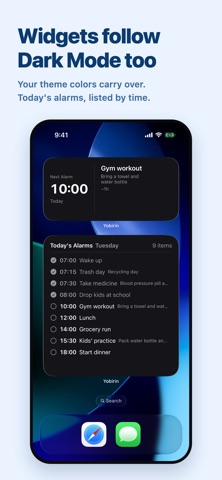
Now supports iOS 27. NEW • The "Today's Alarms" widget now supports the 4×6 size on iPhone — a full Home Screen page — so you can see the whole day at a glance. DESIGN • The weekday tabs are now part of the navigation bar, refreshed to match the new look of iOS 27. BUG FIXES • Fixed an issue where the widget could leave an empty slot even though more alarms could be shown, and the "+N more" count did not appear. • Weekday labels now switch to the right form for the available width.
Price & rating history · US
Reconstructed from the listing changes AppTracker has observed in this storefront. A field is charted once it has changed more than once, and each line starts at the value it moved from.
Average rating · ★ 4.75 now · 2 changes on record
Ratings breakdown · US
The star breakdown behind this app's rating in this storefront.
Screenshots



About
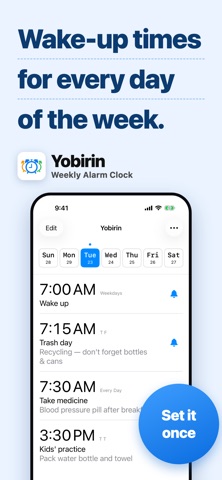
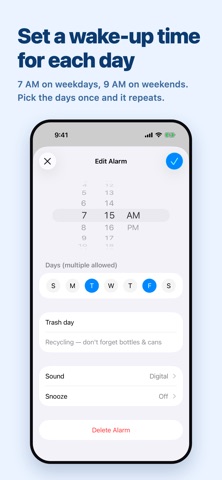
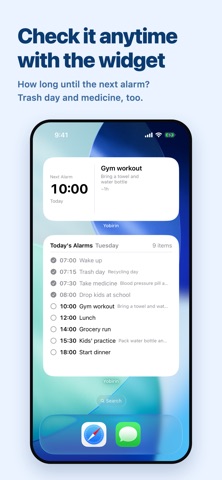
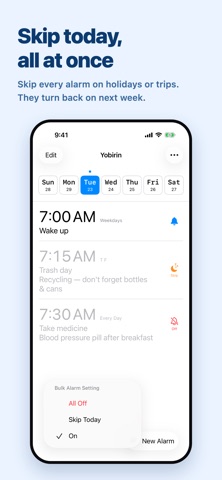
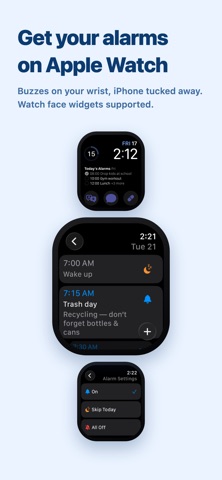
Yobirin is a simple alarm app that lets you set different alarms for each day of the week. Tired of resetting tomorrow's alarm every single night? Yobirin takes that small daily stress off your hands. Set your alarms once, and they repeat automatically every week. "Wake up early on Mondays, sleep in on weekends." "Garbage day reminders for Mon/Wed/Fri — and don't forget the things I always forget." "Tuesday night only — can't miss my favorite show." Whatever your weekly rhythm looks like, automate it with a single setup. Built on the same system as the iPhone's built-in alarm, with the flexibility of day-by-day customization. Main Features ■ Day-by-day alarm settings Save different times, sounds, and snooze settings for each day of the week. Set once, and it repeats every week automatically. ■ Smart per-day skip Need to skip just this week's alarm? Easy. Skipped alarms automatically turn back on next week, so you'll never forget to re-enable them. ■ Bulk alarm controls On a holiday or going on a trip? With one tap, skip or turn off all of today's alarms. ■ Labels & notes Show labels like "Pack lunch" or "Take meds" on your alarms. Notes are visible right from the alarm list. ■ Current time bar See at a glance how close you are to the next alarm — visualize your day's progress. ■ Customizable week start Choose which day starts your week to match your lifestyle. ■ OS-level alarm notifications Built on the same system as the iPhone's standard alarm, your alarms ring reliably even in the background. ■ Full iPad support - A layout built for the larger screen, so your weekly alarm list has room to breathe - Works in both portrait and landscape - Supports Split View and Slide Over — keep your alarm list beside another app - Add the same alarm widgets to your Home Screen as on iPhone ■ Apple Watch app Check and control alarms right from your wrist — no need to take out your iPhone. - See your next alarm and the full weekly list on Apple Watch - Tap to cycle through "On → Skip → Off" - Bulk actions like "Skip today" and "Turn all off" right from your wrist - Real-time sync with iPhone keeps everything up to date ■ Apple Watch complications Add Yobirin to your watch face in various complication sizes. - "Next Alarm" widget shows your upcoming alarm - "Today's Alarms" widget lists today's schedule Glance at your wrist to see your day. ■ Apple Watch notifications Same system as the iPhone's built-in alarm — alarms ring on Apple Watch too. Even when your phone is in your bag, the wrist tap won't let you miss a thing. ■ Theme customization Match the app's color theme to your taste. Make the screen you see every morning feel like yours. ■ iCloud backup & sync With iCloud enabled, your alarm data is automatically backed up. Sign in with the same Apple ID on iPad or iPhone, and alarms sync across devices. Reinstalling the app? Your data is restored from iCloud automatically. Made for you if: ■ You wake at 7 AM on weekdays but want silence on weekends ■ You want to remember weekly things like garbage day or class supplies ■ You work shifts and your wake-up time changes each day ■ You want time-based reminders for daily tasks ■ You have weekly commitments you can't afford to miss ■ You want to see the day's tasks the moment you wake up ■ The standard alarm app feels cluttered to manage ■ You want to control alarms from your Apple Watch Wake up smarter with Yobirin.
What's new · 1.2.0
Now supports iOS 27. NEW • The "Today's Alarms" widget now supports the 4×6 size on iPhone — a full Home Screen page — so you can see the whole day at a glance. DESIGN • The weekday tabs are now part of the navigation bar, refreshed to match the new look of iOS 27. BUG FIXES • Fixed an issue where the widget could leave an empty slot even though more alarms could be shown, and the "+N more" count did not appear. • Weekday labels now switch to the right form for the available width.
Details