

WigWag: Pitch Calling
David Castillo · Sports
Independent analytics for this App Store listing. AppTracker is not affiliated with David Castillo.
Chart standing · US
What changed · US
Listing changes AppTracker has observed for this app in this storefront — new versions, price moves, rating shifts, and store copy.
• Settings now shows the correct app version. Recent improvements: • Team invite links open straight in the app, so players can join in one tap. • Players can open Settings and switch to a team they coach. • Smoother onboarding: the team name field can be cleared and retyped. • More reliable screens when access changes mid-game, with no more dead ends. • Fixed a crash some players hit right after joining a team. Thanks for calling pitches with WigWag! Questions or ideas? Reach us from Settings → Support.
Screenshots




About
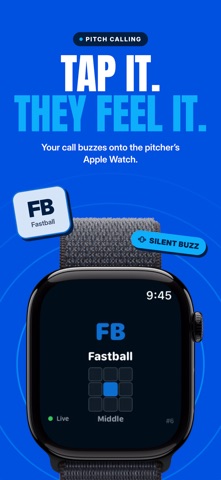
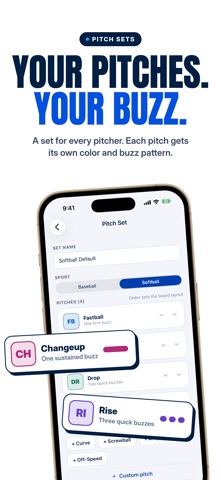
WigWag turns your iPhone into a pitch-calling system. Tap a pitch in the dugout and your pitcher or catcher sees it on their Apple Watch with a haptic buzz, in about a second. No wristband cards, no shouting across the field, no signs to steal. CALL PITCHES • Build pitch sets for baseball or softball: fastball, curve, change, rise, drop and your own • Add a location on a 3x3 zone with one tap • Special calls for step off, time out and pickoff • Resend or wipe a call instantly if the catcher missed it • See delivery confirmation for every receiver ONE DIRECTION, BY DESIGN The watch only shows the call. Players cannot reply, acknowledge or shake off. A plain-language Rules & Compliance page explains exactly how the system works, so you can show any umpire who asks. League rules on electronic devices vary: check yours before using WigWag in a sanctioned game. CHART EVERY PITCH • Record what was thrown, where it ended and what happened • Ball, called strike, swing and miss, foul, in play, with where the ball went • Count, outs, runners and pitch count tracked as you go • Undo anything in one tap KNOW EVERY HITTER • Save opponents with their batting order and notes • Key in a whole lineup before first pitch • See each hitter's zone map and how their last at-bats went, right at the plate • Reports build game after game BUILT FOR THE DUGOUT • Practice mode for bullpens, game mode for the real thing • Invite players with a link; they receive calls on their own watch • One coach calls while another charts on a second phone • Optional heart-rate sharing, only when a player turns it on PLANS Free: 20 pitch calls a month to your own Apple Watch. WigWag Pro: unlimited calls to your players, charting, hitter reports and saved opponents, for 2 people or your whole team. Plans are managed on getwigwag.com, with a 7-day free trial on monthly and yearly. Requires an iPhone. Receiving calls requires an Apple Watch with WigWag installed. Terms of Use (EULA): https://www.apple.com/legal/internet-services/itunes/dev/stdeula/ Privacy: getwigwag.com/privacy Terms: getwigwag.com/terms
What's new · 1.0.2
• Settings now shows the correct app version. Recent improvements: • Team invite links open straight in the app, so players can join in one tap. • Players can open Settings and switch to a team they coach. • Smoother onboarding: the team name field can be cleared and retyped. • More reliable screens when access changes mid-game, with no more dead ends. • Fixed a crash some players hit right after joining a team. Thanks for calling pitches with WigWag! Questions or ideas? Reach us from Settings → Support.
Details