

Minua: Earn Screen Time
Alexandru Ghita · Productivity
Independent analytics for this App Store listing. AppTracker is not affiliated with Alexandru Ghita.
Chart standing · US
What changed · US
Listing changes AppTracker has observed for this app in this storefront — new versions, price moves, rating shifts, and store copy.
What's new in 1.1.2 • Bug: switching Settings to "My child" without a PIN changed the title and then simply forgot to ask for a PIN. Fix: the PIN screen now appears straight away, as promised. • Bug: when a parent approved the unlock with Ask to Buy, the "trial has ended" screen didn't notice and stayed put. Fix: it now closes the moment the approval arrives. Restore Purchase closes it too. • Bug: offline, the unlock button just spun forever, full of hope. Fix: it now says it can't reach the App Store and offers Try again. • Bug: a failed purchase check showed an error message only a compiler could love. Fix: plain words instead. • Bug: with only bonus time and nothing earned yet, the ring sat empty while announcing that fun apps were unlocked. Fix: the ring now agrees with itself. • Bug: "System Default" in the language list refused to learn any language. Fix: it's translated now.
In-app purchases · US
What this app sells inside itself, grouped by kind and priced for this storefront.
Screenshots

About
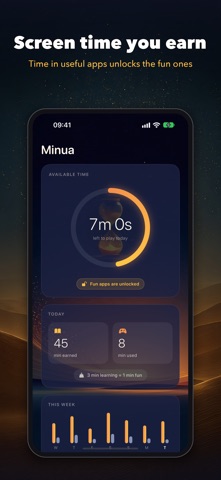
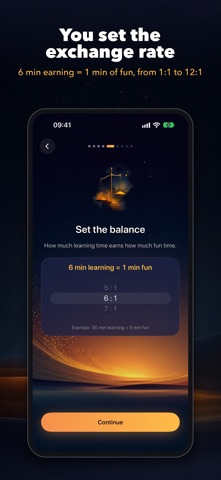
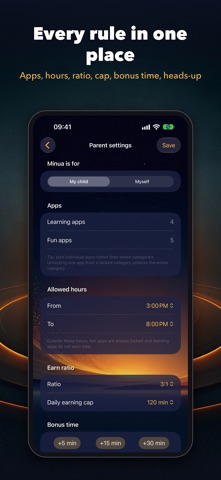
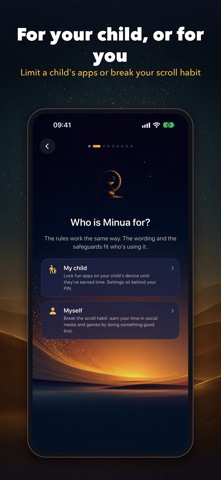
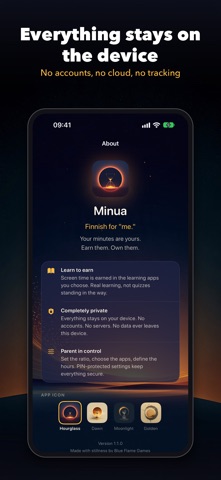
Screen time you earn, for your child or for yourself. Time in the apps you want more of unlocks time in the apps you want less of. Set it up on your child's iPhone or iPad behind a parent PIN, or on your own phone to break the scroll habit. You pick the apps, the ratio and the hours. Everything stays on the device. HOW IT WORKS 1. Choose who Minua is for: My child or Myself. 2. Choose the earning apps (learning apps, on a child's device): reading, math, languages, workouts, meditation, whatever you want more of. 3. Choose the fun apps: social media, videos, games. They stay locked until there's time in the balance. 4. Set the ratio, anywhere from 1:1 to 12:1. At 6:1, six minutes of earning unlocks one minute of fun. 5. Set the allowed hours and a daily earning cap. The balance shows minutes earned, minutes used and what's left. When it runs out, the fun apps lock again. It resets every day, so each morning starts fresh. ON A CHILD'S DEVICE • Settings and purchases sit behind a 4-digit parent PIN, with a timed lockout after repeated wrong attempts • On a child's device in Family Sharing, you approve Minua with your Apple Account, so your child can't switch the permission off or delete Minua without you • Setup tips to prevent app deletion and idle earning FOR YOURSELF • Put the apps you scroll behind the apps you want to spend more time in • Wording written for adults, and a PIN only if you want one • It's your phone and your rules: you can change them in Settings whenever you decide to. Minua just makes the scroll wait until you've earned it IN BOTH MODES • Ratio from 1:1 to 12:1, allowed hours and a daily earning cap • Bonus time: +5, +15 or +30 minutes for today • A heads-up about two minutes before fun time runs out • A weekly chart of time earned and time played • Change your PIN in Settings • Works on iPhone and iPad BUILT ON APPLE'S SCREEN TIME Minua uses Apple's Screen Time permission to lock and unlock the apps you pick. On devices outside Family Sharing, Minua shows on its home screen if the permission is ever switched off, and the in-app guide walks you through the settings that make the rules harder to get around. PRIVATE BY DESIGN No accounts and no sign-up. No servers, no tracking, no analytics. Your settings and your balance stay on the device, and Minua works offline. TRY IT FIRST Every feature is free for 7 days. After that, a single one-time purchase unlocks Minua for good. No subscription.
What's new · 1.1.2
What's new in 1.1.2 • Bug: switching Settings to "My child" without a PIN changed the title and then simply forgot to ask for a PIN. Fix: the PIN screen now appears straight away, as promised. • Bug: when a parent approved the unlock with Ask to Buy, the "trial has ended" screen didn't notice and stayed put. Fix: it now closes the moment the approval arrives. Restore Purchase closes it too. • Bug: offline, the unlock button just spun forever, full of hope. Fix: it now says it can't reach the App Store and offers Try again. • Bug: a failed purchase check showed an error message only a compiler could love. Fix: plain words instead. • Bug: with only bonus time and nothing earned yet, the ring sat empty while announcing that fun apps were unlocked. Fix: the ring now agrees with itself. • Bug: "System Default" in the language list refused to learn any language. Fix: it's translated now.
Details