

Car Sounds Dashboard Widget HD
Emre Erkis · Utilities
Independent analytics for this App Store listing. AppTracker is not affiliated with Emre Erkis.
Chart standing · US
What changed · US
Listing changes AppTracker has observed for this app in this storefront — new versions, price moves, rating shifts, and store copy.
Price & rating history · US
Reconstructed from the listing changes AppTracker has observed in this storefront. A field is charted once it has changed more than once, and each line starts at the value it moved from.
Average rating · ★ 0.00 now · 2 changes on record
In-app purchases · US
What this app sells inside itself, grouped by kind and priced for this storefront.
Screenshots



About
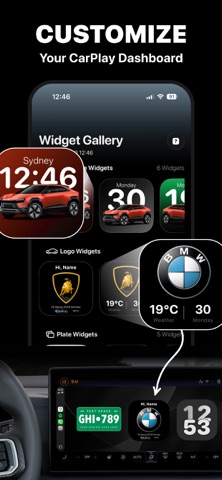
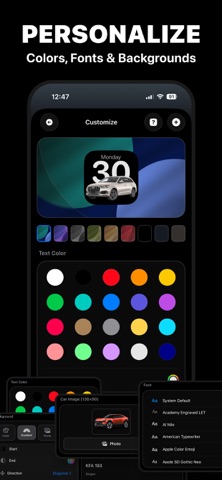
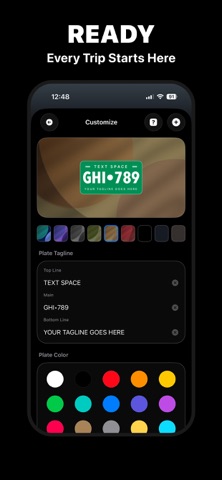
Make your CarPlay screen truly yours. Widget Gallery lets you create and customize personal widgets for your car's display—car images, logo designs, license plates, clocks, and weather. Pick your favorite designs, tweak colors and backgrounds, and add them to CarPlay with a single tap. Widgets for Every Style Choose from a wide range of widget types. Display sleek car images, logo-style designs, or custom license plates. Add clocks, weather, and location widgets so your CarPlay screen is both personal and useful. Each widget can be tailored to match your taste. Full Customization Change colors, backgrounds, and fonts. Use solid colors, gradients, or your own photos. Adjust text and plate details until everything looks exactly how you want. Every widget is fully customizable before you add it to CarPlay. Your Personal Library Save your favorite widgets to your library. Build a collection of designs for different moods or occasions, and add any of them to CarPlay whenever you like. Your library stays with you, so you can switch widgets quickly and easily. Connect Sound Play a custom sound when CarPlay connects. Set up a short automation in Shortcuts once, and your chosen sound will play every time you get in the car. Simple setup, no extra apps or complicated steps. Easy Setup Adding widgets to CarPlay is straightforward. Browse the gallery, customize your picks, save them, and add them to your car's display. The app guides you through each step so you can start personalizing in minutes. Widget Gallery turns your CarPlay screen into a reflection of your style. Download now and make every drive feel more personal. **Note:** Some features require in-app purchases or a premium subscription. (Examples: More Widget Edit Features And Stock Widgets) Privacy Policy: https://mobyte.com.tr/en/carly/privacy/ Terms: https://mobyte.com.tr/en/carly/terms/
What's new · 1.0.1
Clearer listing, more themes, smoother save‑to‑car‑display flow. Bug fixes and performance.
Details