

Sparks Studio: Kids Art & AI
Alexandru Ghita · Education
Independent analytics for this App Store listing. AppTracker is not affiliated with Alexandru Ghita.
Chart standing · US
What changed · US
Listing changes AppTracker has observed for this app in this storefront — new versions, price moves, rating shifts, and store copy.
• Bug: grown-ups had to solve a math problem to open their own settings. In their own profile. On their own phone. Fix: grown-up profiles never see a math challenge now. Kids switching into a grown-up profile still get asked once, so the bee stays honest. • Bug: finish a Color by Number picture and it looked like a cover version of the painting, not the painting. Fix: every area you fill now reveals the original colors and shading, so the finished picture matches the art exactly. We checked every page, pixel by pixel. • Bug: draw a face with the eyes near the edge, tap Fill, and only a little patch got painted. Fix: Fill now paints the whole shape, however close the eyes sit. • Bug: moving a picture around needed two fingers, which is one finger too many when you're holding a coffee. Fix: drag with one finger to move, tap to fill, pinch to zoom. • Bug: the coloring shelf showed finished pictures, which spoiled the ending. Fix: thumbnails now show the outlines waiting for you. • New: a fresh icon. The bee was already in the name; now it's on your home screen too. Draw something, fill it in, and watch it dance.
Screenshots






About
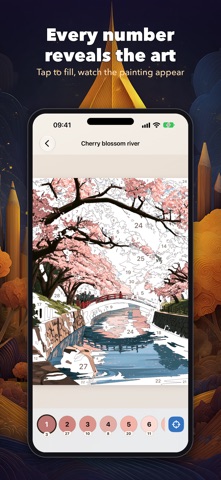
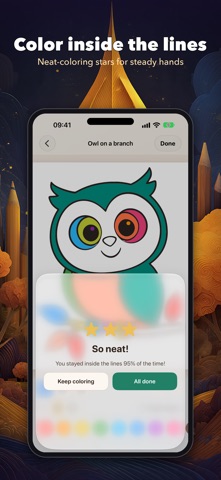
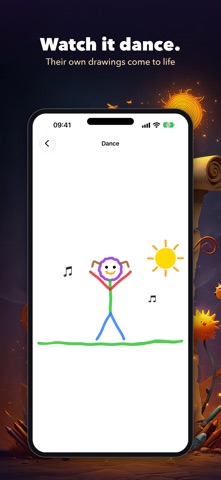
The app interface is currently available in English. Color to unwind. Doodlebee is a calm coloring book for grown-ups, with a creative studio for the kids too. Pick a number, tap its areas and watch the original painting appear, shading and all: 146 pages of detailed scenes, animals, flowers and mandalas. Kids color in, draw, fill and watch their drawings dance. No ads, and everything stays on your device. COLOR BY NUMBER FOR GROWN-UPS • Color by Number: pick a numbered color, tap the matching areas and watch the original painting appear, shading and all. • Intricate, relaxing pictures and mandalas for grown-ups, and simple number pages for kids. • One tap finds the next area left to color. • Grown-ups get their own profile: Home opens with coloring, and no math puzzles stand between you and your settings. DRAW IT, THEN FILL IT • Brushes, shapes, stickers and text, sized for small hands, with undo, zoom and pan. • Tap Fill inside anything you drew and only that shape fills, even when a line doesn't quite meet. • Draw a character with arms and legs, then watch it walk, run, dance, wave, jump, sit or fall asleep. COLORING FOR LITTLE HANDS • Color In: kids color by hand with crayons, an eraser and a fill tool for big areas. • Magic edges keeps each stroke inside the shape it started in, so the youngest artists stay inside the lines. • When they finish, up to three neatness stars celebrate how carefully they colored. Never a scolding. • Pinch to zoom up to 8x for the tiny details. STORYBOOKS AND MUSIC • Turn stories into storybooks illustrated with their own drawings. "Read to me" reads every page aloud. • Grown-ups can save a storybook as a PDF to share with family. • A music maker with loops, beats and instruments, plus sounds of rain, birds and the sea. A GALLERY OF KEEPSAKES • Every coloring page, drawing, song and storybook is saved in each person's own gallery. • Brothers, sisters and grown-ups each get a profile (up to four with Premium). Tap your picture on "Who's creating?" to switch. CALM, SAFE SCREEN TIME • No ads and no accounts. Creations stay on the device, and grown-ups decide what to share. • Daily time limits for children, with "+15 minutes today" when you say so. • A grown-ups-only area protects purchases, sharing and settings. START FREE, UNLOCK ONCE The free plan includes one profile, three creations a week and the first pages of every coloring shelf. One purchase unlocks everything for the whole family: every coloring page, unlimited creations and up to four profiles. No ads. No subscription needed. It works with Family Sharing, so everyone in your Family Sharing group gets it on their own devices. Existing subscriptions can still be restored and managed. Optional story helper: with Premium, Sparky suggests story ideas while children write, and every reply is checked before a child sees it. Story helper requires a device that supports Apple Intelligence. Everything else works without it. Terms of Use (EULA): https://www.apple.com/legal/internet-services/itunes/dev/stdeula/
What's new · 2.0.0
• Bug: grown-ups had to solve a math problem to open their own settings. In their own profile. On their own phone. Fix: grown-up profiles never see a math challenge now. Kids switching into a grown-up profile still get asked once, so the bee stays honest. • Bug: finish a Color by Number picture and it looked like a cover version of the painting, not the painting. Fix: every area you fill now reveals the original colors and shading, so the finished picture matches the art exactly. We checked every page, pixel by pixel. • Bug: draw a face with the eyes near the edge, tap Fill, and only a little patch got painted. Fix: Fill now paints the whole shape, however close the eyes sit. • Bug: moving a picture around needed two fingers, which is one finger too many when you're holding a coffee. Fix: drag with one finger to move, tap to fill, pinch to zoom. • Bug: the coloring shelf showed finished pictures, which spoiled the ending. Fix: thumbnails now show the outlines waiting for you. • New: a fresh icon. The bee was already in the name; now it's on your home screen too. Draw something, fill it in, and watch it dance.
Details