

Printer App: Print from Mobile
Shams Alam · Business
Independent analytics for this App Store listing. AppTracker is not affiliated with Shams Alam.
Chart standing · US
What changed · US
Listing changes AppTracker has observed for this app in this storefront — new versions, price moves, rating shifts, and store copy.
Changes in this version: 1. Fixed bugs and performance improved 2. Removed onboarding from the app 3. Improved the documents conversions 4. Added share extensions to print directly without opening the app
Ratings breakdown · US
The star breakdown behind this app's rating in this storefront.
In-app purchases · US
What this app sells inside itself, grouped by kind and priced for this storefront.
Screenshots


About
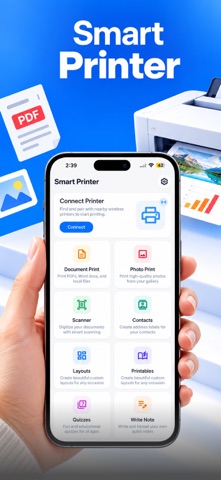
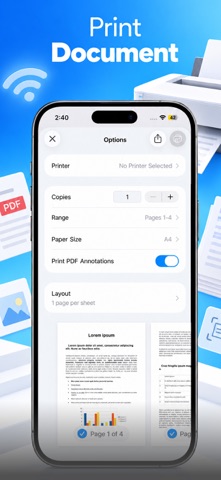
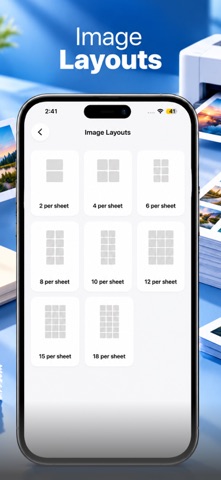
Experience the ultimate freedom of mobile printing. Transform your iPhone or iPad into a powerful command center for all your printing needs. Printer App: Print from Mobile allows you to connect instantly to over 10,000+ wireless printer models, including HP, Canon, Epson, Brother, and more, without the need for complex drivers or cables. Whether you need to print a last-minute contract, a cherished photo, or a school assignment, our app makes it as simple as "Tap and Print." Key Features: - Universal Wireless Printing: Connect to any WiFi or AirPrint-enabled printer instantly. - Smart Document Scanner: Use your camera to create high-quality PDF scans with automatic edge detection. - Print Everything: Supports PDFs, Word docs, Excel spreadsheets, PowerPoint, and high-resolution Photos. - Web & Email Printing: Print web pages or email attachments directly from the app. - Advanced Print Tools: Merge multiple PDFs, add page numbers, or convert images to PDF before printing. Why Choose Us? Unlike standard tools, our app is optimized for speed and reliability. We support a vast range of printer brands (HP, Epson, Canon, Brother, Xerox, Samsung, etc.) ensuring that whether you are at home, the office, or a local library, you stay productive. How to Use: - Connect your iPhone and Printer to the same Wi-Fi network. - Select the file or photo you wish to print. - Preview and adjust settings (layout, copies, color). - Hit "Print" and you're done! Privacy Policy : https://askshams.com/privacy-policy/ Term & Conditions : https://askshams.com/terms-conditions/
What's new · 1.2
Changes in this version: 1. Fixed bugs and performance improved 2. Removed onboarding from the app 3. Improved the documents conversions 4. Added share extensions to print directly without opening the app
Details