

OverScore - Sport Scoreboard
sujang kang · Sports
Independent analytics for this App Store listing. AppTracker is not affiliated with sujang kang.
Chart standing · US
What changed · US
Listing changes AppTracker has observed for this app in this storefront — new versions, price moves, rating shifts, and store copy.
• Fixed an issue where the source video's frame rate could be detected incorrectly, causing a 30 FPS video to be treated as 60 FPS. The video list and the exported video now both match the original frame rate • When you add a scoreboard to video shot at 120 FPS or 240 FPS, such as slow motion, it is now exported at 60 FPS. This keeps export times and file sizes from becoming impractically large. Exporting without a scoreboard keeps the original frame rate • Fixed an issue where temporary files could stay on your device after importing video from the photo library, so free space would not come back even after deleting the video in the app. Files left behind by earlier versions are now removed automatically when the app starts
In-app purchases · US
No in-app purchases.
Screenshots



Keywords this app targets
Search terms AppTracker associates with this app — estimates, not search volume. ❝ = in the app's title; a highlighted number is its current position for that term.
Similar apps
Competitors and close alternatives, as estimated by AppTracker.
 SportCam - Video & Scoreboard
The Squash Game Company
1 shared title word
SportCam - Video & Scoreboard
The Squash Game Company
1 shared title word
 ScoreBoard for watch
TheCoolBytes
1 shared topic · 1 shared title word
ScoreBoard for watch
TheCoolBytes
1 shared topic · 1 shared title word
 Score Soccer
Rise Run Sports LLC
Score Soccer
Rise Run Sports LLC
 Simple Soccer Scorer
Iniko LTD
Simple Soccer Scorer
Iniko LTD
 Scoreboard: Keep 2 Teams Score
Edwin Chan
1 shared title word
Scoreboard: Keep 2 Teams Score
Edwin Chan
1 shared title word
 FlickScore
LUCA TRAPASSO
FlickScore
LUCA TRAPASSO
 AnyScore Keeper
Matyas Kriz
AnyScore Keeper
Matyas Kriz
 Scoring Board
Wai Cheong Yip
Scoring Board
Wai Cheong Yip
About
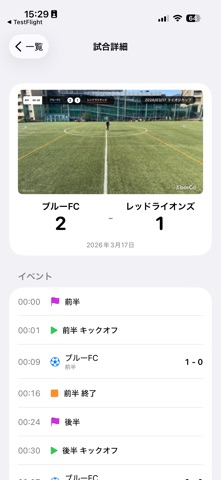
OverScore lets you overlay scoreboards onto sports match videos and export them as polished MP4 files. Whether it's your child's youth soccer game, a recreational league match, a handball tournament, or a rugby fixture, OverScore transforms ordinary match footage into professional-looking broadcasts — complete with live-updating scoreboards. KEY FEATURES - Overlay scoreboards on recorded videos - Record scores live with a built-in stopwatch (no video required) - Record goals at exact timestamps in the video - Set match timers (supports halves, extra time, and custom periods) - Choose timer position (left or right side) - Restart clock across periods (carry over timer value) - Record and display penalty shootouts (PK) - Penalty timer with countdown display (for sin-bins / suspensions) - Timeout feature (auto-pauses match timer, shows timeout count) - Customize scoreboard theme, colors, size, and position - Merge multiple videos (e.g., first half + second half) - Display match info (tournament name, date, etc.) - Set team colors - Export as MP4 - Save to photo library or share HOW TO USE 1. Select your match video (or start without one) 2. Customize the scoreboard style 3. Play the video and record goal timings 4. Export and share PERFECT FOR - Parents recording their children's matches - Coaches and managers archiving team footage - Recreational players creating match highlights - School teams sharing game videos SUPPORTED SPORTS Soccer, futsal, handball, rugby, hockey, basketball, and more LANGUAGES Japanese, English, Korean, Simplified Chinese
What's new · 1.3.5
• Fixed an issue where the source video's frame rate could be detected incorrectly, causing a 30 FPS video to be treated as 60 FPS. The video list and the exported video now both match the original frame rate • When you add a scoreboard to video shot at 120 FPS or 240 FPS, such as slow motion, it is now exported at 60 FPS. This keeps export times and file sizes from becoming impractically large. Exporting without a scoreboard keeps the original frame rate • Fixed an issue where temporary files could stay on your device after importing video from the photo library, so free space would not come back even after deleting the video in the app. Files left behind by earlier versions are now removed automatically when the app starts
Details