

On The Lock - Lock Screen Memo
JayApp · Productivity
Independent analytics for this App Store listing. AppTracker is not affiliated with JayApp.
Chart standing · US
What changed · US
Listing changes AppTracker has observed for this app in this storefront — new versions, price moves, rating shifts, and store copy.
• Sticky notes on your wallpaper: in the wallpaper maker, stick as many sticky notes as you like and pick a color (yellow, pink, mint, blue) and tape for each. • A truer sticky-note skin: the Lock Screen "Sticky Note" skin now looks like a sheet of paper held by tape. • New stickers, Memochi: 8 cute Memochi stickers, free. • Completed list: checked to-dos leave the list right away, with an instant undo. See them by day in Completed, and bring them back or delete them. Completed to-dos are removed automatically after 30 days. • Morning nudge: if you like, we'll ask every morning what you must not forget today. It pauses after 7 days without use. • Show to-dos on the Lock Screen: one button on the to-do page puts your to-dos on the Lock Screen. • Also: the "about to pause" reminder is gone. Converting a memo you already turned into to-dos now tells you so, and checking a to-do no longer makes the list jump.
Ratings breakdown · US
The star breakdown behind this app's rating in this storefront.
In-app purchases · US
What this app sells inside itself, grouped by kind and priced for this storefront.
Screenshots


About
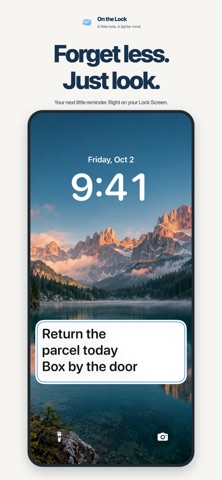
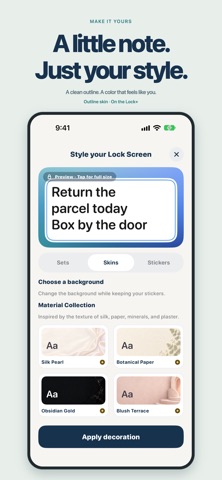
On The Lock is a simple memo app that keeps one important thing visible on your Lock Screen. On The Lock helps you keep quick notes, todos, photos, and today’s context where you actually notice them: the Lock Screen. Write a memo the moment it comes to mind, turn it into today’s todos, and keep your next step visible with Live Activity. Use Home Screen and Lock Screen widgets for quick capture and check-off. Add photos for visual context, connect Calendar for today’s remaining events, set a target date/D-day, and customize layouts, colors, text size, alignment, and background skins. Organize with categories, reminders, completed items, archives, iCloud backup, and an option to hide sensitive content while your device is locked. https://www.apple.com/legal/internet-services/itunes/dev/stdeula/
What's new · 2.10.2
• Sticky notes on your wallpaper: in the wallpaper maker, stick as many sticky notes as you like and pick a color (yellow, pink, mint, blue) and tape for each. • A truer sticky-note skin: the Lock Screen "Sticky Note" skin now looks like a sheet of paper held by tape. • New stickers, Memochi: 8 cute Memochi stickers, free. • Completed list: checked to-dos leave the list right away, with an instant undo. See them by day in Completed, and bring them back or delete them. Completed to-dos are removed automatically after 30 days. • Morning nudge: if you like, we'll ask every morning what you must not forget today. It pauses after 7 days without use. • Show to-dos on the Lock Screen: one button on the to-do page puts your to-dos on the Lock Screen. • Also: the "about to pause" reminder is gone. Converting a memo you already turned into to-dos now tells you so, and checking a to-do no longer makes the list jump.
Details