

Cully - Photo Cleaner
YOU&VI UG · Photo & Video
Independent analytics for this App Store listing. AppTracker is not affiliated with YOU&VI UG.
Chart standing · US
What changed · US
Listing changes AppTracker has observed for this app in this storefront — new versions, price moves, rating shifts, and store copy.
Cully 2.1.1: free to try, unlock once. • Already bought Cully? This update recognizes your purchase reliably and keeps Cully unlocked for good. If needed, tap “Restore purchase” in Settings. • Cully is now free to try: your first five sorting days are on us, meaning five dates whose photos you sort, with no time limit. After that, one purchase unlocks unlimited days on all your devices, for good. No subscription. • Recommend Cully: share your numbers with a friend, from Settings or after a milestone. • Grid: sort order in the menu, file type on the tiles, smoother scrolling. • Videos: full-screen playback uses the system player on iOS, and sound comes back reliably after closing. • Stats: thousands separators, "0 GB" instead of "Zero KB".
Ratings breakdown · US
The star breakdown behind this app's rating in this storefront.
In-app purchases · US
What this app sells inside itself, grouped by kind and priced for this storefront.
Screenshots




Keywords this app targets
Search terms AppTracker associates with this app — estimates, not search volume. ❝ = in the app's title; a highlighted number is its current position for that term.
Similar apps
Competitors and close alternatives, as estimated by AppTracker.
 Photo Cleaner ®
Luca Companjen
2 shared topics · 3 shared title words
Photo Cleaner ®
Luca Companjen
2 shared topics · 3 shared title words
 Hop: Photo Cleaner
, MOHAMED FAKIR
2 shared topics · 3 shared title words
Hop: Photo Cleaner
, MOHAMED FAKIR
2 shared topics · 3 shared title words
 Swipe Wipe Photo Cleaner AI
FlashSoft OU
2 shared topics · 3 shared title words
Swipe Wipe Photo Cleaner AI
FlashSoft OU
2 shared topics · 3 shared title words
 Swipewipe: Photo Cleaner
MWM
1 shared topic · 3 shared title words
Swipewipe: Photo Cleaner
MWM
1 shared topic · 3 shared title words
 Cleanup Photos by Fluntro
Mohith km
2 shared topics
Cleanup Photos by Fluntro
Mohith km
2 shared topics
 Picnic: Clean Up Storage
MWM
2 shared topics · 1 shared title word
Picnic: Clean Up Storage
MWM
2 shared topics · 1 shared title word
 Powerful Clean: Phone Cleaner
Matthew Lewis
2 shared topics · 1 shared title word
Powerful Clean: Phone Cleaner
Matthew Lewis
2 shared topics · 1 shared title word
 OpenCleaner
Arthur BRICQ
OpenCleaner
Arthur BRICQ
About
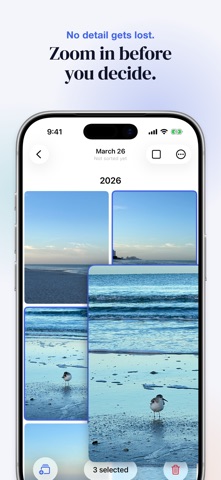
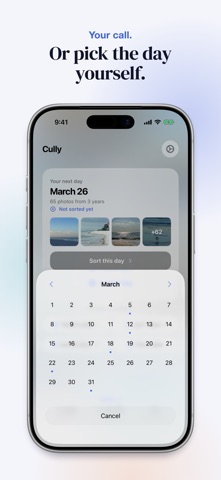
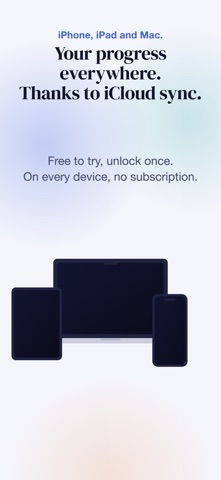
Tidy up your photo library. Day by day. Over 20,000 photos and no idea where to start? Cully turns that into something you can actually do. The idea is simple: choose a random date and browse your photos from that day, from all years at once. A different slice of your life, every session. Keep the best, delete the rest. Five minutes a day, and your library feels lighter. HOW IT WORKS • Cully suggests a day. You instantly see all photos from that day, across all years. Not in the mood? Roll again or pick a date in the calendar, where sorted days are marked. • Scroll through your grid. Select photos and zoom in for a closer look. • Every deletion needs your confirmation. Photos go to Recently Deleted and can be restored for 30 days. FEATURES • Privacy first: No account, no server, no tracking. Your photos never leave your device. • Smart random: Prefers days you haven't sorted yet. • Albums: Send a selection straight to an album instead of deleting it. • Finish a day: You decide when a day is done. Sorted days show up in your stats and calendar. • Live Photos & videos: Play them right in the grid. • Share originals: Long-press or right-click any photo to share it in full quality. • Your stats: See how many photos you've deleted and how much storage you've freed up. • Gentle reminders: Optional notifications to help you stay on track. • Widgets: Your deletion stats at a glance. • iPhone, iPad and Mac: Native apps for every screen, stats and settings in sync via your own iCloud. • Free to try: Your first five sorting days are free, meaning five dates whose photos you sort, with no time limit. After that, one purchase unlocks unlimited days on all your devices. No subscription. • Quick actions: Jump straight to a random day, today's date or the last 7 or 30 days. WHY CULLY? In photography, "to cull" means going through your shots and keeping only the best. We built Cully because we had the same problem: a photo library that kept growing, with no good way to clean it up. No account. No AI. No analytics. No subscription. Just open it and get started. Made in Berlin.
What's new · 2.1.1
Cully 2.1.1: free to try, unlock once. • Already bought Cully? This update recognizes your purchase reliably and keeps Cully unlocked for good. If needed, tap “Restore purchase” in Settings. • Cully is now free to try: your first five sorting days are on us, meaning five dates whose photos you sort, with no time limit. After that, one purchase unlocks unlimited days on all your devices, for good. No subscription. • Recommend Cully: share your numbers with a friend, from Settings or after a milestone. • Grid: sort order in the menu, file type on the tiles, smoother scrolling. • Videos: full-screen playback uses the system player on iOS, and sound comes back reliably after closing. • Stats: thousands separators, "0 GB" instead of "Zero KB".
Details