

Guess This Note: Piano Trainer
pilyeong heo · Music
Independent analytics for this App Store listing. AppTracker is not affiliated with pilyeong heo.
Chart standing · US
What changed · US
Listing changes AppTracker has observed for this app in this storefront — new versions, price moves, rating shifts, and store copy.
v1.6.1 Update - New: Dark mode. Follows your device setting by default; choose Light or Dark in Settings - Home screen: the logo and title now sit in a compact header, so the test, daily challenge and training cards start higher on the screen - Guitar sound rebuilt with a plucked-string model for a more natural tone - Fixed: the status bar on the result screen was hard to read in light mode - Fixed: the keyboard in Ear Training no longer jumps when the answer appears
Screenshots


About
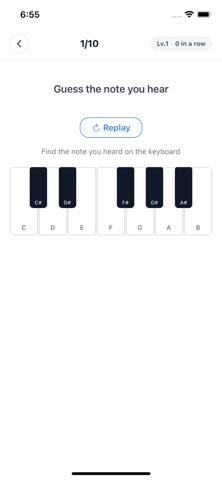
Train your musical ear by listening to piano notes and guessing them. [Practice] Tap the piano keys to learn each note's sound. Switch between octaves to explore the full range. Hide the note names and challenge yourself! Choose from piano, electric piano, guitar or flute. [Ear Training] Listen to a piano note and find it on the keyboard. As the level goes up, the difficulty increases. See how many you can get right in a row! [Test Your Pitch] Ten questions that mix relative pitch (which note is higher, intervals, melodic direction) and absolute pitch (name the note you hear). Find out how good your ear really is, and come back for a new Daily Challenge every day. [Features] - Simple controls, clean design - 8 languages supported (English, Korean, Japanese, Simplified Chinese, Traditional Chinese, Spanish, French, German) - 4 instruments: piano, electric piano, guitar, flute [Guess This Note Pro] Pro is a one-time purchase: it removes all ads and unlocks Custom Training, where you build your own drills by note type, difficulty, and length. Purchases can be restored from the Pro screen. Privacy Policy: https://pilyeooong.github.io/guess-this-note/privacy-policy.html
What's new · 1.6.1
v1.6.1 Update - New: Dark mode. Follows your device setting by default; choose Light or Dark in Settings - Home screen: the logo and title now sit in a compact header, so the test, daily challenge and training cards start higher on the screen - Guitar sound rebuilt with a plucked-string model for a more natural tone - Fixed: the status bar on the result screen was hard to read in light mode - Fixed: the keyboard in Ear Training no longer jumps when the answer appears
Details