
Chart standing · US
Screenshots




About
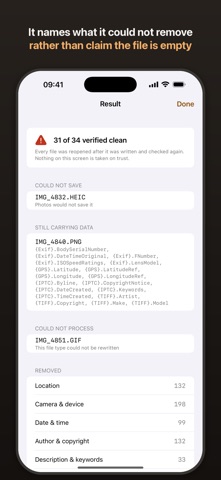
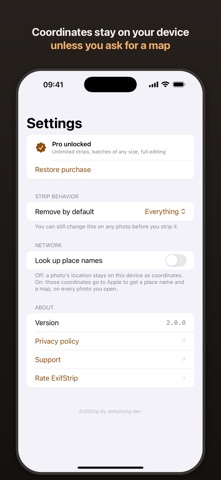
ExifStrip shows what your photos say about you, then takes it out. A photo you are about to send carries a GPS fix, a camera serial number, a timestamp, and whatever name is sitting in the copyright field. ExifStrip groups all of it by what it reveals about you - location, camera and device, date and time, author, description - rather than by which EXIF container it happens to live in. A lens model is trivia. A GPS fix is your address. Nothing counts as removed until the finished file has been read back. ExifStrip reopens what it just wrote, counts what survived, and shows you that number. A strip that quietly did nothing produces a perfectly good photo, which is why the count matters more than the checkmark. WHAT IT DOES - Reads every tag in the file: EXIF, TIFF, IPTC, GPS, and anything else in there - Strips everything, or location only - Photos and video - Batch strip without a limit on how many, one file's bytes at a time - Edit 16 metadata fields: date, location, camera make, model, lens, aperture, shutter speed, ISO, focal length, artist, copyright, title, caption, keywords, comment and software - Share Extension strips from the share sheet without opening the app - Names what it kept on purpose - orientation and color space - instead of claiming the file is empty - Says which fields could not be removed, with their values, rather than a bare count PRIVACY No server. No account. No analytics. Reading, stripping and editing all happen on your device, in airplane mode if you like. Nothing reaches the network unless you ask for it. A purchase does. So does turning coordinates into a place name and a map, which is why that is off until you turn it on, per photo or for good: a GPS fix is the last thing in the file that should leave quietly. App Privacy label: No Data Collected. FREE AND PRO Free: 3 strips per day, and unlimited viewing of everything in every file. Pro is a one-time purchase, not a subscription: unlimited strips, batches of any size, metadata editing, and saving stripped copies to your library.
What's new · 2.0.0
This release fixes the thing the app is for. Until now, stripping removed nothing. The file came back, the app said it was done, and every piece of metadata was still in it. A stripped photo and an untouched one looked identical, so there was no way to notice from the outside. ExifStrip now reopens every file after writing it and counts what survived. The number you see comes from reading the finished file, not from what the app meant to do. Also new: - Video, not just photos - Batch strip without a limit on how many - Photos are grouped by what they reveal about you - location, camera and device, date and time, author, description - instead of by EXIF container - Fields that could not be removed are listed with their values, rather than a bare count - Fields kept on purpose, like orientation and color space, are named - On iPad: three columns, so choosing the next photo does not mean leaving this one - Place names and maps are off until you ask for them. Opening a photo used to send its coordinates away for an address without saying so - Turkish, Portuguese, Italian, French and Spanish Free tier is 3 strips per day, and a file with nothing in it no longer costs one.
Details