

Tracer: Trace Drawing Camera
Pull apps · Graphics & Design
Independent analytics for this App Store listing. AppTracker is not affiliated with Pull apps.
Chart standing · US
What changed · US
Listing changes AppTracker has observed for this app in this storefront — new versions, price moves, rating shifts, and store copy.
Projects just got more flexible. You can now long-press any project to rename it or make a copy, including its photo and tracing setup. Handy when you want to try a different approach without starting over. Also included: • Small interface improvements throughout the app • Bug fixes and general stability improvements Thanks for using Tracer!
Price & rating history · US
Reconstructed from the listing changes AppTracker has observed in this storefront. A field is charted once it has changed more than once, and each line starts at the value it moved from.
Average rating · ★ 4.60 now · 20 changes on record
Ratings breakdown · US
The star breakdown behind this app's rating in this storefront.
Screenshots
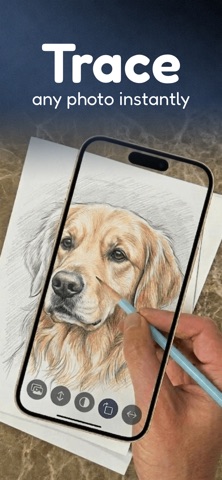
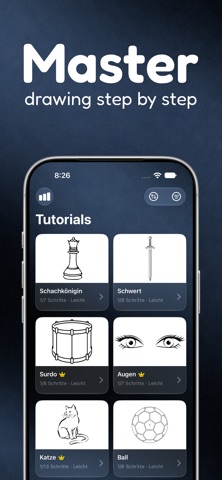


About
Tracer turns your phone into a digital tracing tool that helps you practice drawing and recreate images step by step. Import any image, adjust its opacity, place your phone over paper, and trace the lines to create your own drawings. Whether you're a beginner or just want to improve your sketching skills, Tracer makes drawing easier and more fun. Create Your Own Projects Import any image from your photo library or capture one with your camera. Adjust the image opacity and trace it directly on paper to recreate drawings. Tracer includes built-in project management to organize and manage your work: • Create and manage multiple drawing projects • Keep your imported images and sketches organized per project • Easily switch between ongoing projects without losing progress Tracer also includes two modes to fit different workflows: • Classic Mode – a simple and focused tracing experience • AR Mode – overlay images in real-world space for more accurate tracing Advanced tools to improve your tracing sessions: • Zoom to focus on details and extend image reach • 0.5x zoom for a wider field of view • Flashlight option for low-light drawing sessions • Smart alignment for better positioning accuracy • Grid overlays to help structure and align your drawings Perfect for tracing: • Characters • Illustrations • Logos • Tattoos • Sketches • Any image you want to learn to draw Learn With Step-by-Step Guides Use the Learn tab to follow ready-made tutorials. Each guide breaks down drawings into simple steps so you can understand how they are built from basic shapes to finished sketches. Great for beginners who want to start drawing. Support: support@pullapps.app Privacy Policy: https://pullapps.app/privacy-policy-tracer Terms of Use (EULA): https://www.apple.com/legal/internet-services/itunes/dev/stdeula/
What's new · 1.4.1
Projects just got more flexible. You can now long-press any project to rename it or make a copy, including its photo and tracing setup. Handy when you want to try a different approach without starting over. Also included: • Small interface improvements throughout the app • Bug fixes and general stability improvements Thanks for using Tracer!
Details