
Chart standing · US
What changed · US
Listing changes AppTracker has observed for this app in this storefront — new versions, price moves, rating shifts, and store copy.
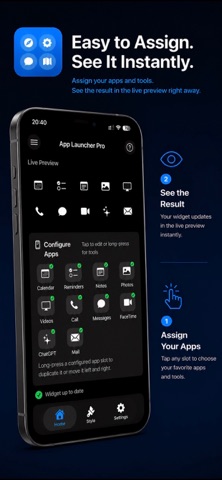
AppLauncherPro has been reorganised for a clearer and faster configuration experience: • New Home, Style and Settings tabs • Live preview and app configuration are now together • Widget appearance controls are grouped under Style • App preferences and presets are easier to find • Unsaved changes are automatically preserved when the app moves to the background • General interface and usability improvements
Ratings breakdown · US
The star breakdown behind this app's rating in this storefront.
Screenshots


About
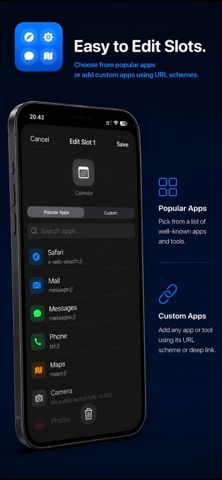
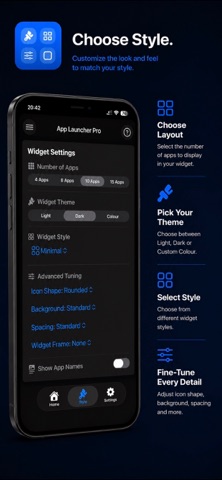
AppLauncher Pro lets you build a clean Home Screen widget for quick access to your favourite apps and services. Choose your layout, pick a theme, customize app icons and create a launcher widget that fits the way you use your iPhone or iPad. Configure popular apps in seconds or add your own custom apps with a URL scheme. AppLauncher Pro also includes premium features for users who want more flexibility, including additional widget styles, saved presets, advanced tuning and premium layout tools. Please note: Some apps may not support public URL schemes and some launch options may change depending on the app version installed on your device. Key Features: • Create launcher widgets with 4, 8, 10 or 15 apps • Support for iPhone and iPad, including larger iPad widget layouts • Light, dark and transparent widget themes • Popular app presets plus custom app setup with URL schemes • Optional app labels • Premium widget styles: Minimal, Glass, Outlined and Solid • Premium saved presets: Main, Work and Travel • Premium slot tools: Duplicate and reorder configured apps • Premium feature for multiple preset-based widgets • Premium advanced tuning: Icon shape, background intensity and spacing density • Built-in help for widget setup and URL scheme notes
What's new · 2.3
AppLauncherPro has been reorganised for a clearer and faster configuration experience: • New Home, Style and Settings tabs • Live preview and app configuration are now together • Widget appearance controls are grouped under Style • App preferences and presets are easier to find • Unsaved changes are automatically preserved when the app moves to the background • General interface and usability improvements
Details