

Video Transcriber: Scribehz
Vikram Singh · Productivity
Independent analytics for this App Store listing. AppTracker is not affiliated with Vikram Singh.
Chart standing · US
What changed · US
Listing changes AppTracker has observed for this app in this storefront — new versions, price moves, rating shifts, and store copy.
## What's New: - A cleaner two-color look that follows your light and dark themes - Audio transcription: MP3, M4A, WAV, AIFF, AAC, and CAF files - Word-by-word follow-along: each word lights up as it is spoken - Tap any line to jump to that moment - Apple's newest on-device speech engine on iOS 26, built for long recordings - A rebuilt onboarding that shows how transcription works - Better VoiceOver labels and support for larger text sizes - Stability and performance fixes
Screenshots



About
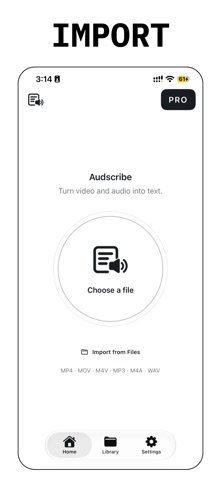
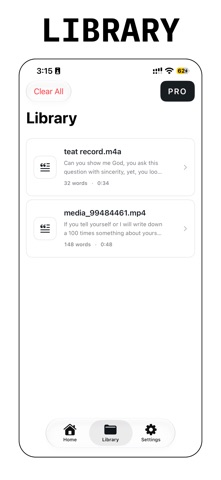
Turn video and audio into text you can keep. Audscribe listens to the speech in a video or audio file and writes it out as a clean transcript. Lectures, meetings, interviews, podcasts, voice memos. Pick a file, tap Transcribe, and read along word by word. No account. No setup. HOW IT WORKS 1. Import a video from Photos, or a video or audio file from Files. 2. Tap Transcribe to Text. 3. Press play. Each word lights up as it is spoken. 4. Copy, share, or export it as a PDF with Pro. KEY FEATURES - Video: MP4, MOV, M4V - Audio: MP3, M4A, WAV, AIFF, AAC, CAF - Word-by-word follow-along for video and audio - Tap any line to jump to that moment - Live progress and a live preview while it works - Full transcript on screen before you subscribe - Copy the text, share it anywhere, or export a formatted PDF - Your transcripts saved to a searchable Library - Transcribes on your iPhone, so your recordings stay with you PREVIEW AND PRO You can import a file and read the complete transcript. Saving transcripts to the Library, copying the text, sharing it, and PDF export require a Pro subscription, which also supports the app's development. Payment is charged to your Apple ID at confirmation. The subscription renews automatically for the same period and price unless you cancel at least 24 hours before the period ends. Manage or cancel in Settings; Apple ID; Subscriptions. Prices vary by region and are shown in your local currency before purchase. PRIVACY POLICY: https://1kbapps.com/audscribe/ TERMS OF USE: https://www.apple.com/legal/internet-services/itunes/dev/stdeula/
What's new · 2.0
## What's New: - A cleaner two-color look that follows your light and dark themes - Audio transcription: MP3, M4A, WAV, AIFF, AAC, and CAF files - Word-by-word follow-along: each word lights up as it is spoken - Tap any line to jump to that moment - Apple's newest on-device speech engine on iOS 26, built for long recordings - A rebuilt onboarding that shows how transcription works - Better VoiceOver labels and support for larger text sizes - Stability and performance fixes
Details