
Chart standing · US
What changed · US
Listing changes AppTracker has observed for this app in this storefront — new versions, price moves, rating shifts, and store copy.
New: Documents — everything at hand Expi has a new first tab, Documents. Items with a document photo appear as clear cards. Tap a card and the document opens full screen with the brightness turned all the way up — show it at a counter without digging through your gallery. Hold and drag to reorder the cards, and optionally lock the whole tab behind your fingerprint or face. New: Monthly summary Once a month you get a single heads-up with everything that expires that month — the whole picture at a glance, without opening the app. A cleaner, clearer look The header and the screens with a top bar now have a subtle frosted glass, with content sliding smoothly beneath it. We also fixed scanning — the Done button no longer covers the shutter, and you get a gentle tap when a photo is taken. The app is faster and smoother overall.
Screenshots



About
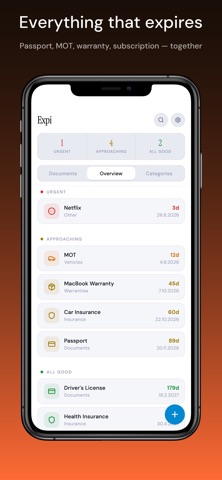
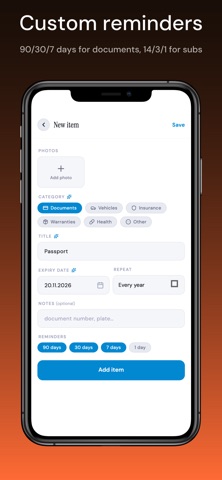
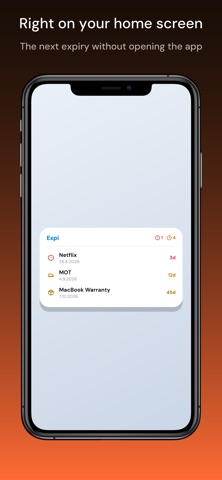
All your expiry dates in one place. Documents, vehicles, insurance, warranties, subscriptions — Expi tracks them all. Snap a photo, OCR fills in the date, smart reminders before it expires. Documents you may need to show stay one tap away. Passport expired at the airport. Warranty gone the day after it broke. Car inspection overdue. Your partner's driving licence — you had no idea. Expi reminds you before any of it happens — for the expiries that actually hurt when you miss them. Built for people leaving cluttered, single-purpose trackers — warranties in one app, subscriptions in another, documents in a third. Expi does all of it. WHAT EXPI TRACKS — Documents — ID, passport, driving licence, certificates, permits, residency cards — Vehicles — MOT/inspection, insurance, emissions check — Insurance — health, life, property, travel — Warranties — electronics, appliances, furniture — Health — medication, vaccinations, health cards — Other — subscriptions, domains, anything with an expiry date HOW IT WORKS — Foto-first add — snap a document photo, OCR (offline, on-device) extracts the date and suggests a category — Documents tab — items with a photo become cards; tap one and it opens full screen with the brightness turned up, ready to show. Behind Face ID if you want — Quick-add templates — "My documents", "New car", "New apartment", "Kid" — start fast, refine later — Smart reminders — preset per category (Documents 90/30/7 days, Subscriptions 14/3/1 day), adjustable per item — Monthly summary — on the 1st you find out what expires this month — Add to calendar — drop an expiry from the item detail into your own calendar — Snooze from the notification — push a reminder to tomorrow or next week without opening the app — Home screen widget — basic shows 1 item, full widget shows 5 + a health score 100% ON YOUR DEVICE No account. No sign-up. No cloud. Expi runs entirely on your phone — your documents never leave it. OCR is on-device. The only backup is an encrypted .expi file you control (AES-256-GCM, 6-digit PIN you set) — lose your phone, restore on a new one. PRIVACY — No account, no login, no cloud — everything stays on your device. — OCR runs on your device — photos never leave it. — No third-party tracking. No ads. No personal analytics. FREE AND PREMIUM Free: — up to 5 items — 2 document photos with OCR — 1 reminder per item — basic home screen widget (1 item) — encrypted local backup (.expi) Premium: — unlimited items — unlimited document photos with OCR — smart reminders (multiple notifications, customizable per category) — custom categories — full home screen widget (5 items + health score) Lifetime option available in your first 14 days as a new user. Privacy Policy: https://1tnt.link/expi/privacy.html Terms of Use (EULA): https://1tnt.link/expi/eula.html
What's new · 1.7.0
New: Documents — everything at hand Expi has a new first tab, Documents. Items with a document photo appear as clear cards. Tap a card and the document opens full screen with the brightness turned all the way up — show it at a counter without digging through your gallery. Hold and drag to reorder the cards, and optionally lock the whole tab behind your fingerprint or face. New: Monthly summary Once a month you get a single heads-up with everything that expires that month — the whole picture at a glance, without opening the app. A cleaner, clearer look The header and the screens with a top bar now have a subtle frosted glass, with content sliding smoothly beneath it. We also fixed scanning — the Done button no longer covers the shutter, and you get a gentle tap when a photo is taken. The app is faster and smoother overall.
Details