

Learn to Draw Daily - Contour
Karol Jaworski · Education
Independent analytics for this App Store listing. AppTracker is not affiliated with Karol Jaworski.
Chart standing · US
What changed · US
Listing changes AppTracker has observed for this app in this storefront — new versions, price moves, rating shifts, and store copy.
What's new in 1.1.2 • Subscribers stay unlocked from the moment the app opens, and Restore Purchases now checks your Apple Account. • The subscription screens show exactly what you pay and when it renews. • Curriculum lessons now count toward your Skill Balance, and the radar chart shows your real practice mix. • Sketchbook photos sit in a clean grid and open the session you tap. • Quick Start on Home always opens the session you picked.
Screenshots



About
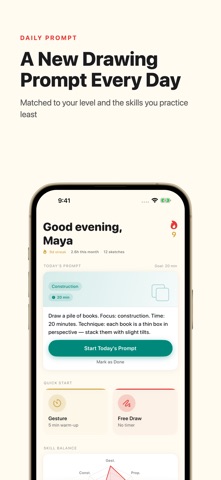
Contour is the drawing practice app built for artists who want to actually get better - not just occasionally doodle. Every day you get a fresh drawing prompt. You have a gesture timer ready to go. You have a structured curriculum that takes you from shaky lines to confident figure drawing. And you have a sketchbook that remembers every session, every sketch, every step forward. Whether you're a complete beginner or someone returning to drawing after years away, Contour gives you the structure to build a real daily practice. DAILY PROMPTS A new drawing challenge every day. Subjects rotate across figures, objects, environments, and concepts - keeping your practice varied and your eye sharp. Prompts are matched to your skill level and weighted toward the skills you have been neglecting. GESTURE DRAWING TIMER Time-based drawing sessions that train your hand to capture form quickly. Choose from 7 preset sessions - from 30-second warm-up poses to 20-minute extended studies. Free includes Warm-up and Quick Study. Pro unlocks all 7 presets plus custom intervals, where you set your own pose length and pose count. FOCUSED EXERCISES Targeted drills for specific skills: Line Confidence, Shape Construction, Blind Contour, Negative Space, and more. Free includes 3 exercise types. Pro unlocks all 10. STRUCTURED CURRICULUM A 6-level, 26-unit drawing curriculum built for self-taught artists. Every unit is a full lesson - the concept explained, a warm-up, a core exercise, and self-assessment questions to check your own work. Start with foundations - line quality, proportion, basic forms. Progress through depth and perspective, value and shading, composition, and subject mastery. Free includes Level 1 (Foundations, Weeks 1-4). Pro unlocks the full curriculum. SKILL BALANCE RADAR See exactly where you're strong and where you need work. The radar chart tracks 7 core skills - updated after every session so you always know what to practice next. PERSONAL SKETCHBOOK Log every practice session with notes and photos of your work. Build a visual record of your progress. Free shows your 30 most recent sessions. Pro shows your whole history, so nothing gets left out. DAILY REMINDERS Set a reminder time and Contour nudges you once a day. Small sessions, done consistently, are the whole point. CONTOUR PRO Unlock every feature with a monthly or annual subscription. The price for your country is shown in the app before you subscribe. Cancel anytime. - All 7 gesture presets + custom intervals - All 10 focused exercise types - Full 6-level curriculum (Levels 2-6) - Your full sketchbook history THE PHILOSOPHY Most people who want to draw never start - or start and stop after a week. Contour is designed around one idea: small daily sessions compound into real skill. Twenty minutes today. Twenty minutes tomorrow. A year from now, you won't recognize your own drawings. Pick up your pencil. Let's draw something good. Terms of Use (EULA): https://www.apple.com/legal/internet-services/itunes/dev/stdeula/
What's new · 1.1.2
What's new in 1.1.2 • Subscribers stay unlocked from the moment the app opens, and Restore Purchases now checks your Apple Account. • The subscription screens show exactly what you pay and when it renews. • Curriculum lessons now count toward your Skill Balance, and the radar chart shows your real practice mix. • Sketchbook photos sit in a clean grid and open the session you tap. • Quick Start on Home always opens the session you picked.
Details