

Magnetometer+
Kyu-Hee Jang · Productivity
Independent analytics for this App Store listing. AppTracker is not affiliated with Kyu-Hee Jang.
Chart standing · US
What changed · US
Listing changes AppTracker has observed for this app in this storefront — new versions, price moves, rating shifts, and store copy.
The meter now shows its calibration: when you open it, a bar fills as you turn the phone, and a short vibration tells you the reading is live. Before, it simply showed 0 µT until calibration finished, which looked like a dead sensor. • Light haptic feedback on Start, Pause and Zero. • Clean line icons replace the emoji in the tab bar, sound, location, Zero and share buttons. • Full Dutch, Danish, Finnish, Czech and Hebrew interface; Norwegian devices now get the Norwegian interface.
Ratings breakdown · US
The star breakdown behind this app's rating in this storefront.
In-app purchases · US
No in-app purchases.
Screenshots


About
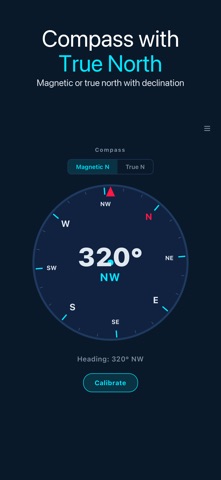
Magnetometer+ turns your iPhone's magnetic sensor into a metal detector and stud finder for iron and steel hidden in walls, floors and furniture, and shows the magnetic field around you in µT. ▶ WHAT IT FINDS — AND WHAT IT DOES NOT It detects ferrous metal: screws and nails in studs and joists, steel pipes, rebar, hinges, brackets and door strikes. The range is a few centimetres, so hold the phone against the surface and sweep slowly. It cannot detect gold, silver, copper, aluminium, wood or plastic. Those materials are not magnetic, and no phone sensor can find them. If you are looking for buried coins or copper wiring, this is not the tool. ▶ CALIBRATES FROM YOUR HAND Every phone's magnetic sensor carries a large built-in offset from its own speaker and battery magnets. Magnetometer+ learns that offset while you turn the phone, so tilting the phone does not look like metal. When the meter opens, a progress bar shows how far calibration has come: turn the phone slowly in every direction, and when the bar is full the reading goes live with a short vibration. Zero here re-learns it wherever you are. ▶ THREE METER MODES • Auto — a radial gauge of the field deviation • Earth Field — total field strength with a latitude band (low, normal, elevated, high) • Metal Detector — deviation from the background field with an intensity verdict, plus optional vibration pulses that quicken as you get closer ▶ SCANNER AND STUD FINDER The Scanner tab has a metal scanner for sweeping a surface and a Stud Finder that marks the strongest point as you slide the phone flat across a wall. It finds the nails and screws that hold drywall to the studs; it does not see the wood itself. ▶ COMPASS A compass with magnetic north or true north and the local declination. ▶ LIVE DATA • X, Y and Z field components on a live chart • Min, average, max and peak with elapsed time • Sensitivity from 0.5x to 2.0x • µT, mT and Gauss units ▶ HISTORY AND EXPORT • Readings are saved with a 7-day trend and a plain-language comparison • Favourites and side-by-side comparison of two readings • Continuous one-second logging with CSV export • Share a reading as an image, optional GPS tag on saved readings • Statistics report, unlocked for 24 hours by watching a short ad USEFUL FOR DIY AND RENOVATION · FINDING STUDS AND JOISTS · CHECKING FOR REBAR OR PIPES BEFORE DRILLING · PHYSICS CLASS AND MAGNET EXPERIMENTS
What's new · 1.0.31
The meter now shows its calibration: when you open it, a bar fills as you turn the phone, and a short vibration tells you the reading is live. Before, it simply showed 0 µT until calibration finished, which looked like a dead sensor. • Light haptic feedback on Start, Pause and Zero. • Clean line icons replace the emoji in the tab bar, sound, location, Zero and share buttons. • Full Dutch, Danish, Finnish, Czech and Hebrew interface; Norwegian devices now get the Norwegian interface.
Details