

OBD CAN - Car Scanner
Beijing Mentalroad Sience Technology Co. Ltd. · Utilities
Independent analytics for this App Store listing. AppTracker is not affiliated with Beijing Mentalroad Sience Technology Co. Ltd.
Chart standing · US
What changed · US
Listing changes AppTracker has observed for this app in this storefront — new versions, price moves, rating shifts, and store copy.
In this update • Custom vehicle parameters: browse model references, import Torque CSV or add your own PIDs. Read selected values and record charts with CSV export. • Vehicle-specific UDS fault scans and clearer results. • Improved adapter recovery, layouts and localization. Recent updates • Sensor and fuel logging with history, report images and CSV export. • Set up dashboards before connecting and revisit saved reports offline.
Screenshots




About
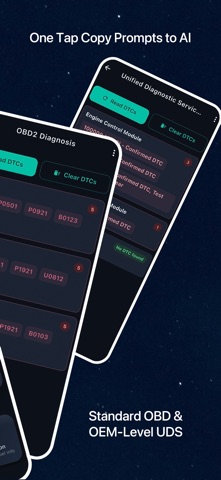
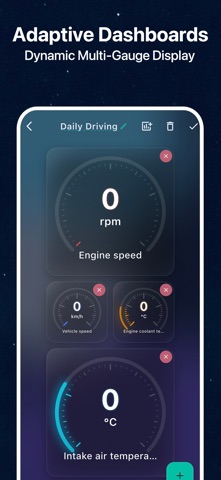
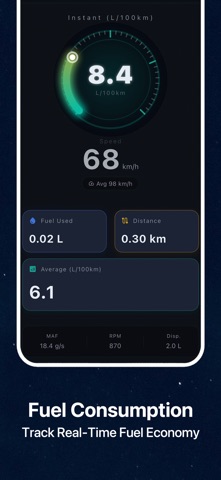
Understand a check engine light and record your car's data with OBD CAN, an OBD2 scanner for trouble codes, live sensors and custom parameters. Requires a compatible OBD2 / ELM327 BLE adapter for iOS. TROUBLE CODES & VEHICLE DIAGNOSTICS • Read and clear standard OBD2 engine and emissions codes for free. • Copy reports and questions to a third-party AI tool of your choice for help interpreting results. VEHICLE-SPECIFIC UDS DIAGNOSTICS Browse vehicle reference configurations and available modules, then scan supported systems such as ABS, airbags and transmission. Read or clear codes where supported. Clearing is confirmed only after an explicit module acknowledgement; no response does not mean no faults. LIVE DATA & CUSTOM DASHBOARDS Monitor supported sensors such as speed, engine RPM and coolant temperature. Customize your dashboard and choose the sensors you want in your live data view, in portrait or landscape. Set up your dashboard and live data selections before connecting to the car. SENSOR DATA LOGGING • Choose your sensors, adjust their read intervals and set a recording duration. Your last settings are saved for next time. • Watch live charts while recording. Stop manually or let the session end at the set time. • Review charts and statistics, revisit saved reports, save a full report image or export CSV data for analysis in a spreadsheet. • Sensors are read in sequence. Selecting more sensors generally increases the time between updates for each one. FUEL CONSUMPTION TRACKING See instant and average fuel consumption, fuel used and distance traveled. Record fuel figures alongside the sensor readings used to calculate them, then export everything in one CSV file. Revisit previous reports or save them as images. Fuel figures come from vehicle-reported fuel flow or a supported estimation method. Availability and results depend on your vehicle's data and the relevant settings. CUSTOM VEHICLE PARAMETERS — LABS Go beyond standard sensors with custom OEM PIDs. Browse by brand and model, import Torque CSV or define requests and formulas. Read once or record continuously with live charts, history and CSV export. Browsing is free; adding, saving, reading and recording parameters require paid membership. Reference compatibility varies by vehicle and module. MORE WAYS TO CHECK YOUR CAR Record acceleration and elapsed time, observe battery voltage during starting, and view supported O2 sensor graphs. Monitor noise with your phone's microphone alongside vehicle data. View VIN, ECU information, emissions readiness and supported Mode 05/06 results. SAVED REPORTS & LANGUAGES Several tests save reports on your device for viewing after sign-in, even without a car connection. Multiple languages and localized CSV column headings are supported. CONNECTION & MEMBERSHIP • A compatible BLE OBD2 adapter is required and sold separately. Classic Bluetooth and Wi-Fi are not supported. • Sensors, modules and tests vary by vehicle, protocol and adapter; not all features work on every vehicle. • Sign-in is required for readings and tests. UDS, custom parameter actions, sensor logging, fuel tracking, custom live data selections and some dashboard and monitoring features need paid membership. • Clearing codes does not repair their cause; readiness results do not guarantee an emissions inspection pass. MEMBERSHIP & SUBSCRIPTIONS Available plans, prices and benefits are shown in the app. If you choose an auto-renewing subscription, payment is charged to your Apple Account at purchase confirmation. It renews unless canceled at least 24 hours before the current period ends, with renewal charged within the final 24 hours. Manage or cancel subscriptions in your Apple Account settings. Restore purchases in the app. Privacy Policy: https://www.obdcan.com/privacy.html Terms of Use: https://www.apple.com/legal/internet-services/itunes/dev/stdeula/
What's new · 1.6.0
In this update • Custom vehicle parameters: browse model references, import Torque CSV or add your own PIDs. Read selected values and record charts with CSV export. • Vehicle-specific UDS fault scans and clearer results. • Improved adapter recovery, layouts and localization. Recent updates • Sensor and fuel logging with history, report images and CSV export. • Set up dashboards before connecting and revisit saved reports offline.
Details