

MP4 Converter any Video to MP4
BRAINIFY (SMC-PRIVATE) LIMITED · Photo & Video
Independent analytics for this App Store listing. AppTracker is not affiliated with BRAINIFY (SMC-PRIVATE) LIMITED.
Chart standing · US
What changed · US
Listing changes AppTracker has observed for this app in this storefront — new versions, price moves, rating shifts, and store copy.
- Added an app cleaner to help users safely free up storage space. - New advanced conversion options, including trim, remove audio, target size, resolution, and FPS. - Improved batch conversion with per-video customization. - Added conversion history, presets, and easier sharing. - Improved performance, stability, and file handling.
Price & rating history · US
Reconstructed from the listing changes AppTracker has observed in this storefront. A field is charted once it has changed more than once, and each line starts at the value it moved from.
Average rating · ★ 4.20 now · 3 changes on record
Ratings breakdown · US
The star breakdown behind this app's rating in this storefront.
In-app purchases · US
No in-app purchases.
Screenshots

About
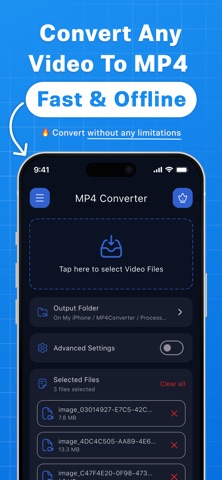
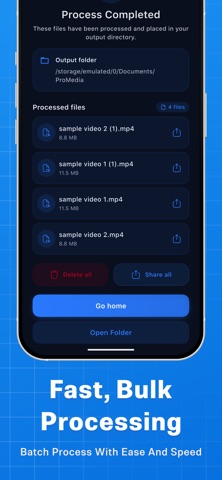
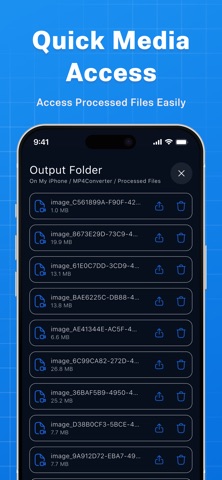
Convert MOV, MKV, AVI, WebM and other compatible videos to MP4 on your iPhone or iPad. Video processing happens on your device, without uploading your files to a conversion server. Converted videos have no app-added watermark. MP4 Converter helps you prepare videos for sharing, editing and playback. Adjust compression, resolution, frame rate and audio settings to suit your needs. • Convert common video formats, including MOV, MKV, AVI, WebM, MPEG, MPG, 3GP, MTS, M2TS, TS and M4V. • Set a target file size in MB. Final size may vary depending on the source video and selected settings. • Batch convert up to 100 videos in one foreground session, subject to available device resources. • Trim videos to keep the section you need. • Keep the original resolution or choose 480p, 720p or 1080p. • Keep the original frame rate or choose 24, 30 or 60 fps. • Rotate videos by 90°, 180° or 270°. • Adjust audio volume, choose mono or stereo, or remove audio. • Choose conversion settings to balance quality and file size. • Review conversion history, retry conversions and reuse saved settings. • Open or share converted files using other apps. • Use Free up space to review and remove app-owned temporary files or selected converted outputs. Original videos are excluded from cleanup. MP4 Converter is free and supported by advertising. No account, subscription or in-app purchase is required. The app may also display an optional promotion for ProMedia, a separate Brainify app. Conversion itself does not require an internet connection. Internet access may be needed to download a selected file from iCloud or another cloud provider, load advertisements, display consent choices, send crash diagnostics or open external links. Keep the app open during conversion. Processing time and supported files depend on the video’s format and codecs, selected settings, available storage and device capabilities. Some damaged, encrypted or unsupported files may not convert. Re-encoding can change video quality. Smaller output sizes may reduce visual detail, and a target file size is an estimate rather than a guarantee. Compatibility with other devices, platforms and editing apps depends on their supported formats and requirements. Your video content is processed locally and is not sent to our advertising or crash-reporting services. If you choose to share or export a file, the receiving app or service handles it under its own privacy practices. Learn about advertising, diagnostics and your privacy choices in our Privacy Policy.
What's new · 3.1.0
- Added an app cleaner to help users safely free up storage space. - New advanced conversion options, including trim, remove audio, target size, resolution, and FPS. - Improved batch conversion with per-video customization. - Added conversion history, presets, and easier sharing. - Improved performance, stability, and file handling.
Details