

Ritn3D: Floor Plan to 3D Home
Rajesh Konatala · Graphics & Design
Independent analytics for this App Store listing. AppTracker is not affiliated with Rajesh Konatala.
Chart standing · US
What changed · US
Listing changes AppTracker has observed for this app in this storefront — new versions, price moves, rating shifts, and store copy.
• Brighter day-time lighting — 3D scenes look natural instead of dim • Real-looking trees and a cleaner ground around your model • Doors now show their wood texture in 3D • Zoom-out stops at the treeline so the view stays inside your scene
Price & rating history · US
Reconstructed from the listing changes AppTracker has observed in this storefront. A field is charted once it has changed more than once, and each line starts at the value it moved from.
Average rating · ★ 5.00 now · 3 changes on record
In-app purchases · US
What this app sells inside itself, grouped by kind and priced for this storefront.
Screenshots





About
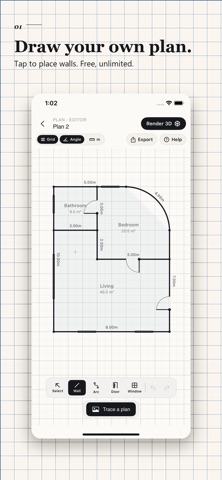
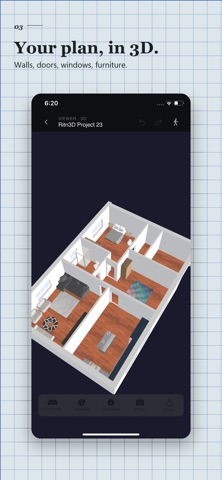
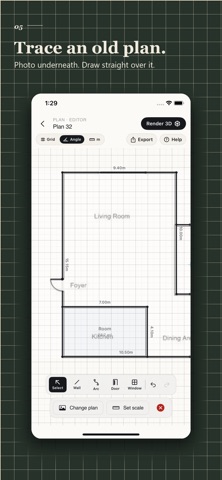
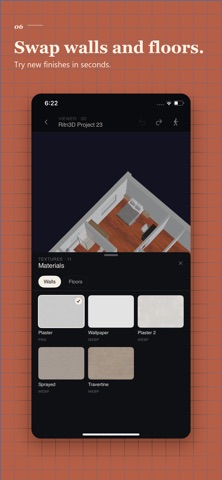
Draw a floor plan on your iPhone, or photograph one you already have. Either way you get an interactive 3D interior you can orbit, walk through, furnish and share with a link — in about two minutes. No CAD software, no 3D modeling skills. Built for phones from day one — iPhone, iPad and web on one account. Sketch on-site, generate the walkthrough on the way home. DRAW A FLOOR PLAN — FREE, UNLIMITED Tap to start a wall, tap to end it. Chain walls into rooms and each space is named and measured automatically. Add doors and windows, curve a wall into an arc when the room isn't square, and let alignment guides keep it straight. Undo, redo and auto-saved drafts throughout. Export as JPG or PDF with dimension lines, a scale bar and a compass — unlimited, no watermark, on every tier including free. TRACE AN EXISTING PLAN Load a photo, screenshot or PDF as an underlay and draw your walls over it — the route for paper plans, hand-drawn sketches and old blueprints. If an upload fails detection, tap "Trace it instead" rather than starting over. CONVERT A FLOOR PLAN PHOTO TO 3D Upload a JPG, PNG or PDF. The AI detects walls, doors, windows and rooms automatically, you fix anything off in the side-by-side editor, and the 3D model generates in under two minutes. WALK THROUGH EVERY ROOM Walk at eye level with on-screen joystick controls. Judge sight lines, corridor widths and proportions as you would standing in the real space. Open doors, look out windows, stand in the kitchen and see the living room. DRAG-AND-DROP FURNITURE Place sofas, beds, dining tables, chairs and desks. Every piece carries real-world dimensions — check whether a king bed fits past the closet door before you buy it. SWAP WALL AND FLOOR FINISHES Sprayed paint, plaster, wallpaper, laminate, hardwood, stone, carpet, tile — reflected in the app and on every share link. SHARE A 3D LINK WITH ANYONE Whoever you send it to installs nothing and creates no account. They open the link on phone, tablet or laptop and see exactly what you see. 3D PRINT YOUR HOUSE Export print-ready STL with manifold geometry and sealed walls, slicer-ready for Cura, PrusaSlicer, Bambu Studio and Lychee. Print at 1:200, 1:100 or 1:50 on FDM, SLA or SLS printers. GLB EXPORT AND PBR MATERIALS GLB opens in Blender, SketchUp, Unity and web viewers. Models render with physically-based materials, warm per-room lighting and ambient shadows — a real space, not a wireframe. DETECTION ACCURACY (Ritn3D internal benchmark set, June 2026) • Vector PDFs from CAD software: 90–95% first-pass • Scanned blueprints: ~80% • Straight-on phone-camera photos: 75–85% • Listing renders with wood textures: under 30% — ask for the line-drawing PDF • Hand-drawn plans: trace them in the editor instead WHO USES RITN3D Homeowners visualizing a renovation before swinging a hammer. Real estate agents turning a listing plan into a walkable link. Interior designers walking clients through a layout before anything is moved. Architects producing study models in minutes without the freelance render cost. Builders cutting change orders. 3D print hobbyists making scale models for display or gifts. PRICING Free — unlimited floor plan drawing plus 3 renders per month. No credit card. Pro — 7-day free trial, then $9.99 per month for 20 renders, walkthrough mode, furniture, HD textures and longer share lists. Pro+ — $19.99 per month for 40 renders and 10 GLB or STL downloads, extra downloads $3.99 each, unused ones roll over. The drawing tool stays free on every tier. Payment is charged to your Apple Account at confirmation of purchase. Subscription auto-renews unless canceled at least 24 hours before the end of the current period, and your account is charged for renewal within 24 hours of the end of the period. Manage or cancel anytime in Settings. Same product in your browser at app.ritn3d.com. Questions? Visit ritn3d.com. Terms: https://www.ritn3d.com/terms-and-conditions/ Privacy: https://www.ritn3d.com/privacy-policy/
What's new · 2.2.4
• Brighter day-time lighting — 3D scenes look natural instead of dim • Real-looking trees and a cleaner ground around your model • Doors now show their wood texture in 3D • Zoom-out stops at the treeline so the view stays inside your scene
Details