

PGPony: PGP & GPG Encryption
Kevin Stewart · Utilities
Independent analytics for this App Store listing. AppTracker is not affiliated with Kevin Stewart.
Chart standing · US
What changed · US
Listing changes AppTracker has observed for this app in this storefront — new versions, price moves, rating shifts, and store copy.
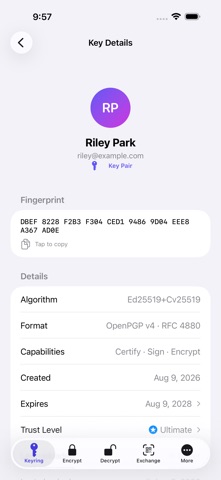
Post-quantum signatures. Create ML-DSA-65 + Ed25519 keys (RFC 9980), sign and verify with them, and add post-quantum subkeys to a key you already have, including the v4 shape GnuPG 2.5 reads. Several recipients. A message to two or more recipients that includes post-quantum keys now decrypts for every one of them. Before, it could fail to decrypt. NIST curves. P-256, P-384 and P-521 keys now encrypt, decrypt, sign and verify, not just import. Key Detail, reorganized. Actions now sit in a menu in the corner. Add, revoke or remove subkeys and User IDs, then upload the updated key to key servers from the same screen, with the primary identity kept the way you set it. Encrypting. Pick which subkey to encrypt to when a key has more than one, see which of your keys decrypted a message, and get a warning when a message mixes post-quantum and classic recipients. Key servers. Add your own key servers, and turn Web Key Directory lookups on or off. Files made with gpg -c --force-aead now decrypt. Security hardening. Stricter checks on keys and messages that come from outside, and tighter limits on what PGPony will read. Keys whose signatures this device cannot verify (some older DSA, brainpool and Ed448 keys) are now only updated when you re-import them yourself. If you write to someone with such a key, compare its fingerprint with them once. Thanks to the testers who sent sample files and step-by-step reports for this release.
Price & rating history · US
Reconstructed from the listing changes AppTracker has observed in this storefront. A field is charted once it has changed more than once, and each line starts at the value it moved from.
Average rating · ★ 4.71 now · 6 changes on record
Ratings breakdown · US
The star breakdown behind this app's rating in this storefront.
In-app purchases · US
No in-app purchases.
Screenshots



About
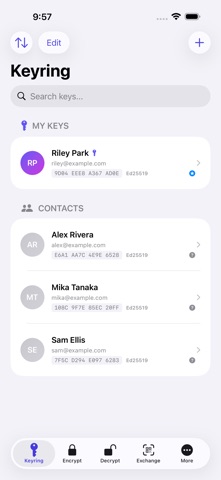
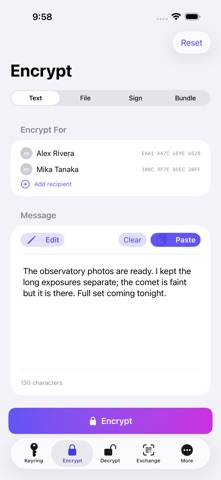
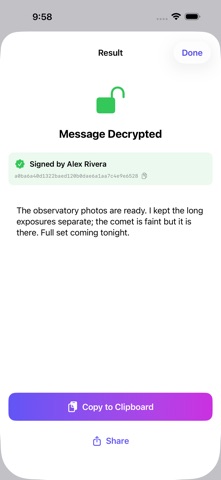
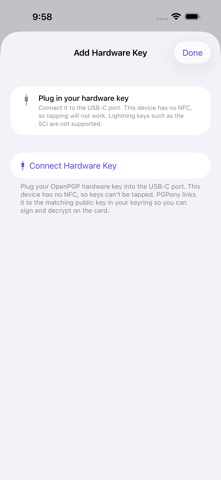
PGPony makes PGP encryption easy, private, and powerful, and every feature is free. Generate keys, encrypt to people or to a password, sign and verify, back up your whole keyring, and revoke compromised keys, all from your iPhone and iPad, in eight languages. New in 8.3.0: post-quantum signatures, NIST P-256, P-384 and P-521 keys, messages to several post-quantum recipients, and a reorganized Key Detail screen. POST-QUANTUM Encrypt with ML-KEM-768 or ML-KEM-1024 paired with X25519, and sign with ML-DSA-65 paired with Ed25519 (RFC 9980), on RFC 9580 (v6) keys or the v4 shape GnuPG 2.5 reads. Add post-quantum subkeys to a key you already have. HARDWARE SECURITY KEYS Generate a key pair on the card over NFC, or add an existing card with a tap. Sign, decrypt, and encrypt-and-sign in one step, with RSA and ECC (Ed25519/Curve25519) keys, on YubiKey, Token2, and others, over NFC or USB-C. Full card admin: PINs, factory reset, and Card Details. ENCRYPT, DECRYPT & SIGN Encrypt messages and files of any size to one or many public keys, or to a password with no keys at all, readable by gpg -c and back. Pick which subkey to encrypt to when a key has more than one. Decrypt with a private key, a hardware key, or a passphrase, and see which of your keys opened the message. Sign without encrypting, including detached signatures, and verify a file against its signature. GENERATE & MANAGE KEYS Create keys on a card or in-app: post-quantum, v6 Ed25519, classic Ed25519 + Cv25519, or RSA 2048/4096, with or without an email address. Add, revoke, or remove subkeys (including authentication subkeys) and User IDs. Full OpenPGP v6 (RFC 9580), interoperable with Sequoia PGP and GnuPG. Import from files, clipboard, QR codes, or keyservers. Make revocation certificates and export private keys (GnuPG-compatible). BACK UP & RESTORE Save your whole keyring, secret keys included, as one encrypted file. A single backup code opens it, and the same file restores onto another device. The file stays with you, never on anyone's server. KEYSERVERS Look up a recipient by email through Web Key Directory, then key servers. Add your own servers, publish to several at once, and upload an updated key straight from Key Detail. Route lookups through Tor or a SOCKS proxy, or turn on offline mode to stop every network request. PASSWORD STORE Open a pass (password-store) folder, decrypt an entry with a software or hardware key, and copy it through an auto-clearing clipboard. SHARE SHEET EXTENSION Encrypt or decrypt text, encrypt a file, or sign a file in any app: Safari, Files, Notes, Mail. SECURITY FIRST Face ID / Touch ID lock with auto-lock. Software keys live in the iOS Keychain. Keys and messages from outside are checked strictly before they are used. No analytics, tracking, accounts, or sign-up. Your private keys never leave your device, and with a hardware key they never leave the card. EIGHT LANGUAGES English, German, Spanish, French, Japanese, Brazilian Portuguese, Russian, and Simplified Chinese. Built by an indie developer who cares about your privacy. Your keys, your messages, your data, always yours. Terms of Use (EULA): https://pgpony.app/eula.html Privacy Policy: https://pgpony.app/privacy.html
What's new · 8.3.0
Post-quantum signatures. Create ML-DSA-65 + Ed25519 keys (RFC 9980), sign and verify with them, and add post-quantum subkeys to a key you already have, including the v4 shape GnuPG 2.5 reads. Several recipients. A message to two or more recipients that includes post-quantum keys now decrypts for every one of them. Before, it could fail to decrypt. NIST curves. P-256, P-384 and P-521 keys now encrypt, decrypt, sign and verify, not just import. Key Detail, reorganized. Actions now sit in a menu in the corner. Add, revoke or remove subkeys and User IDs, then upload the updated key to key servers from the same screen, with the primary identity kept the way you set it. Encrypting. Pick which subkey to encrypt to when a key has more than one, see which of your keys decrypted a message, and get a warning when a message mixes post-quantum and classic recipients. Key servers. Add your own key servers, and turn Web Key Directory lookups on or off. Files made with gpg -c --force-aead now decrypt. Security hardening. Stricter checks on keys and messages that come from outside, and tighter limits on what PGPony will read. Keys whose signatures this device cannot verify (some older DSA, brainpool and Ed448 keys) are now only updated when you re-import them yourself. If you write to someone with such a key, compare its fingerprint with them once. Thanks to the testers who sent sample files and step-by-step reports for this release.
Details