

Re:Count - Tally Counter
Jamie Newman · Utilities
Independent analytics for this App Store listing. AppTracker is not affiliated with Jamie Newman.
Chart standing · US
What changed · US
Listing changes AppTracker has observed for this app in this storefront — new versions, price moves, rating shifts, and store copy.
This update adds Privacy Choices to Settings. Where your region requires consent for ads, such as the UK and the EU, you can now review or change your choice in Settings at any time. If you decline consent, Re:Count no longer asks for permission to track you. Ads are now limited to content suitable for a general audience. Thanks for using Re:Count!
Screenshots





About
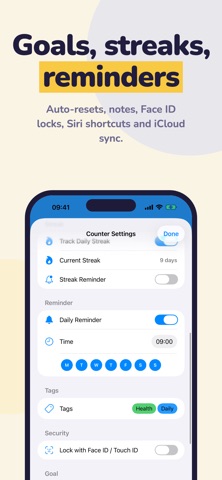
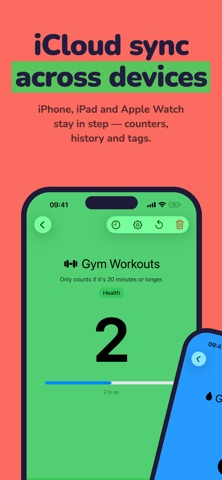
Re:Count is a simple, fast counter for anything you want to keep track of. COUNT ANYTHING • Unlimited counters, each with its own name, icon and colour • Tap to count straight from the list, and undo a mistaken tap • Custom step sizes: add 1, 5, 10 or any number up to 9999 • Allow negative values, or stop at zero • Pin favourites to the top, and reorder by dragging • Archive finished counters to keep their history out of the way • Auto-reset daily, weekly or monthly • Search by name when your list gets long MAKE IT YOURS • 38 icons - water drop, dumbbell, coffee cup, book • Any colour from the colour picker, or the classic palette • Your icons and colours show on widgets and your Watch too • Add a note to any counter - what counts and what doesn't TAGS AND SEARCH • Tag your counters - "Health", "Work", "Daily" - each tag with its own colour; pick more than one to narrow the list to counters that have them all • Counters appear in iPhone search, and in the app icon's quick actions • Tap a widget to open that counter, not just the app • Choose tags for a Focus, and only those counters show while it is on • Anything locked with Face ID stays out of all of it GOALS AND LIMITS • Set a target to reach ("read 20 pages") or a limit to stay under ("no more than 2 coffees") • Progress bars show exactly where you are • Give a target a date to be met by, and see whether you are on pace STREAKS • Track consecutive days of activity • A flame badge shows your current run • Optional streak reminder: if you haven't logged anything by a time you choose, Re:Count nudges you before your streak breaks REMINDERS • Give any counter its own daily reminder at a time you choose • Pick which days of the week it fires • Add a step straight from the reminder, without opening the app • Reminders for locked counters never show the counter's name HISTORY • Every change is logged with a timestamp • Charts by week, month or year, plus a calendar of active days • Browse day by day, or export the whole log as CSV • Swipe an entry away and the value, chart, streak and export all recalculate STATS • One screen for the whole app: activity, totals for the period, your goals with how they are tracking, and any streaks running YOUR DATA IS YOURS • Export everything to a file and import it back - counters, history, notes and tags • Restoring never duplicates counters already on the device • Choose whether locked counters go in the file ON YOUR WRIST • A full Apple Watch app • Turn the Digital Crown to count - no need to reach for your phone • Add a counter to your watch face as a complication, with goal ring and streak • Your counters, history and streaks stay in sync with your iPhone ON YOUR HOME SCREEN • Small, Medium, Large and Lock Screen widgets • Increment straight from the widget without opening the app • A Control Centre, Lock Screen and Action button control (iOS 18 and later) adds a step with one tap HANDS FREE • "Add one to Water in Re:Count" - Siri counts for you • Ask "What's my Pages Read in Re:Count" for a quick answer • Add, subtract and check actions are in the Shortcuts app BUILT FOR EVERYONE • Full VoiceOver support - each counter reads as one row, and counting is its own action • Text scales with Dynamic Type • Counter colours pick the more readable text automatically, in both light and dark mode IN YOUR LANGUAGE • English, German, Spanish, French, Japanese, Simplified Chinese, Traditional Chinese, Italian, Brazilian Portuguese, Korean, Dutch, Turkish, Polish, Vietnamese, Thai and Indonesian • The whole app is translated - widgets, the Watch app, notifications and the Siri phrases too PRIVATE BY DEFAULT • Syncs through your own iCloud account - nobody else can see your counters • No account, no sign-up, no analytics • Lock any counter behind Face ID or Touch ID - Siri leaves those alone Free to use, with a one-time purchase to remove ads.
What's new · 1.10.1
This update adds Privacy Choices to Settings. Where your region requires consent for ads, such as the UK and the EU, you can now review or change your choice in Settings at any time. If you decline consent, Re:Count no longer asks for permission to track you. Ads are now limited to content suitable for a general audience. Thanks for using Re:Count!
Details