

GigLedger Mileage Tax Tracker
Andrew Titus · Finance
Independent analytics for this App Store listing. AppTracker is not affiliated with Andrew Titus.
Chart standing · US
What changed · US
Listing changes AppTracker has observed for this app in this storefront — new versions, price moves, rating shifts, and store copy.
- Shift mode: start and end your dash with one tap from the app, Control Center, the Lock Screen or Siri. Each delivery still saves as its own business trip, or choose one trip per shift in Auto-Tracking settings. - Driving for two apps at once? Set your default app to "Ask each time" and your Apple Watch shows a Done button for each app. Switch apps any time from the "Driving for" line on the Mileage tab. - See that tracking is working while you drive, plus a shift summary that points out any GPS gaps so you can fix them. - New "Which miles count?" guide explains which miles you can deduct. - "Your numbers" on the Dashboard: your real dollars per mile and per hour. - Weekly recap and a weekly streak. - Uber Eats: import trip-by-trip from Earnings Activity, and scan the week summary to fill in tips, online time and trip count. - Spark Driver (Walmart) added as a platform. - Scanning earnings screenshots is more accurate across DoorDash, Uber Eats and Spark, and it asks which app when a screen isn't clear. - New imports: Uber weekly CSV, DoorDash statement PDF, Stripe payouts, expense CSVs, and monthly catch-up totals when switching apps. - Driving for two apps at once: Delivery Done taps from the Watch keep one trip per delivery, and $/hr no longer counts the same hours twice. - Duplicate check for scanned receipts, fuel and 1099s. - Quarterly estimated payments can now be edited or marked unpaid. - Lighter, more reliable background tracking on long shifts, plus fixes for two cases where iOS could close the app in the background.
Ratings breakdown · US
The star breakdown behind this app's rating in this storefront.
In-app purchases · US
What this app sells inside itself, grouped by kind and priced for this storefront.
Screenshots





About
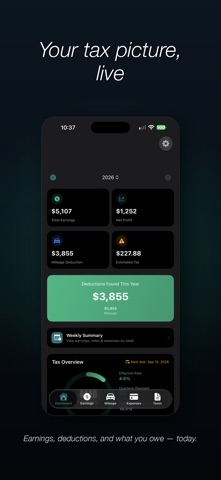
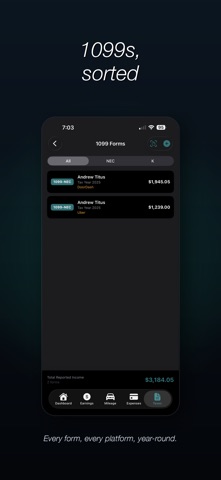
See exactly how much you owe in taxes — and how much you've already saved in deductions — every time you finish a shift. Built by a Dasher, for Dashers, Uber drivers, Lyft drivers, Instacart shoppers, and every gig worker who works year-round. Track every dollar earned and every mile driven, in real time. TRACK EARNINGS • Log income from multiple gig platforms in one place • Track base pay, tips, and cash tips separately • Import earnings from DoorDash CSV exports • Driving analytics heatmap — see your best days and times to drive • Platform comparison and weekly earnings trends MILEAGE & GPS TRACKING • Auto-tracking detects trips automatically • One-tap GPS tracking for manual sessions • IRS standard mileage rate applied automatically • Log tolls and parking for additional deductions EXPENSE & FUEL TRACKING • Categorize business expenses with receipt scanning • Recurring expense automation for monthly bills • Fuel tracking with real MPG calculation • Scan gas receipts for automatic fill-up entry • Cost per mile and monthly fuel trends SMART TAX ESTIMATES • Self-employment tax calculations (federal, state, local) • Quarterly payment amounts and due date reminders • Tax scenario planner for "what-if" projections • Health insurance deduction tracker • Personalized deduction suggestions VEHICLE MANAGEMENT • Depreciation calculator with MACRS and Section 179 • Standard mileage vs. actual expense comparison • Maintenance tracker with service reminders TAX FILING TOOLS • Schedule C preview by IRS line items • 1099 form management • Year-end tax prep package as one PDF • TurboTax-compatible CSV export WIDGETS & APPLE WATCH • Home screen widgets (small, medium, large) • Lock screen widgets for quick earnings glance • Watch face complications with goal progress ring • Daily goal tracking and cash tip logging from your wrist • Live trip tracking on Apple Watch BUILT FOR GIG WORKERS • Supports DoorDash, Uber, Lyft, Instacart, Grubhub, Amazon Flex, and more • Dark mode interface designed for drivers • Privacy first — data stored locally with optional iCloud sync Privacy Policy: https://gigledger.org/privacy Terms of Service: https://gigledger.org/terms
What's new · 1.3.50
- Shift mode: start and end your dash with one tap from the app, Control Center, the Lock Screen or Siri. Each delivery still saves as its own business trip, or choose one trip per shift in Auto-Tracking settings. - Driving for two apps at once? Set your default app to "Ask each time" and your Apple Watch shows a Done button for each app. Switch apps any time from the "Driving for" line on the Mileage tab. - See that tracking is working while you drive, plus a shift summary that points out any GPS gaps so you can fix them. - New "Which miles count?" guide explains which miles you can deduct. - "Your numbers" on the Dashboard: your real dollars per mile and per hour. - Weekly recap and a weekly streak. - Uber Eats: import trip-by-trip from Earnings Activity, and scan the week summary to fill in tips, online time and trip count. - Spark Driver (Walmart) added as a platform. - Scanning earnings screenshots is more accurate across DoorDash, Uber Eats and Spark, and it asks which app when a screen isn't clear. - New imports: Uber weekly CSV, DoorDash statement PDF, Stripe payouts, expense CSVs, and monthly catch-up totals when switching apps. - Driving for two apps at once: Delivery Done taps from the Watch keep one trip per delivery, and $/hr no longer counts the same hours twice. - Duplicate check for scanned receipts, fuel and 1099s. - Quarterly estimated payments can now be edited or marked unpaid. - Lighter, more reliable background tracking on long shifts, plus fixes for two cases where iOS could close the app in the background.
Details