
Chart standing · US
What changed · US
Listing changes AppTracker has observed for this app in this storefront — new versions, price moves, rating shifts, and store copy.
1. Screen mirroring, high-definition maps, D-format videos, supporting up to 1080p and 60fps 2. Virtual key deleted prompt 3. Add dropdown refresh in personal center 4. Optimize special workshop 5. Add vehicle control log 6. Unconscious invitation (share invitation, no need to fill in invitation code, automatically bind inviter and invitee) 7. Delivery tracking optimization 8. Supplementary translation 9. Other optimizations
Ratings breakdown · US
The star breakdown behind this app's rating in this storefront.
Screenshots


About
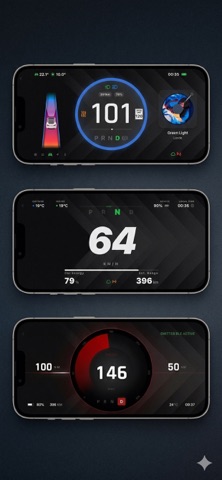
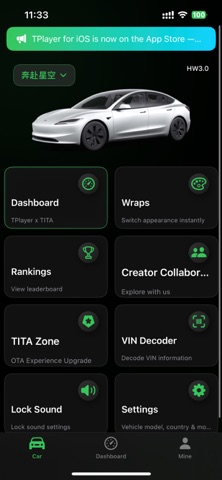
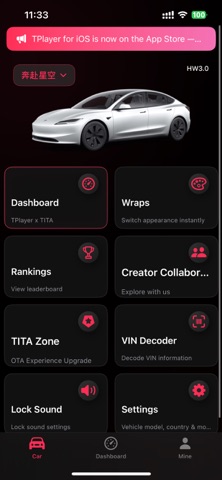
TPlayer — Bluetooth Digital Dashboard. More Than a Speedometer. TPlayer is a third-party app for Tesla owners. With Tesla OAuth authorization and virtual key pairing, view real-time vehicle status, log trips and charging, and use customizable immersive dashboards while driving. Connect via Bluetooth for low-latency data, or extend with optional TITA transmitter hardware. No extra OBD dongle needed for basic dashboard features. Third-party application, not affiliated with Tesla Inc. Connection & Data Sources • Cloud: After Tesla authorization and data service activation, get real-time status via Fleet API—remote control, trip logging, and push notifications. • Bluetooth: Local BLE connection for lower-latency speed and status; works in weak or no-network conditions. • Transmitter (Optional): TITA hardware reads the vehicle bus for lower latency and richer data; OTA firmware supported. • Data Enhancement (Optional): Unlock lateral acceleration, pitch angle, and other advanced telemetry. Sources can be switched at runtime; priority: transmitter > Bluetooth > cloud. Dashboard & Personalization • Dial styles: Classic (free), Portrait, Minimal, HUD, Racing, Amap & Apple Maps navigation—some unlock via IAP or membership. • Info cards: Tire pressure, temperature, navigation, map, music, turn signals, data source status. • Wallpapers & themes: Curated library, custom image/video backgrounds, accent colors, unit settings. • Acceleration effects: Full-screen visuals triggered by speed threshold. • Mini Player: Virtual companion with skins, glow, and expressions. • Audio visualizer (Optional): Music rhythm spectrum on the dashboard. My Tesla · Monitoring & Remote Control • Live status: Battery, range, temperature, locks, Sentry, charging; multi-vehicle support. • Remote control: Climate, lock/unlock, horn, lights, frunk/trunk, charge port, windows, Sentry, Bioweapon Defense (Tesla auth required; delays possible when asleep). • Special Safety: Monitor doors, frunk/trunk, windows; quick close where supported. • Scheduled Sentry: Auto on/off by schedule with logs. • Find My Car: Compass and map guidance in parking lots. Trips · Charging · Data • Auto logs for driving, charging, parking—map tracks, speed curves, energy and regen analysis. • Daily/weekly/monthly reports, charging heatmaps, battery health (SOH) history. • Journeys to combine and share trips; 3D track replay. • Leaderboards, VIN decode, recall lookup, delivery tracking. Tools & Resources • Supercharger stall unlock at the station. • Wrap & lock sound library—preview in app; apply on vehicle via Tesla in-car UI. • TITA Zone: Hardware firmware OTA. • Push notifications for trips and charging events. Privacy & Data • No Tesla password access—OAuth only. • Bluetooth mode processes some data locally. • Cloud data handled per Privacy Policy; permissions for vehicle communication and display only. • Revoking Tesla auth stops real-time sync; history retained. Who It's For • Phone dashboard without extra hardware. • Bluetooth responsiveness plus cloud trips and remote control. • Custom dials, wallpapers, effects, and Mini Player. • Trip stats, battery health, and Supercharger tools in one app. Terms of Use (EULA): https://www.apple.com/legal/internet-services/itunes/dev/stdeula/ Privacy Policy: https://teslaapi.twanjia.com/html/app/privacy-policy.html
What's new · 1.10.0
1. Screen mirroring, high-definition maps, D-format videos, supporting up to 1080p and 60fps 2. Virtual key deleted prompt 3. Add dropdown refresh in personal center 4. Optimize special workshop 5. Add vehicle control log 6. Unconscious invitation (share invitation, no need to fill in invitation code, automatically bind inviter and invitee) 7. Delivery tracking optimization 8. Supplementary translation 9. Other optimizations
Details