

Large Video Cleaner
Zasder LLC · Photo & Video
Independent analytics for this App Store listing. AppTracker is not affiliated with Zasder LLC.
Chart standing · US
What changed · US
Listing changes AppTracker has observed for this app in this storefront — new versions, price moves, rating shifts, and store copy.
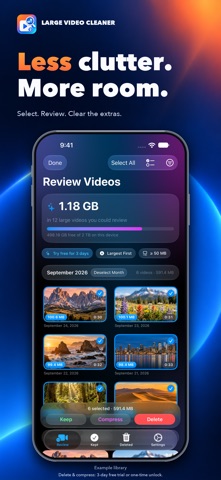
New: Free to Try, Then Yours for Good Large Video Cleaner is now free to download. Try every feature free for 3 days; after that, scanning and reviewing your videos stay free, and a one-time unlock keeps deleting, compressing and trimming. No subscription, no ads. Already bought the app? Everything stays unlocked for you, at no extra cost. New: Delete in Bulk, Faster Select mode now has an action bar along the bottom with Keep, Compress and Delete always in reach, and a running total of how much space your selection holds. Select All takes everything the current filter shows, and the checklist menu grabs everything over 1, 2 or 5 GB, or everything older than a year, in one tap. New: Find What's Worth Compressing A new "Worth Compressing" filter shows the videos that will actually shrink - older videos imported from cameras or other phones, and 4K. Compression now uses the space-saving HEVC format, which is faster too, and the Compress screen estimates the result before you start and warns when a video is already as small as it will get. New: Recently Added Sort by when a video arrived on your device, so the file that synced or was AirDropped in overnight shows up first, even if it was recorded years ago. New: Compression Keeps Going in the Background Start compressing a batch and switch apps - it carries on, with progress shown by iOS. Your screen also stays awake while it works. New: Know Where Your Space Went After you delete, the app tells you how much went to Recently Deleted and that iOS keeps it for 30 days, with a shortcut to Photos to empty it now. Improved: Always Up to Date New videos recorded since your last scan now appear on their own when you open the app, and changing the minimum size in Settings updates the list straight away. Improved: Faster Trimming Trimming now copies the part you keep instead of re-encoding it, so it takes seconds and loses no quality. Improved: Copies Keep Their Details Compressed and trimmed copies now keep the original's location and Favorite status, as well as its date. Improved: People Scan Results are remembered between launches, the scan is faster, and it no longer downloads videos from iCloud just to look at them. Improved: Accessibility and Access The trim handles now work with VoiceOver and announce their times, Play previews just the part you're keeping, and if you've given the app access to only some of your photos, a Manage button lets you change which ones. Also fixed: the Open Photos button in the Deleted tab now works; videos just over the minimum size are no longer left out of the scan; the Kept tab no longer misses some kept videos; Undo on a compressed copy now tells you if the delete didn't go through; and sharing a video no longer leaves a large temporary copy behind.
In-app purchases · US
No in-app purchases.
Screenshots



Keywords this app targets
Search terms AppTracker associates with this app — estimates, not search volume. ❝ = in the app's title; a highlighted number is its current position for that term.
Similar apps
Competitors and close alternatives, as estimated by AppTracker.
 Large Video Finder
Florian Schimanke
1 shared topic · 3 shared title words
Large Video Finder
Florian Schimanke
1 shared topic · 3 shared title words
 Delete Large Videos Fast
OpsOh LLC
1 shared topic · 1 shared title word
Delete Large Videos Fast
OpsOh LLC
1 shared topic · 1 shared title word
 SizeUp Storage Cleaner
Annie Cohen
1 shared topic · 1 shared title word
SizeUp Storage Cleaner
Annie Cohen
1 shared topic · 1 shared title word
 FreeUp Storage - Space Cleaner
Antonius Johannes Henricu van den Berg
1 shared topic · 1 shared title word
FreeUp Storage - Space Cleaner
Antonius Johannes Henricu van den Berg
1 shared topic · 1 shared title word
 Storage Cleaner ·
STARLIT IT PROMOTION AGENCY LIMITED
1 shared topic · 1 shared title word
Storage Cleaner ·
STARLIT IT PROMOTION AGENCY LIMITED
1 shared topic · 1 shared title word
 Cleanio: AI Phone Cleaner
MARSBY TEKNOLOJI ANONIM SIRKETI
2 shared topics · 1 shared title word
Cleanio: AI Phone Cleaner
MARSBY TEKNOLOJI ANONIM SIRKETI
2 shared topics · 1 shared title word
 SpaceClean Pro-Storage Cleaner
Guangzhou Zhuoniu Information Technology Co.,ltd.
2 shared topics · 1 shared title word
SpaceClean Pro-Storage Cleaner
Guangzhou Zhuoniu Information Technology Co.,ltd.
2 shared topics · 1 shared title word
 Video Compress - Clean Storage
Khatuli Todua
1 shared topic · 1 shared title word
Video Compress - Clean Storage
Khatuli Todua
1 shared topic · 1 shared title word
About
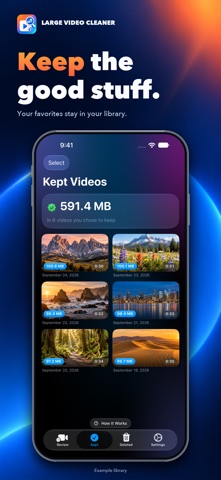
Running out of storage? Large Video Cleaner helps you quickly find and remove the biggest videos clogging up your photo library. We all have them: accidentally recorded videos, hours-long screen recordings, or videos your kids left recording overnight. These massive files silently eat up your iCloud and device storage. Large Video Cleaner sorts your entire video library by file size so the biggest space hogs appear first, making it easy to reclaim gigabytes of storage in minutes. KEY FEATURES - Largest First: videos are sorted by file size so you immediately see what's using the most space. - Quick Review: tap any video to preview it, then keep, trim, compress or delete it. - Bulk Actions: Select All, or everything over 1, 2 or 5 GB, then keep, compress or delete in one go, with a running total of the space involved. - Smart Compression: space-saving HEVC compression that keeps going in the background, estimates the result first, and tells you when a video won't shrink. The "Worth Compressing" filter finds the older and 4K videos that will. - Month Sections and Recently Added: see which months are filling your storage, or what arrived most recently. - Keep List: mark videos as "Keep" to hide them from future reviews without deleting them. - People Detection: detects whether videos contain people, to help you spot accidental pocket and blank-wall recordings. - Safe Deleting: deleted videos go to Recently Deleted in Photos, where you have 30 days to recover them. - Private: everything runs on your device. No accounts, no ads, no tracking, no data collection. FREE TO TRY, THEN YOURS FOR GOOD Try every feature free for 3 full days. After that, scanning and reviewing your videos stay free forever, and a one-time unlock keeps deleting, compressing and trimming. No subscription. Already bought the app? Everything stays unlocked for you. Perfect for parents whose kids fill up the iPad with endless recordings, or anyone who wants to take control of their video storage.
What's new · 1.4
New: Free to Try, Then Yours for Good Large Video Cleaner is now free to download. Try every feature free for 3 days; after that, scanning and reviewing your videos stay free, and a one-time unlock keeps deleting, compressing and trimming. No subscription, no ads. Already bought the app? Everything stays unlocked for you, at no extra cost. New: Delete in Bulk, Faster Select mode now has an action bar along the bottom with Keep, Compress and Delete always in reach, and a running total of how much space your selection holds. Select All takes everything the current filter shows, and the checklist menu grabs everything over 1, 2 or 5 GB, or everything older than a year, in one tap. New: Find What's Worth Compressing A new "Worth Compressing" filter shows the videos that will actually shrink - older videos imported from cameras or other phones, and 4K. Compression now uses the space-saving HEVC format, which is faster too, and the Compress screen estimates the result before you start and warns when a video is already as small as it will get. New: Recently Added Sort by when a video arrived on your device, so the file that synced or was AirDropped in overnight shows up first, even if it was recorded years ago. New: Compression Keeps Going in the Background Start compressing a batch and switch apps - it carries on, with progress shown by iOS. Your screen also stays awake while it works. New: Know Where Your Space Went After you delete, the app tells you how much went to Recently Deleted and that iOS keeps it for 30 days, with a shortcut to Photos to empty it now. Improved: Always Up to Date New videos recorded since your last scan now appear on their own when you open the app, and changing the minimum size in Settings updates the list straight away. Improved: Faster Trimming Trimming now copies the part you keep instead of re-encoding it, so it takes seconds and loses no quality. Improved: Copies Keep Their Details Compressed and trimmed copies now keep the original's location and Favorite status, as well as its date. Improved: People Scan Results are remembered between launches, the scan is faster, and it no longer downloads videos from iCloud just to look at them. Improved: Accessibility and Access The trim handles now work with VoiceOver and announce their times, Play previews just the part you're keeping, and if you've given the app access to only some of your photos, a Manage button lets you change which ones. Also fixed: the Open Photos button in the Deleted tab now works; videos just over the minimum size are no longer left out of the scan; the Kept tab no longer misses some kept videos; Undo on a compressed copy now tells you if the delete didn't go through; and sharing a video no longer leaves a large temporary copy behind.
Details