

EMF Detector - EMF Meter
Kyu-Hee Jang · Utilities
Independent analytics for this App Store listing. AppTracker is not affiliated with Kyu-Hee Jang.
Chart standing · US
What changed · US
Listing changes AppTracker has observed for this app in this storefront — new versions, price moves, rating shifts, and store copy.
Start measuring by tapping the gauge itself, or the new START button right under it. In Standard mode the gauge no longer sits at a blank 0 while it calibrates: it shows "Calibrating…" and tells you to turn the phone in a slow figure-8. A short vibration confirms each start and stop, the gauge level labels read more clearly, and the tabs and buttons use clean line icons.
Price & rating history · US
Reconstructed from the listing changes AppTracker has observed in this storefront. A field is charted once it has changed more than once, and each line starts at the value it moved from.
Average rating · ★ 3.89 now · 5 changes on record
Ratings breakdown · US
The star breakdown behind this app's rating in this storefront.
Screenshots

About
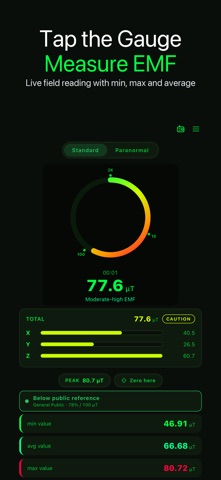
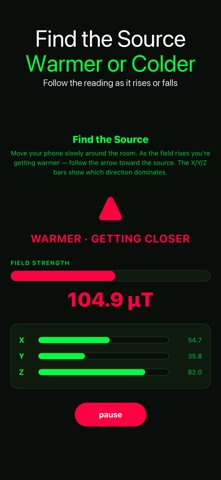
EMF Detector reads your phone's magnetometer and shows the magnetic field around you in µT or mG: on a live gauge, as separate X, Y and Z axes, and over the last 24 hours. START IN ONE TAP Tap the gauge, or the green START button under it. The app first separates the phone's own magnetism from the field around you. While it says "Calibrating…", turn the phone slowly in a figure-8 for a few seconds; the live reading then appears and stays steadier while you tilt the phone. A short vibration confirms every start and stop. TWO WAYS TO MEASURE • Standard: a radial gauge with plain-language levels from "No EMF detected" upward. In Settings you can switch it to a Safety view that labels a reading as background, weak field, wiring detected or live wire (an estimate from field strength, not proof of a wire) and sets it against ICNIRP reference levels for the general public or for workers. • Paranormal: records a quiet baseline first, then rates each spike against it on a five-step scale and marks it on a session timeline. FIND THE SOURCE The Source tab turns the reading into a warmer / colder hunt. Move the phone slowly around the room; the indicator shows whether the reading is rising or falling, and the X/Y/Z bars show the sensor's value on each axis. KEEP A RECORD • Measurement sessions are saved with their minimum, average and maximum • A 7-day trend with insights, such as how a reading compares with your usual level • Notes and favorites for each reading, plus a side-by-side compare view • CSV export of your history, and share-as-image for the current reading • A 24-hour exposure chart on the main screen • Peak hold, and "Zero here" to re-learn the baseline in a new spot • Calibration offset, µT or mG units, and a choice of reference levels TIPS FOR A GOOD READING 1. Start away from speakers, magnetic cases and car mounts, and do the figure-8 until the number appears. 2. Hold the phone flat and sweep slowly, a few centimetres from the wall or appliance. 3. Watch for a rise against your starting level rather than one absolute number. 4. Tap "Zero here" when you move to a new room so the baseline is re-learned there. FOR GHOST-HUNTING NIGHTS Spirit Box turns the live field into pulses, vibration and spoken words. It is entertainment: field spikes come from wiring, motors, magnets and the phone itself, and no spirits are detected. A Halloween theme can be switched on in Settings. HONEST TECH NOTE A phone magnetometer measures static and slowly changing magnetic fields: steel, magnets, motors, transformers and wiring under load. It samples about ten times a second, so it cannot measure 50/60 Hz mains fields accurately, and it cannot detect radio frequency, Wi-Fi, 5G or radiation. It is not a certified safety instrument; use it to explore and compare readings around your home. Made for curious people comparing readings around appliances and from room to room, and for paranormal investigators.
What's new · 1.0.34
Start measuring by tapping the gauge itself, or the new START button right under it. In Standard mode the gauge no longer sits at a blank 0 while it calibrates: it shows "Calibrating…" and tells you to turn the phone in a slow figure-8. A short vibration confirms each start and stop, the gauge level labels read more clearly, and the tabs and buttons use clean line icons.
Details